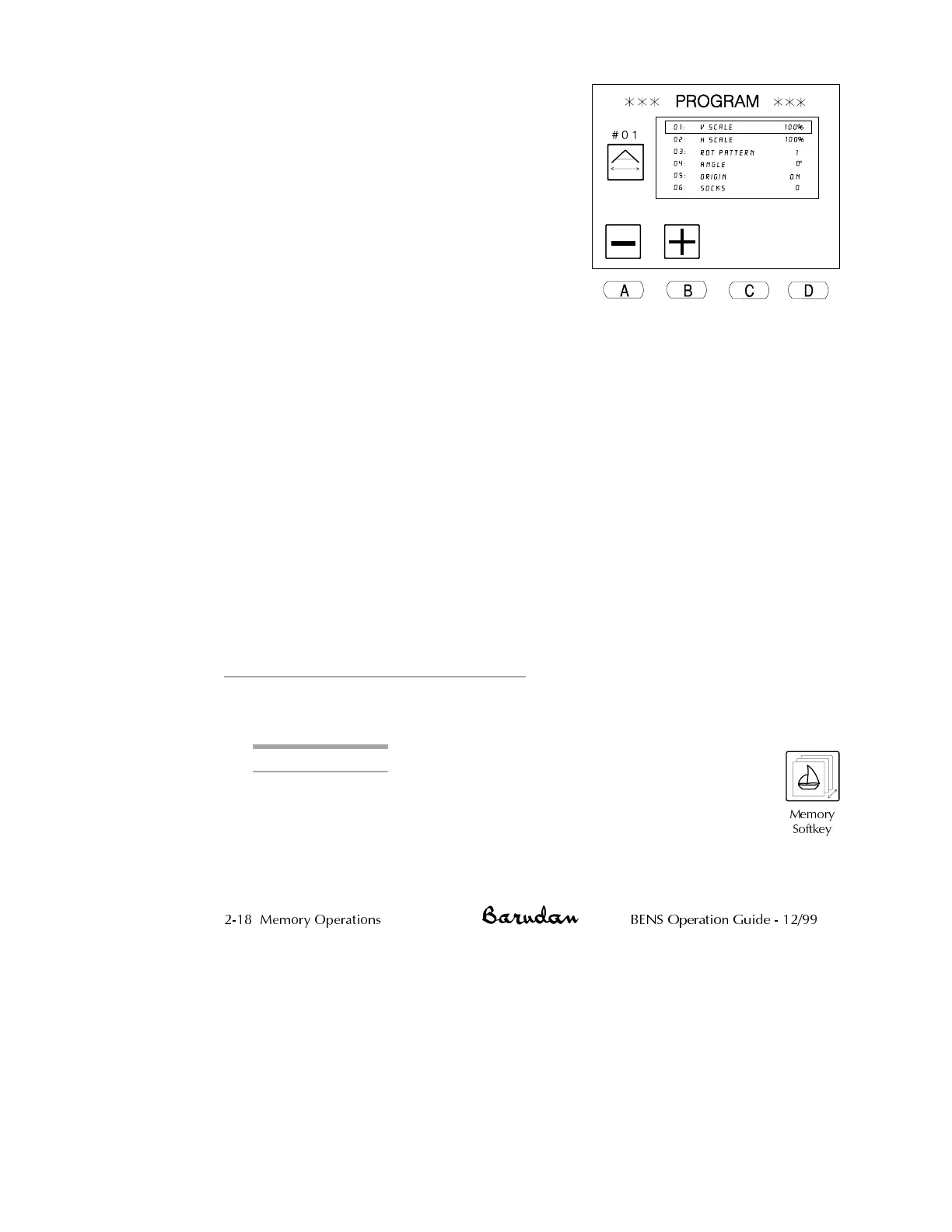
4.
Use the jog keys to move through the
list, until the option you want to change
is selected. A box outline displays
around the selected option.
5. With the desired option selected, use the
A and B menu keys to change the value.
Refer to the table on the preceding
pages for a description of each option
and its range of values.
•
Press A, below the Minus icon,to
decrease the value.
•
Press B, below the Plus icon,to
increase the value.
NOTE: Options with a toggle value change when either A or B is pressed.
When an option is changed from the default value, a dark box displays
behind it in the list, showing that it was changed. If you go back into
Program for this pattern later, changed parameters still show a dark
box.
6.
When done programming the pattern, press the Memory softkey,to
save changes and close the Program list.
NOTE: Programming changes to a pattern are saved with it when it is
transferred to disk or tape.
When a pattern that was programmed is selected in the pattern list, a
dark box displays behind its memory location number, so it is easy to tell
it was programmed. The basic screen shows the programmed repeats and
a picture of the programmed rotation. See page 1-19 for the location of
this information on the basic screen.
Deleting Patterns from Memory
Patterns no longer needed can be removed from memory, freeing that location to store
a new pattern.
Deleting a Pattern
1.
Press the Memory softkey. The pattern list displays, showing
patterns stored in memory.
2-18 Memory Operations BENS Operation Guide - 12/99
Memory
Softkey



 To Next Page