29
8.3.6 Advanced Timings for GigE Vision
®
/USB3 Vision
TM
Message Channel
The following events can be transmissited via the asynchronous Message Channel:
PrimaryApplicationStitch (only GigE), GigEVisionError (only GigE), GigEVisionHeartbeat-
TimeOut (only GigE), EventLost, Line0..3 FallingEdge, Line0..3 RisingEdge, Exposure-
Start, ExposureEnd, FrameStart, FrameTransferSkipped, TransferBufferFull, Trigger-
Ready, TransferBufferReady, TriggerOverlapped, TriggerSkipped
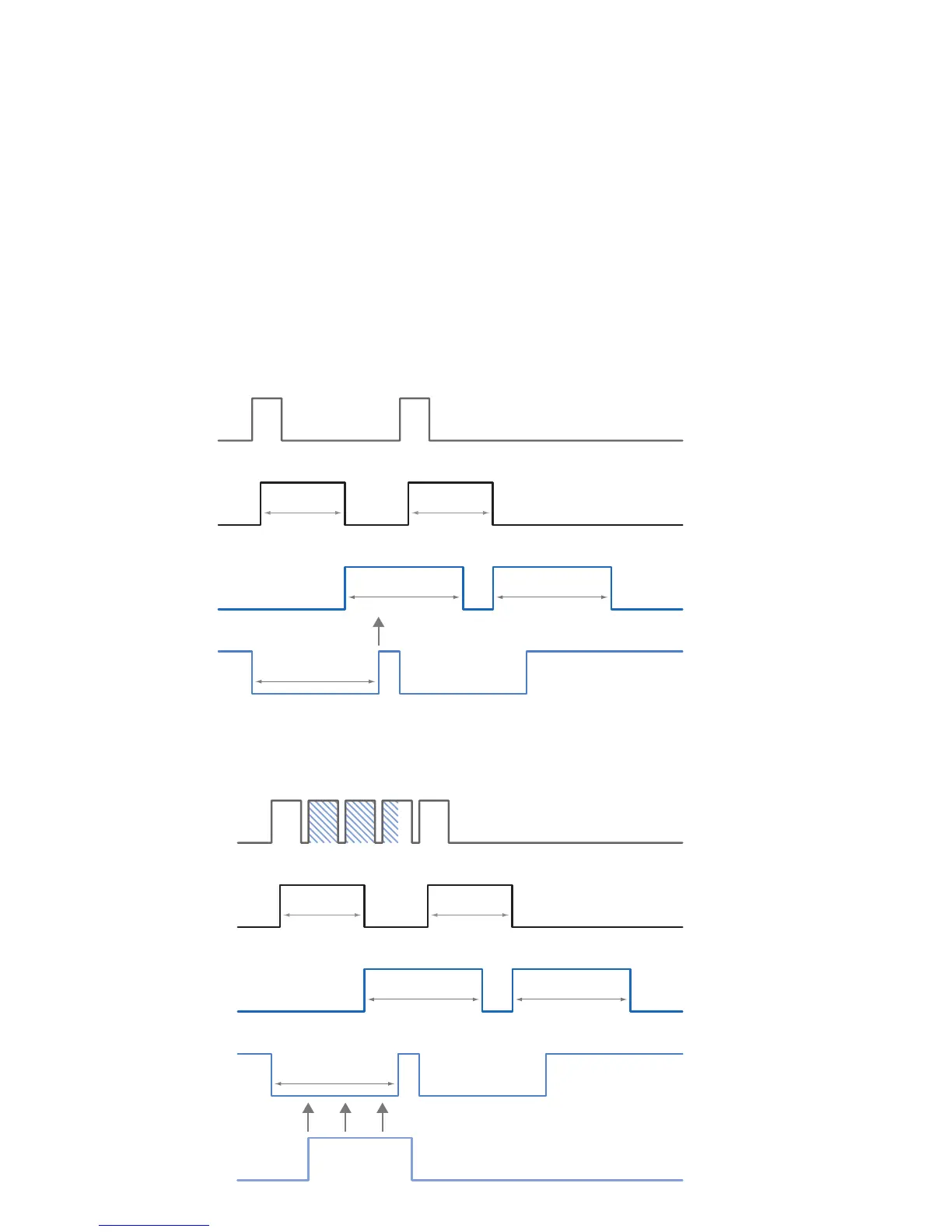
The charts below show some timings for the event signaling by the asynchronous mes-
sage channel. Vendor-specic events are explained.
8.3.6.1 EventLost
This signal can be put out when a selected event was lost. The cause may be that too
many events occur.
8.3.6.2 TriggerReady
This event signals whether the camera is able to process incoming trigger signals or not.
Event: TriggerReady
t
notready
8.3.6.3 TriggerSkipped
If the camera is unable to process incoming trigger signals, which means the camera
should be triggered within the interval t
notready
, these triggers are skipped. On Baumer CX
cameras the user will be informed about this fact by means of the event "TriggerSkipped".



 To Next Page