2 Infusion Modes
2-22 COLLEAGUE CXE VOLUMETRIC INFUSION PUMP OPERATOR’S MANUAL 071960491
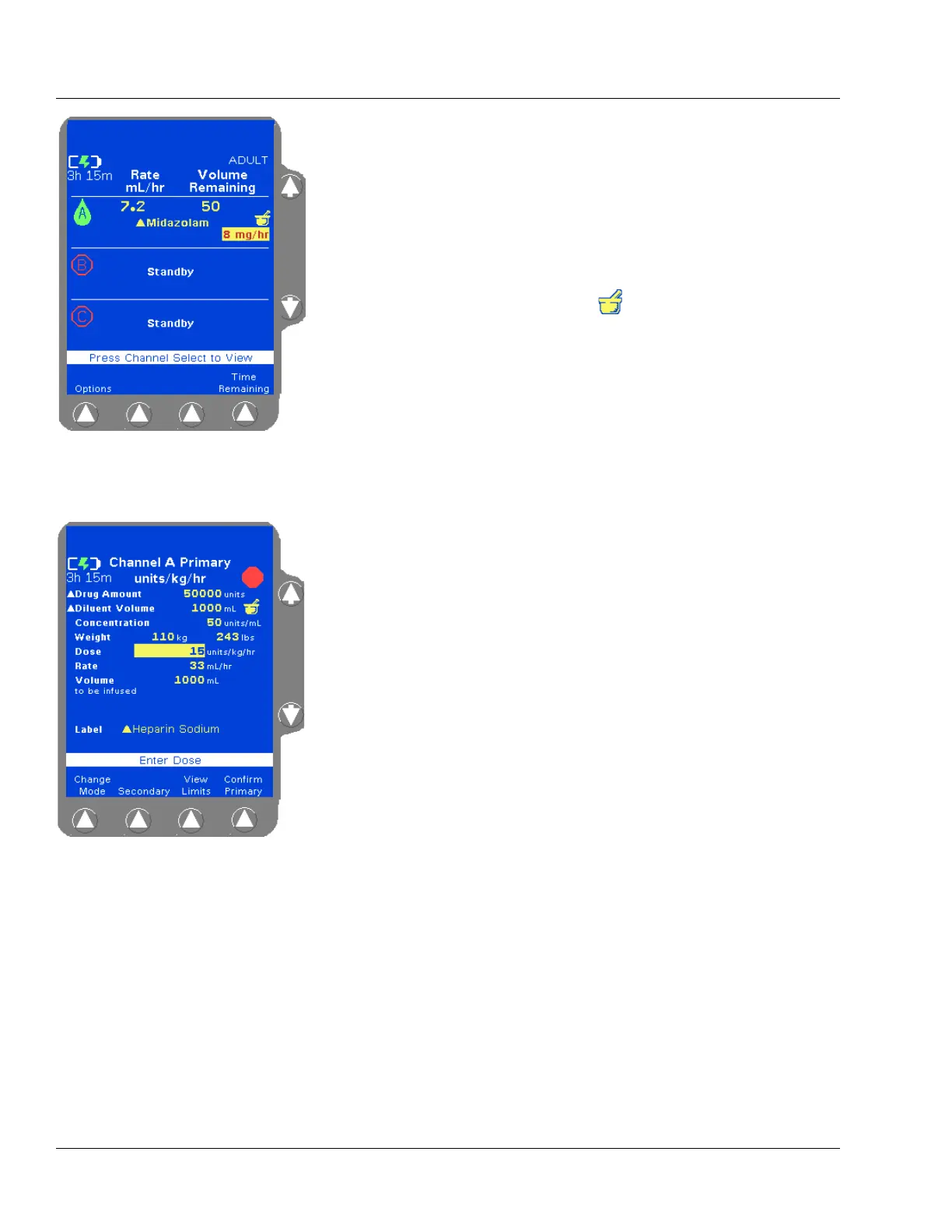
On the Main Display, the flow rate for infusions for which the
clinician chose to override the predefined limits are displayed in
red text on a yellow background. See Figure 2-12 for an example
of a Main Display screen for an infusion that overrides the
COLLEAGUE GUARDIAN feature limits. The triangle next to
the Midazolam label indicates that the standard concentration has
been edited from the predefined values.
Infusions utilizing the COLLEAGUE GUARDIAN feature are
identified on the pump’s information and programming screens
by the mortar and pestle icon to the right of the infusion
information. See Figure 2-12 and Figure 2-13 for examples.
The COLLEAGUE GUARDIAN feature can be used for primary
infusions only. A secondary infusion can be programmed to run
with a primary infusion that utilizes the COLLEAGUE
GUARDIAN feature.
COLLEAGUE GUARDIAN parameters can be set by authorized
facility personnel for labels in the pump’s label library, for any
primary dose mode and rate-volume infusions.
An optional default dose may be preconfigured; if so, the Dose
field is prefilled on the programming screen when the label is
selected.
For dose modes, COLLEAGUE GUARDIAN parameters can be
configured to allow changes to the standard concentration.
• If changes to standard concentration are not allowed, the
Diluent Volume and Concentration fields cannot be
edited by the clinician when programming an infusion.
• If changes to standard concentration are allowed, the
Diluent Volume and Concentration fields can be edited
by the clinician when programming an infusion. White
triangles appear beside the field names for fields that have
been edited. In the example shown in Figure 2-13, the
clinician has changed the Drug Amount and Diluent
Volume fields to values that differ from the programmed
COLLEAGUE GUARDIAN feature limits for Heparin
Sodium. The yellow triangle beside the Heparin Sodium
label indicates that the concentration can be edited.
For instructions on programming infusions using the COLLEAGUE
GUARDIAN feature, see “Programming a Primary COLLEAGUE
GUARDIAN Infusion (Non-Weight-Based),” 4-29 and “Programming a
Primary COLLEAGUE GUARDIAN Infusion (Weight-Based),” 4-32.
Figure 2-12 Infusion with
COLLEAGUE GUARDIAN Limit
Override
Figure 2-13 COLLEAGUE
GUARDIAN Programming Screen—
Example of Non-Standard
Weight-Based Dose



 To Next Page