071960491 COLLEAGUE CXE VOLUMETRIC INFUSION PUMP OPERATOR’S MANUAL 4-11
Operating Instructions Battery Charge Alerts and Alarms
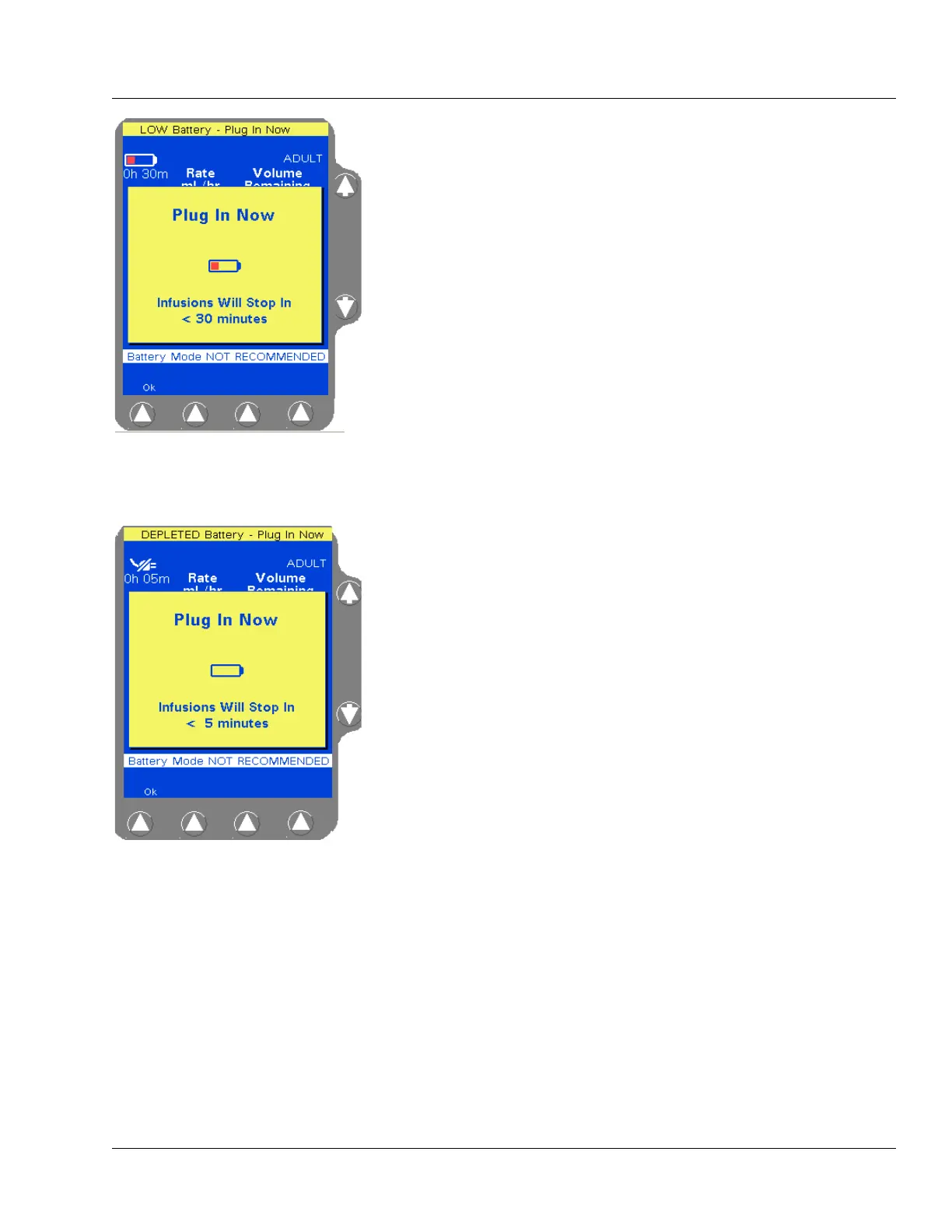
When the battery time remaining reaches 30 minutes, the LOW
Battery - Plug In Now alert occurs. An audible tone sounds and a
Plug In Now pop-up window displays (Figure 4-14), alerting the user
that infusions will stop in less than 30 minutes. The pop-up will reappear
every 5 minutes counting down the battery time until the battery time
remaining reaches 5 minutes.
Pressing the
Ok soft key will clear the pop-up but will not silence the
audible tone. Pressing the
Alarm Silence key will silence the tone for
two minutes. The status line will continue to show the message LOW
Battery - Plug In Now.
When the battery time remaining reaches 5 minutes, the DEPLETED
Battery - Plug In Now alert occurs. An audible tone sounds and a Plug
In Now pop-up window displays (Figure 4-15), alerting the user that
infusions will stop in less than 5 minutes. The pop-up will reappear
every minute until the battery is depleted.
Pressing the
Ok soft key will clear the pop-up but will not silence the
audible tone. The status line will continue to show the message
DEPLETED Battery - Plug In Now.
Figure 4-14 LOW Battery Alert
Pop-up
Figure 4-15 DEPLETED Battery
Alert Pop-up



 To Next Page