071960491 COLLEAGUE CXE VOLUMETRIC INFUSION PUMP OPERATOR’S MANUAL 4-17
Operating Instructions Loading the Administration Set
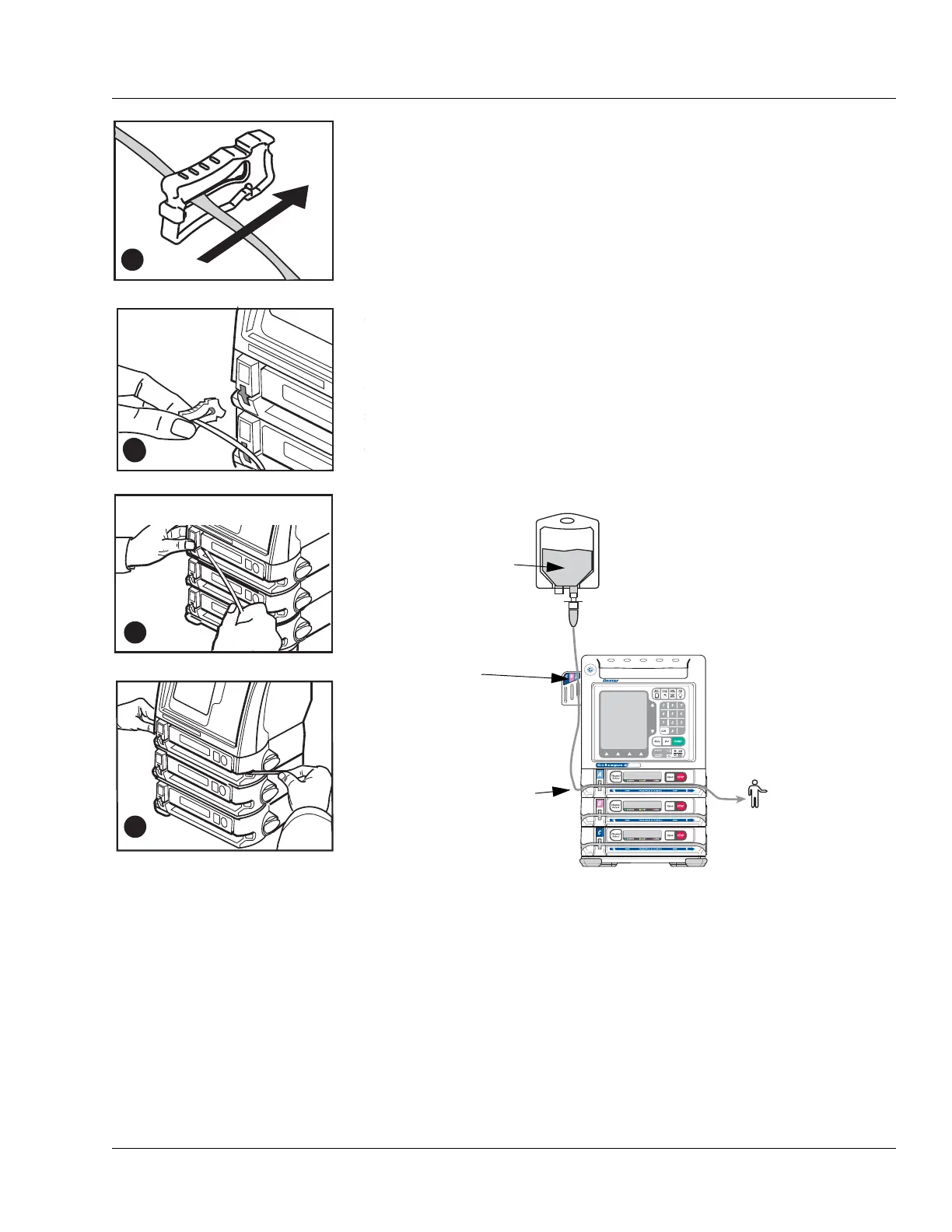
2. Close the keyed slide clamp on the administration set so it occludes
the tubing to prevent free flow. Hold the keyed slide clamp with the
notched side up (Figure 4-19A).
3. Insert the keyed slide clamp into the slot in the pump (Figure 4-19B).
4. Pull the administration set taut and slide it all the way into and along
the tubing channel (Figure 4-19C). The pump pulls in the keyed slide
clamp, then loads the administration set into the pumping
mechanism (Figure 4-19D). The pump module displays
LOADING ,
then
STOPPED.
5. Confirm that the tubing coming from the source container enters the
pump module on the left side, and the tubing exiting the pump on the
right side goes to the patient as shown in Figure 4-20.
6. Open the regulating clamp. Verify that no solution is flowing (no free
flow drops falling in the drip chamber and/or no flow from the end of
the administration set).
7. Attach the primed administration set to the patient access site.
Figure 4-19 Loading the
Administration Set
Note:
Tube Misloaded
Alarm
A Tube Misloaded alarm will occur if the tubing is not
loaded properly. See page 8-15 for more information
about the
Tube Misloaded alarm.
.
E
C
X
E
X
C
C
O
L
L
E
A
G
U
E
G
U
A
R
D
I
A
N
Figure 4-20 Orientation of Source Container, Pump, and Patient
SOURCE
CONTAINER
FROM SOURCE
CONTAINER
TO PATIENT
TUBING
GUIDE (triple
channel pumps
only)



 To Next Page