071960491 COLLEAGUE CXE VOLUMETRIC INFUSION PUMP OPERATOR’S MANUAL 4-33
Operating Instructions Primary Infusions
The programming mode changes to the mode configured for the
selected label, and the Drug Amount, Diluent Volume, and
Concentration fields are filled with the defined values. The
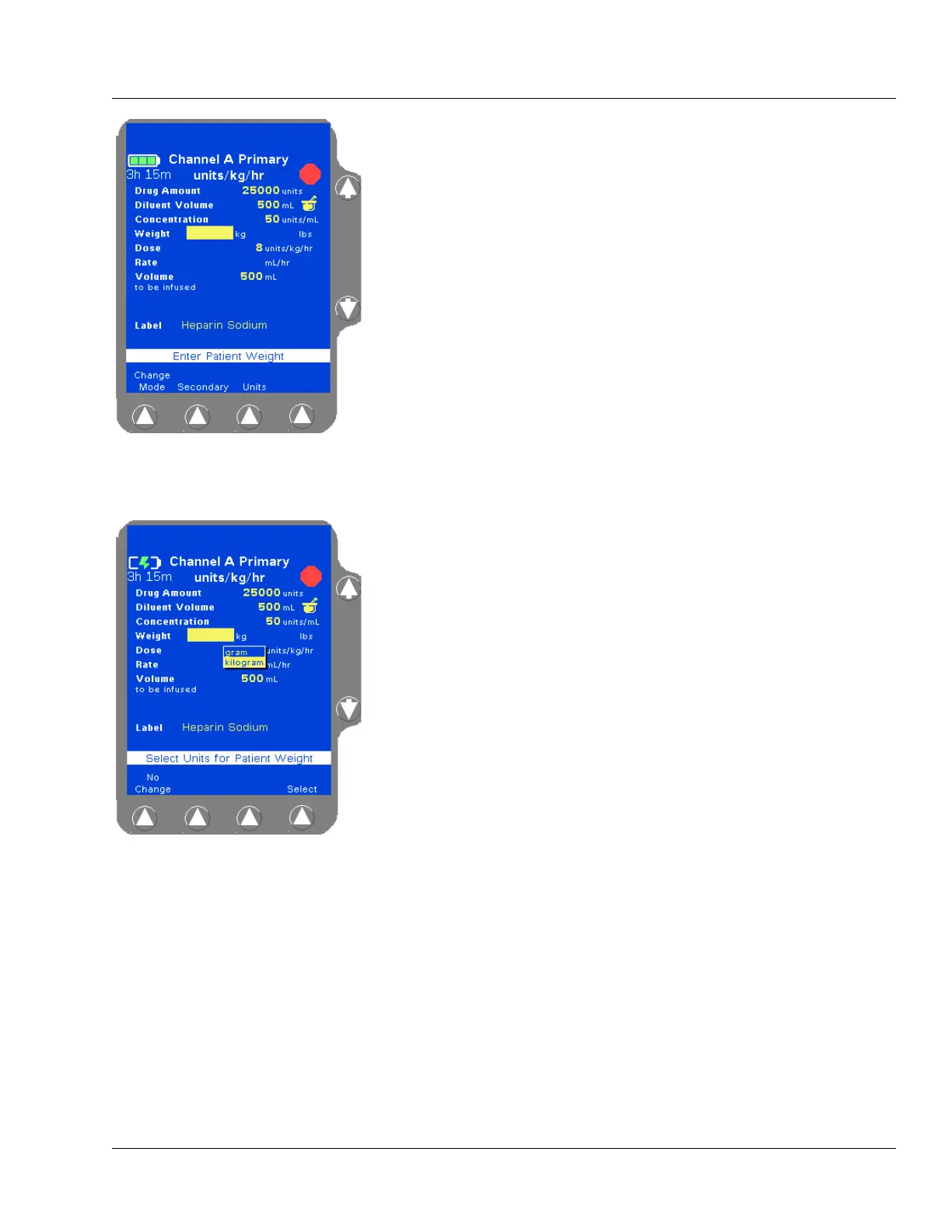
Weight field is highlighted (Figure 4-45). If a default dose has been
configured, it appears in the Dose field.
4. For small patients, weight can be entered in grams (or ounces) if
appropriate. To change weight units, highlight the Weight field,
press the
Units soft key to display the weight units list (Figure 4-46),
highlight the desired weight unit, then press the
Select soft key.
5. Enter patient weight using the numeric keypad.
Depending on how the pump has been configured at the facility, the
kg or lbs field may not be available for data entry. Fields not
available for data entry appear as shaded.
The pump calculates and displays the values for the remaining fields
based on the entered patient weight (Figure 4-47).
Figure 4-45 COLLEAGUE
GUARDIAN Programming Screen—
Weight-Based Label
Figure 4-46 Weight Unit Pop-up



 To Next Page