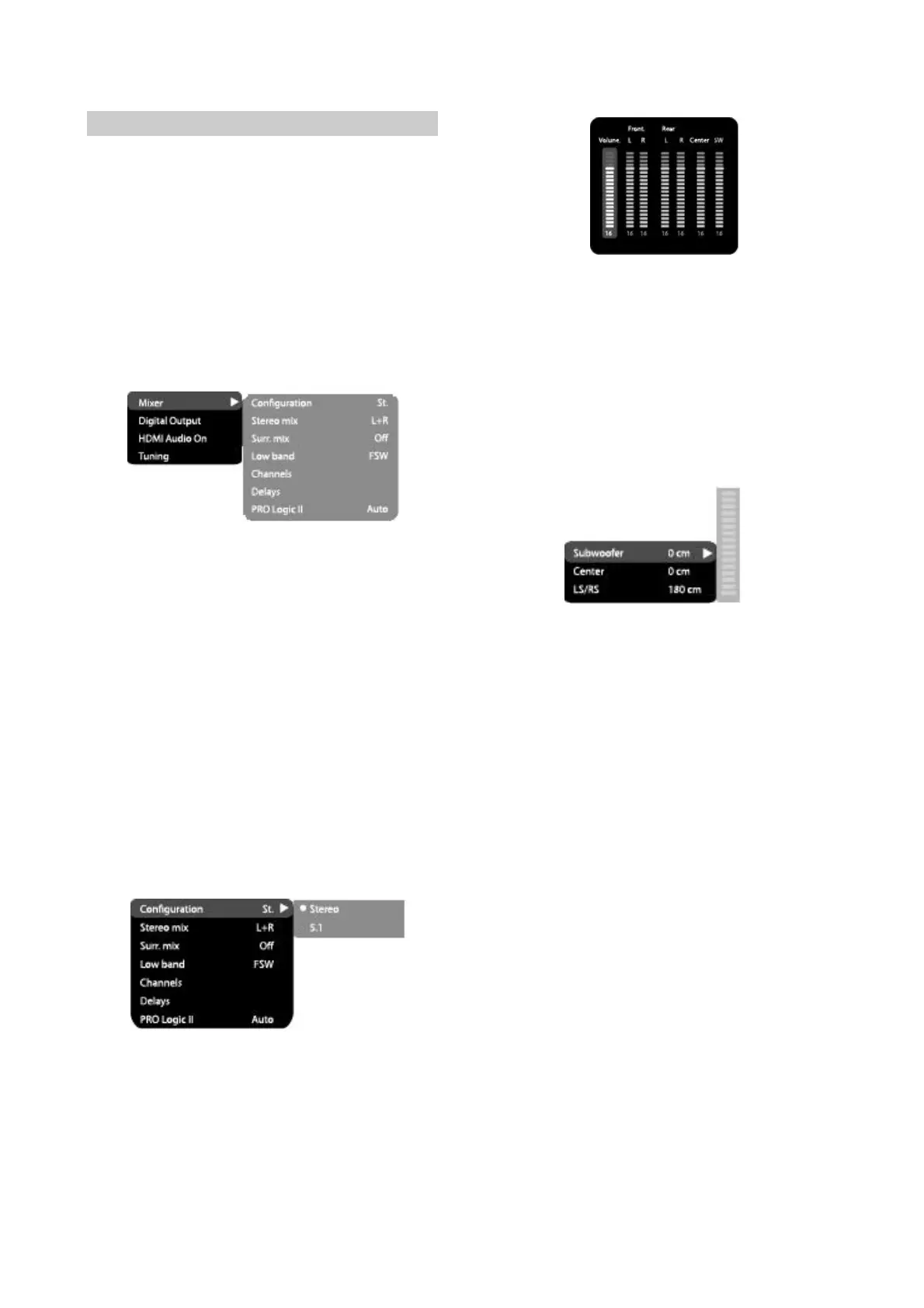
2.3.4Soundsettingsmenu
1.Mixer
A)Configuration:settingofthemodefor
conversionofthe5-channelsignaltostereo
signal
#Options:Stereo,5.1.
#Defaultoption:5.1..
#5.1modemustbesupportedbythedisc
Numberofmuicaccompanimentchannels
dependsonthespecificdisc.
#Adjustmentofthecentralspeakerandsurround
speakersisavailableonlyiftheConfiguration
optionissetto5.1position.
B).Stereomix:playbackset-upwhileplayingthe
discwithtwoindependentaudiochannels.
#Options:L+R,L,R.
#Defaultoption:L+R.
C)Surr.Mix:set-upofsurroundoptionswhile
playingthestereodisc.
#Options:Off,sum,Virt.Surr.
#Defaultoptions:Off.
D).Lowband:distributionoflowfrequencies
throughchannels.
#Options:FrontF,CenterC,SurroundSr,
SubwooferSW.
#Defaultoptions:FrontF,SubwooferSW.
#Ifyouwantthelow-frequencycomponentofthe
soundsignalenteronlythesubwooferchannel,
selectandconfirmtheparameterSubwoofer
SW.
E.Channelsettings:separateadjustingof
volumebychannels.
#Selectthechannelyouwant.
#Adjustthesoundvolumeofeachchannelusing
thewheel.
#PresstheOKtoreturntosoundsettingsmenu.
-9-
F)Delayofthechannel:set-upofsignaldelayin
speakerchannels(central,rearandsubwoofer).
#UsingtheJogDial,selectthechannel,for
whichyouwanttosetupthedelay,andpress
OKforconfirmation.
#UsingtheJogDialsetupthedesireddistance
fromthelistenertoeachspeaker(detailed
descriptionofthisoperationseeonpage43)
#PressLEFTkeyofthecursortoreturnto
speakerconfigurationmenu.
G).PROLogicll:functionofstereosound
conversionto5-channelssound.
#Options:On,Off,Auto.
#Defaultoption:Off.
#InAutoposition,theDVDplayerdetermines
itself,whentousethePROLogiclldecoder.
Somediscsdonotsupportthisfunction.
2.Digitalaudiooutput
A)SPDIFformat:set-upofdigitalaudiooutput
options.
#Options:RAW,PCM.
#Defaultoption:RAW.
#WhenyouselecttheRAWoption,thenot
decodedsignalistransferredtotheDVD
receiver’sdigitaloutputs,thedecodedsignal
istransferredtoanalogoutputs.Decodingis
performedbythebuilt-indecoderoftheDVD
receiver.
Thisfeatureismeanttoensurethatsignal
decodingatdigitaloutputsisperformedbyan
extermaldevice(e.g.anamplifier).
#IfyouselectthePCMoption,aPCMcoded
signalwillbetransferredtotheDVDreceiver’s
digitaloutputs.
B)LPCM:set-upofdigitalaudiooutputoptionsto
complywithdifferentampllfiersandrecelvers.
#Options:48kHz16bit,96kHz24bit,192kHz
24bit.


 To Next Page