EasyManua.ls Logo

BBK DK2810HD - Flow Chart of Troubleshooting

BBK DK2810HD
132 pages
Print Icon
To Next Page IconTo Next Page
To Previous Page IconTo Previous Page
Loading...
3.3.2 Flow chart of troubleshooting
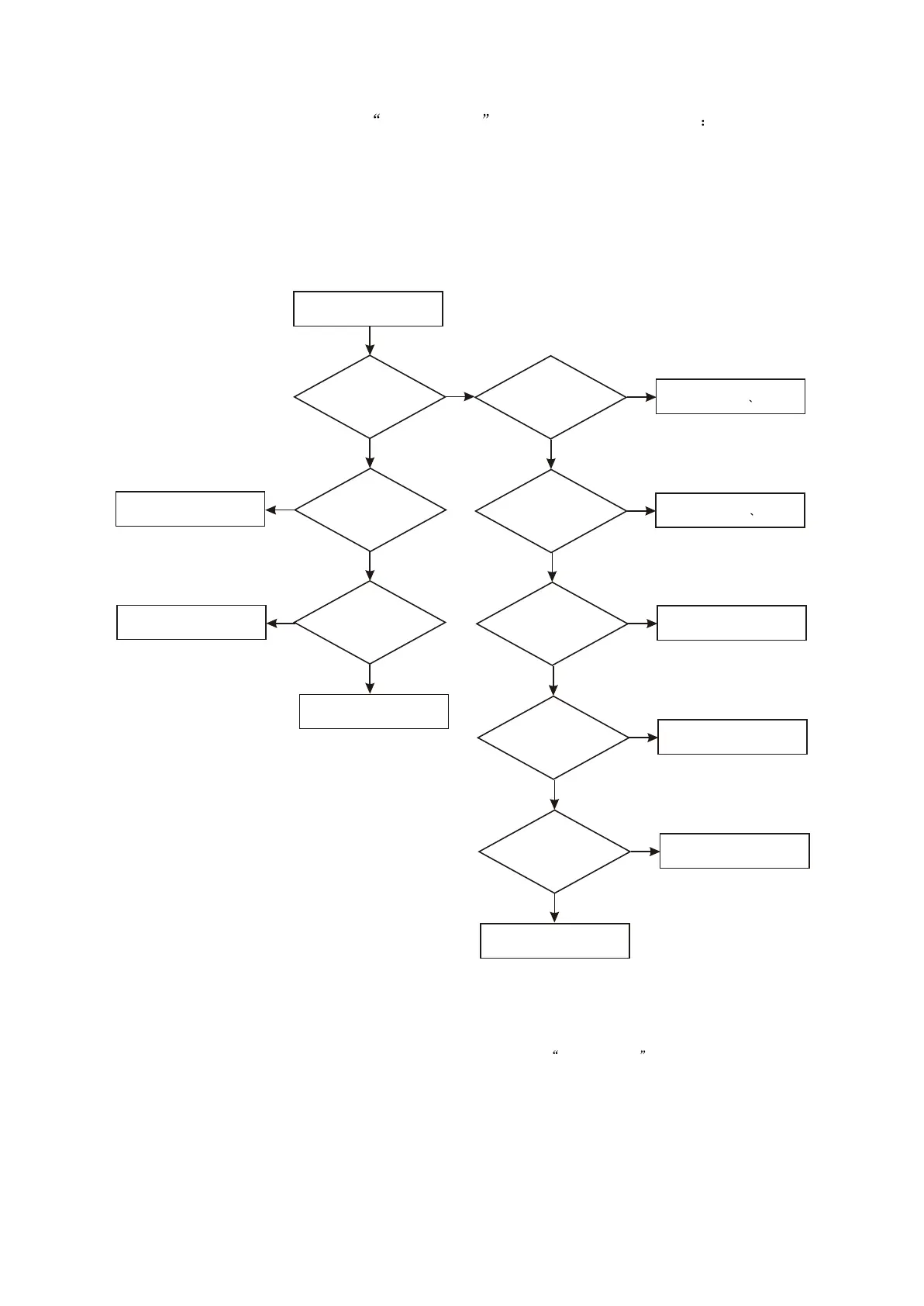
1. Troubleshooting flow chart of power not on is shown in figure 3.3.2.1
Player not power on
Whether
power supply of power
board +5V is
normal
Check 1.8V parth
N
Whether
power supply of decode
board 3.3V is
normal
Y
Whether
Tc509 and Tc510 are
normal
N
Y
Replace software
Whether
L506 and D510 are
conductive
Y
Replace L506 D510
Whether U501 is normal
Y
Whether
rectifying circuit is
normal
Y
Whether F501 is cut off
Y
N
Replace TC509 TC510
N
Replace U501
N
Replace rectify diode
N
Replace F501
N
Check power wire
Whether
power supply of decode
board 1.8V is
normal
Check 3.3V parth
N
Y
Y
Figure 3.3.2.1 Troubleshooting flow chart of not power on
- 34 -

Related product manuals