Product Overview
Device Description (Rear Panel Connectors)
BEC MX-210NP User Manual
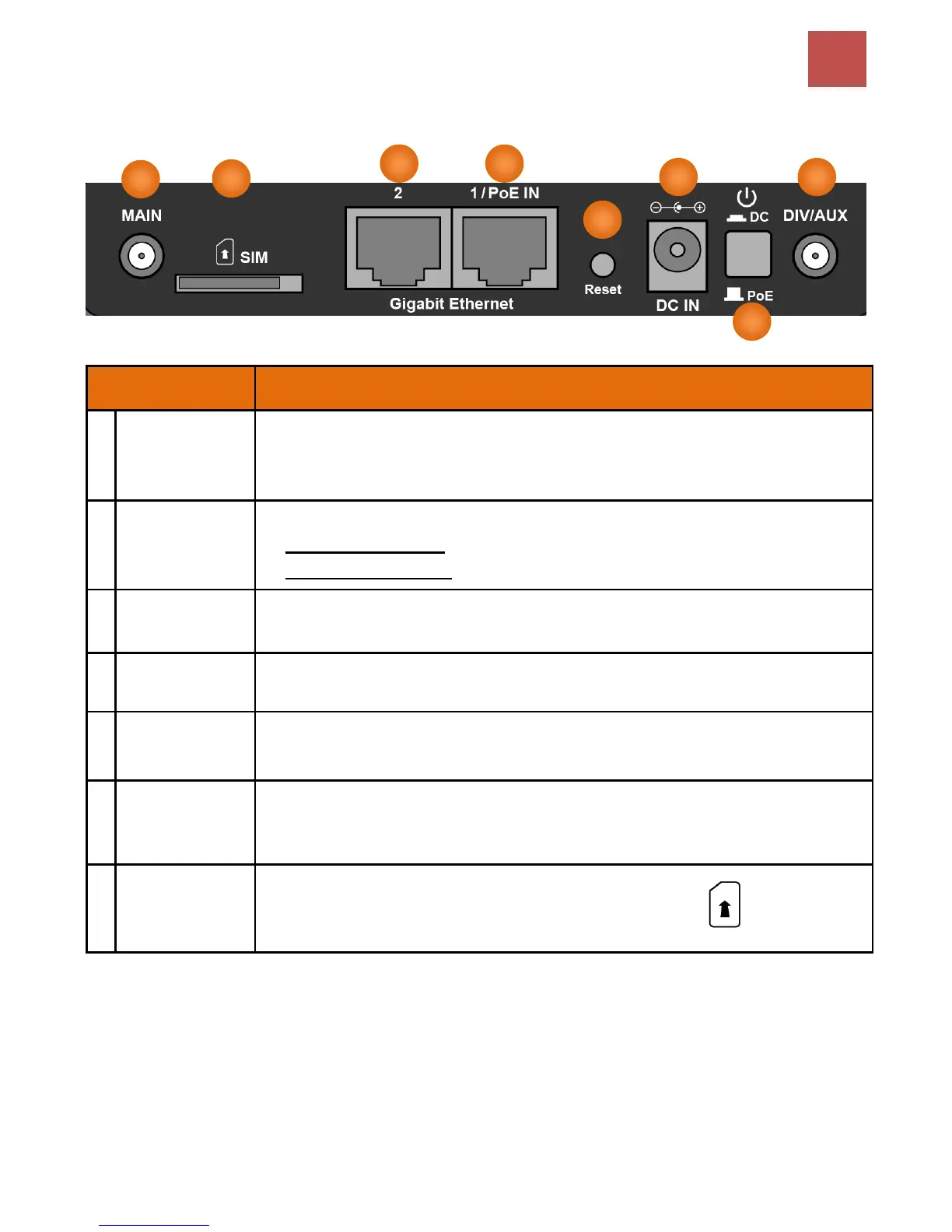
Rear Panel Connectors
4G/LTE Antenna
Connectors
(Main/Aux)
SMA female connectors.
Manually screw the cellular antennas tight to the female connectors.
Connect to Main if decide to use one antenna instead of two.
Power ON/OFF switch
(1) with Power Switch ON: power up by the supplied DC power adapter
(2) with Power Switch OFF: power up by the PoE battery unit
Connect the supplied Power Adapter to this jack.
After the device is powered on, press it 6 seconds or above: to restore to factory default
settings (this is used when you cannot login to the router, e.g. forgot your password)
Gigabit Ethernet
(LAN 1 / PoE)
Ethernet LAN: Connected to an Gigabit (1000Mbps) Ethernet device
Ethernet PoE: Connect with a 802.3at Gb PoE injector to provide power to the MX-210NP
Gigabit Ethernet
(LAN 1 / EWAN)
Ethernet LAN: Connected to an Gigabit (1000Mbps) Ethernet device
Ethernet WAN: Software configurable in the GUI. Connected with a broadband connection
device
Insert the mini SIM card (2FF) with the gold contact facing down.
Push the mini SIM card (2FF) inwards to eject it
* Power off the MX-210NP before inserting or removing the SIM card(s)



 To Next Page