GN-9371_2_3 User Manual
Page 34 of (110)
G-series GN-9371_2_3 PIO Rev. 1.02.docx
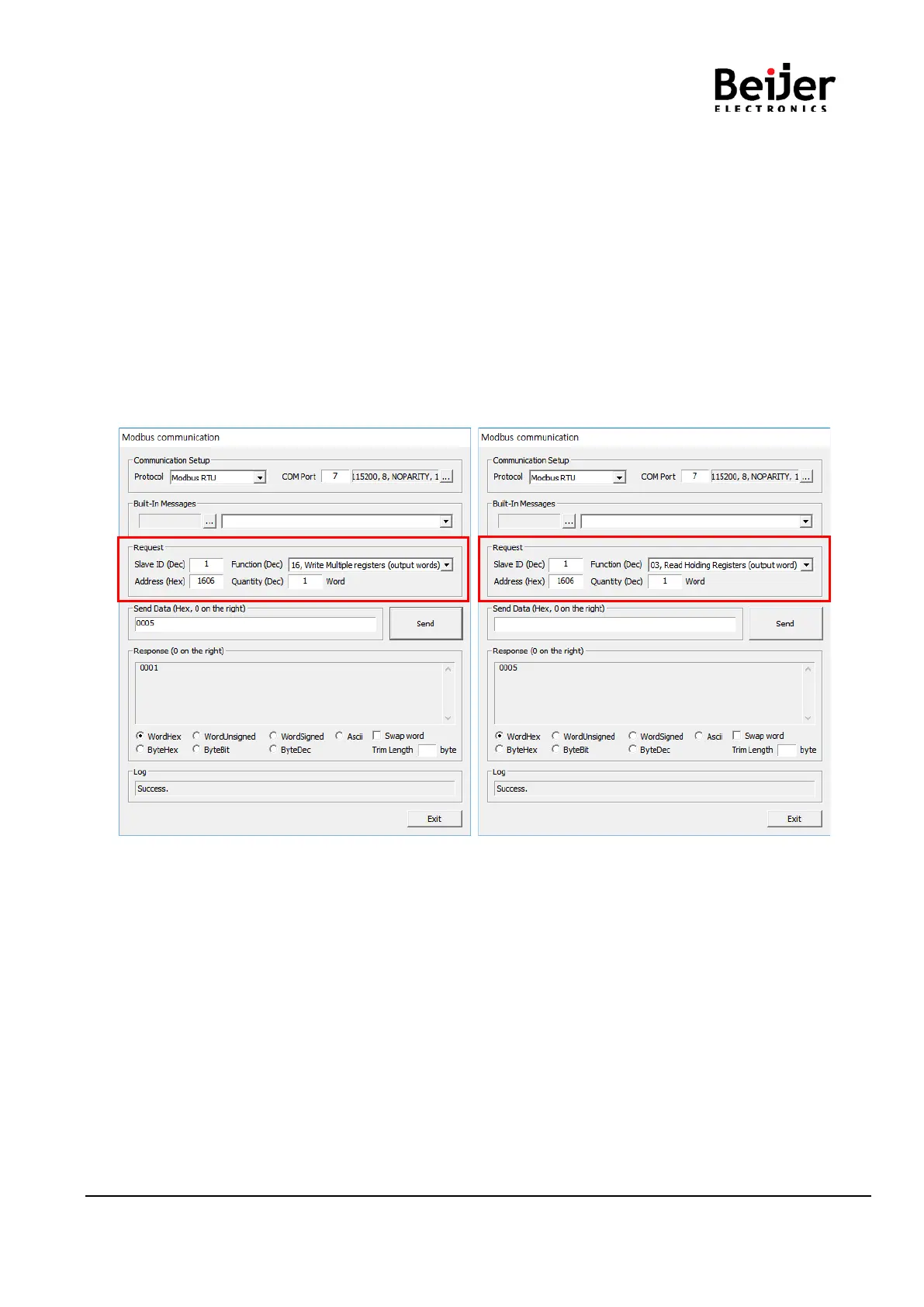
(1) Run ‘[Crevis] -> [IOGuidePro] -> [Protocol Messenger] -> [Modbus]’
(2) Write the value of each.
*Protocol : Modbus RTU
*ComPort : User Port / Baud rate : 115200(default)
*Address(Hex) : 1606 (RS232 Baud rate Register)
: 1607 (RS232 Use bit Setting Register)
: 1608 (RS485 Baud rate Register)
: 1609 (RS485 Use bit Setting Register)
*Function(Dec) : When the value is write - 16, Write Multiple registers
When the value is read - 03, Read Holding Registers
(3) confirm the necessary information.
*When the value is write *When the value is read
Write the desired value and click the Send button. Click the Send button and confirm the value.


 To Next Page