GN-9371_2_3 User Manual
Page 64 of (110)
G-series GN-9371_2_3 PIO Rev. 1.02.docx
8 File System
8.1 Source download and upload (GN-9372 / GN-9373 only)
In this tab of the generic device editor, you can transfer files between CODESYS (host) and the PLC. If the
communication settings are correct and the PLC is online, then CODESYS establishes the connection
automatically to the PLC for the duration of the file transfer.
Downloading Source Code to and from the PLC
CODESYS provides the capability of loading project source code to a PLC as a project archive.
User can then transfer this project archive back to the development system from the PLC as needed.
Requirement: The connection settings are configured for the affected controllers.
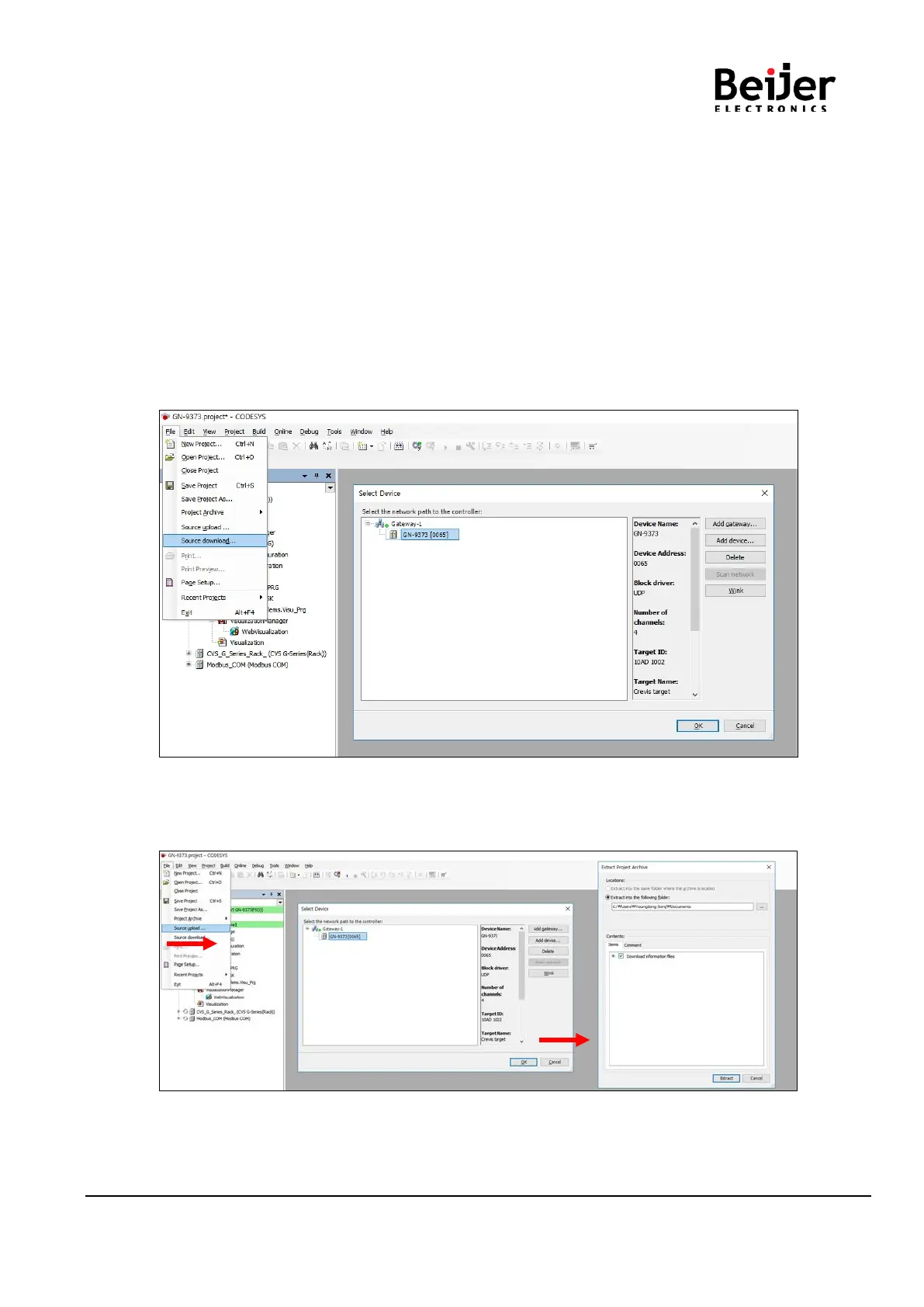
(1) Route: File -> Source download. User can download the project file to PIO.
(2) Click the Source Download menu in Comp. Select the your PIO and click Ok.
(3) When the Online mode, user can download the source file using the Source download to Connected
device in Online pop up menu. After click this, it will be downloaded immediately.
(4) If user wand to extract the project file from the PIO, click the Source Upload menu in Comp.
Select the activated PIO. Route: File -> Source upload


 To Next Page