GN-9371_2_3 User Manual
Page 63 of (110)
G-series GN-9371_2_3 PIO Rev. 1.02.docx
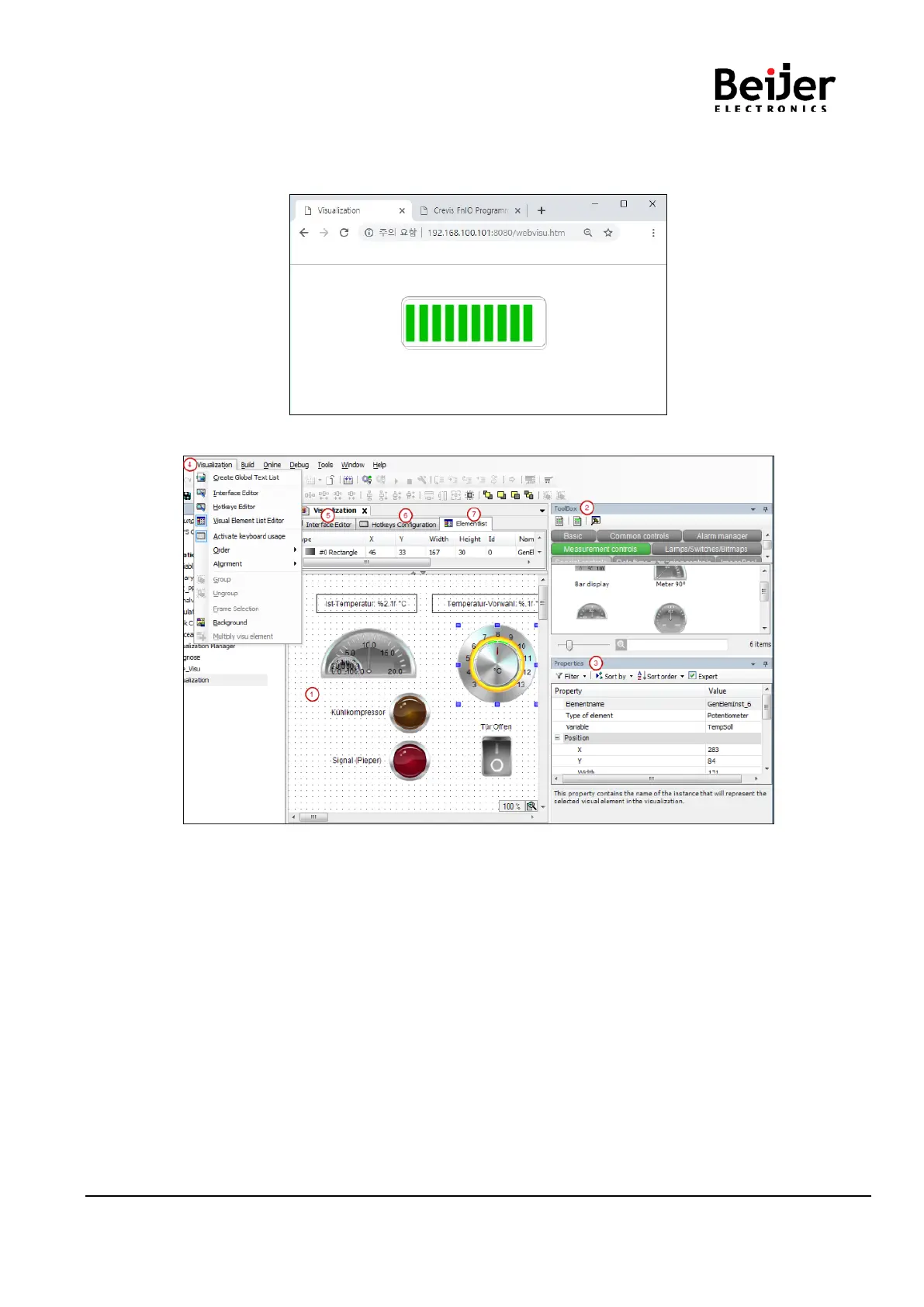
(6) Web visualization page on the Web Browser.
On the web browser, type the “IP address:8080/webvisu.htm” as like below.
It is recommended to use at Chrome and FireFox browser.
(7) The visualization editor opens after a double-click on a visualization object.
No.1 Graphical editor: this is where you create a visualization from the visualization elements that are
provided in the view Tools.
No.2 View Tools: available visualization elements
No.3 View Properties: configuration editor for the visualization element currently selected in the editor
area
No.4 Menu Visualization: commands for working in the visualization editor
Amongst other things, the menu Visualization contains commands for opening additional editors:
No.5 Interface Editor: declaration of variables via which the references of the visualization can be
parameterized.
No. 6 Hotkeys Configuration: definition of shortcuts for inputs on the visualization in online mode.
No. 7 Element list: List of all elements used in the visualization, possibility to change their position on the
z-axis.


 To Next Page