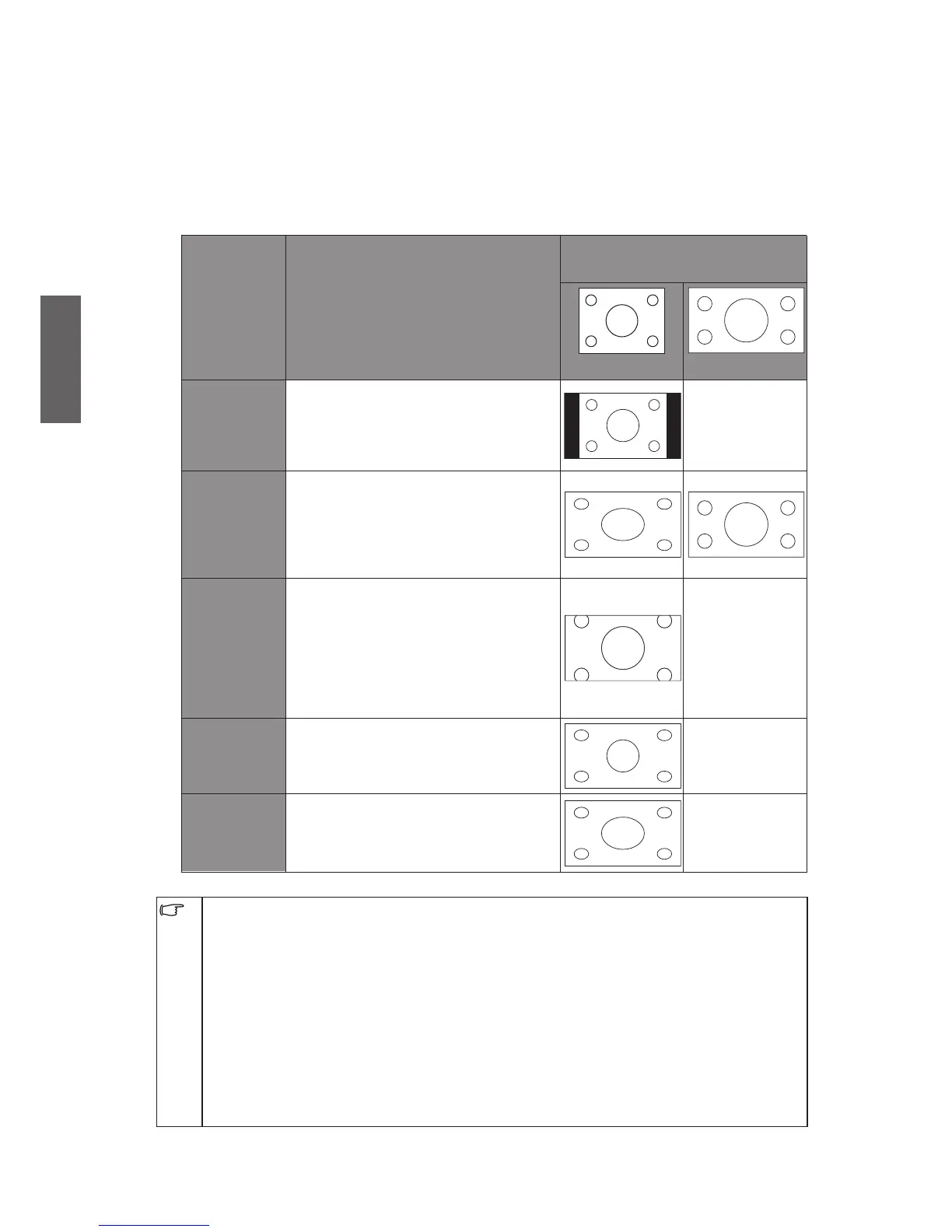
Adjusting aspect ratio
The TV can resize and reshape an image to suit your requirements. The visual result
depends upon the setting your have chosen, and the original aspect ratio of the input
image. Press "WIDE" button on the remote control to cycle through the aspect ratios.
The table below shows the resultant images in relation to the input image when different
aspects are selected:
Aspect
ratio
Description and usage
Aspect ratio of input video
image
4:3
16:9
4:3
Resizes the image to 4:3 aspect
proportions. Recommended for use
when viewing video sources which
are already in 4:3 aspect such as
analog TV and PC video input.
(Not
recommended)
16:9
Stretches a 4:3 image to 16:9 aspect
proportions. Recommended for use
when viewing video sources which
are already in 16:9 aspect such as
digital TV and most widescreen
DVDs.
Zoom
Resizes a 4:3 image to 16:9 aspect
proportions, and trims off the top
and bottom strips. Recommended
for use when viewing 4:3 aspect
video presenting compressed 16:9
aspect images in a 4:3 aspect frame
in a so-called letterbox format (black
strips along the top and bottom).
(Not
recommended)
Panorama
Stretches a 4:3 image to the width of
a 16:9 aspect image proportions.
recommended for use in filling the
screen with a 4:3 aspect image.
(Not
recommended)
FULL
Resizes a 4:3 image to 1:1 aspect
proportions.
(Not
recommended)
You can choose an aspect ratio independently for each input source.•
Available aspect ratio options are dependent on the type of input signal being selected. •
When viewing PC input (via D-Sub
or
DVI), only "16:9" and "4:3" are available for
selection.
TV, AV, S-Video, YPbPr, HDMI SD: 16:9, 4:3, Panorama, ZOOM•
VGA, DVI: 16:9, 4:3•
HDMI HD: 16:9, 4:3, ZOOM, FULL•
YPbPr HD: 16:9, 4:3, ZOOM•
If the input video signal is in letter box format, select "Zoom" to obtain a wider viewable •
area.
In order to avoid possible "image retention"•
or
"screen burn-in" on the LCD screen of your
TV, it is recommended that you change the aspect ratio from time to time, and prevent the
TV from displaying a static image for a prolonged period of time.



 To Next Page