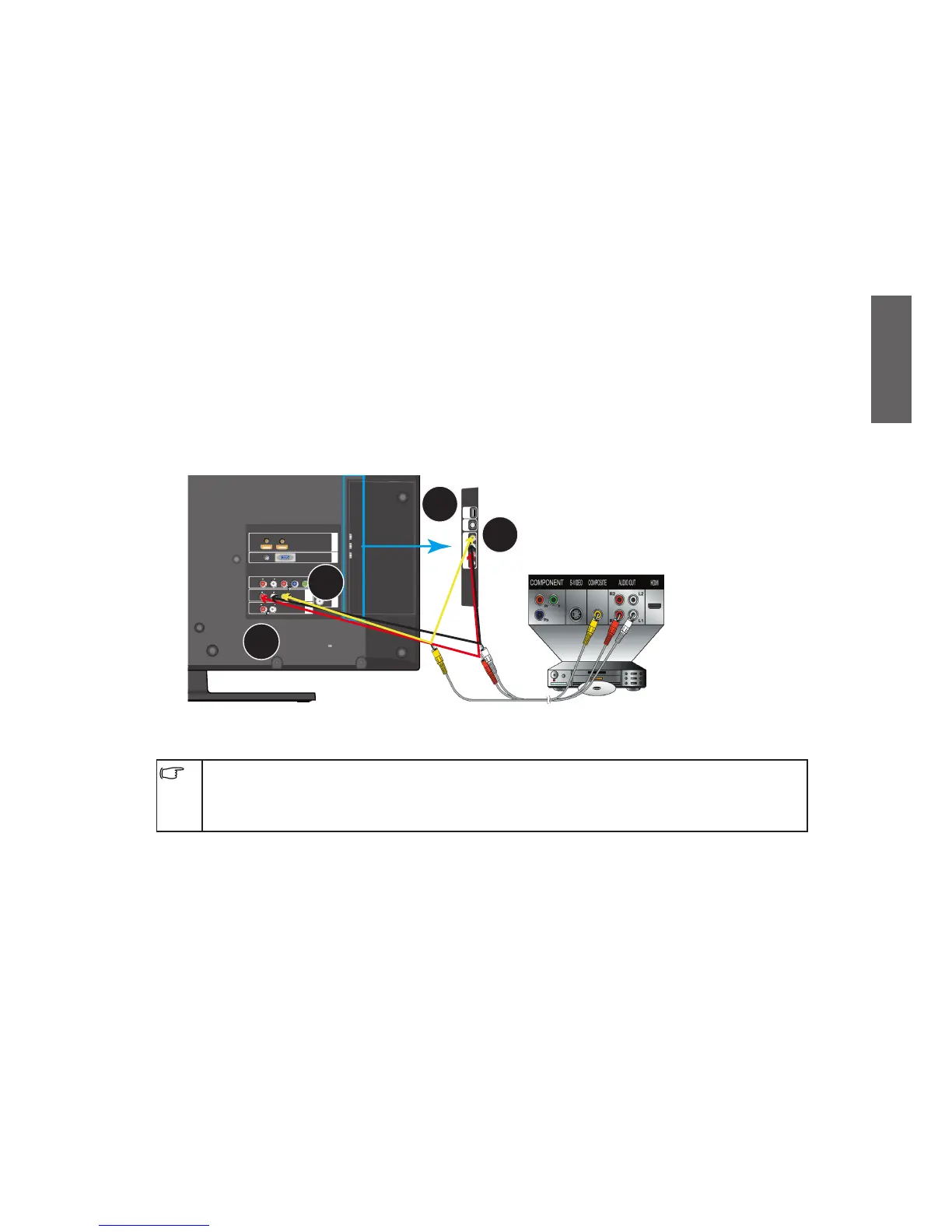
Connect to an Audio/Video
Here are some tips before starting:
Before connecting any devices, please turn off all equipments, including your TV.•
Make sure the type and position of each output, and then decide the best way to •
connect them to your TV. Any mistake in connecting them will deteriorate the image
quality.
Make sure all plugging heads and connectors are firmly fixed.•
Connect to a Composite Video input
Connect the composite video output jacks on your device to the AV, AV/SV AUDIO IN L/
R input jacks using a composite video cable (not provided). The cable comes with three
plugs, which are yellow, for video, white, for left audio channel, and red, for right audio
channel. Make sure you insert each plug into its corresponding jack by its color.
If you want to watch the Composite Video input, press the INPUT button on the remote
control and then press
/
button,
or
repeatedly press the INPUT button to select
Video 1
or
Video 2 as the input, and then press OK button on the remote control to
confirm.
Composite video source is considered the most common signal input source in the market,
and provides the lowest image quality among other sources, such as S-video and component
video. There are still many devices only provide composite video output, such as VCD
players, analog video recorders and game players.



 To Next Page