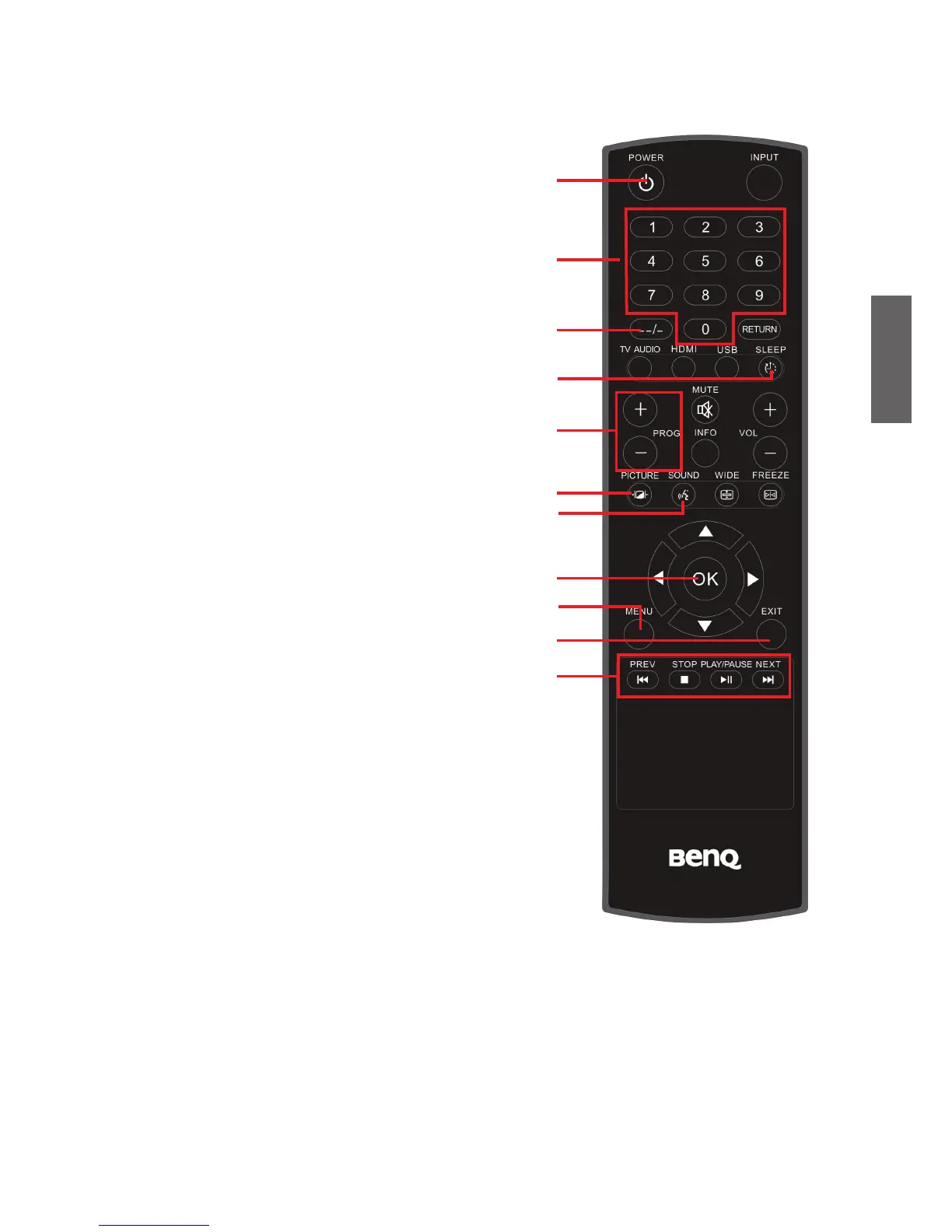
Getting to know the remote control
1. POWER
Press to power the TV on
or
put it to off
mode. See "Power on and off" on page 13.
2. Channel selection
Press these buttons to select the channel
you want to watch. See "Select channels
directly" on page 14.
3. -/-- Channel Number
Press this first to key in 2-digit channel
number. See "Select channels directly" on
page 14.
4. SLEEP
Press to set the automatic shut-down timer.
See "Use the sleep timer" on page 14.
5. PROG +/-
Press these buttons to sequentially
change channels. See "Change channels
sequentially" on page 14.
6. PICTURE
Press to select a preset picture mode. See
"Select a picture mode" on page 14.
7. SOUND
Press to toggle among available TV sound
modes (may vary from your TV sound
system). See "Select TV/Video sound
mode" on page 13.
8.
/
/
/
and OK
When the OSD (On-Screen Display) menu
is open:
‧
Press
/
to select settings.
‧
Press
/
to adjust the value of a
selected option. Press OK button to
confirm your selection. See "Navigate the
OSD menu" on page 23.
9. MENU
Press once to display the OSD menu.
10. EXIT
Press this button to go back to the previous
menu
or exit
the menu.
11. Play USB audio/video files
Press these buttons to play USB audio/
video files: PREV, STOP, PLAY/PAUSE,
NEXT.



 To Next Page