106
Combi mode
Combi mode
The sewing-/embroidery computer has a memory system where both, the
sewing and embroidery memories are saved.
In the sewing memory stitch patterns, lettering and numbers can be combined
and saved.
In the sewing memory each «Drawer» can store a maximum of 70 stitch
patterns as long as there is sufficient free space (capacity) available. If the
storage space (but not all drawers) is full, there may be too many embroidery
designs in the memory.
The memory is long-term, i.e. contents are kept until they are deleted. A power
cut or switching off the sewing-/embroidery computer does not have any effect
on the stored contents.
Creating stitch combinations
Programming and saving
█
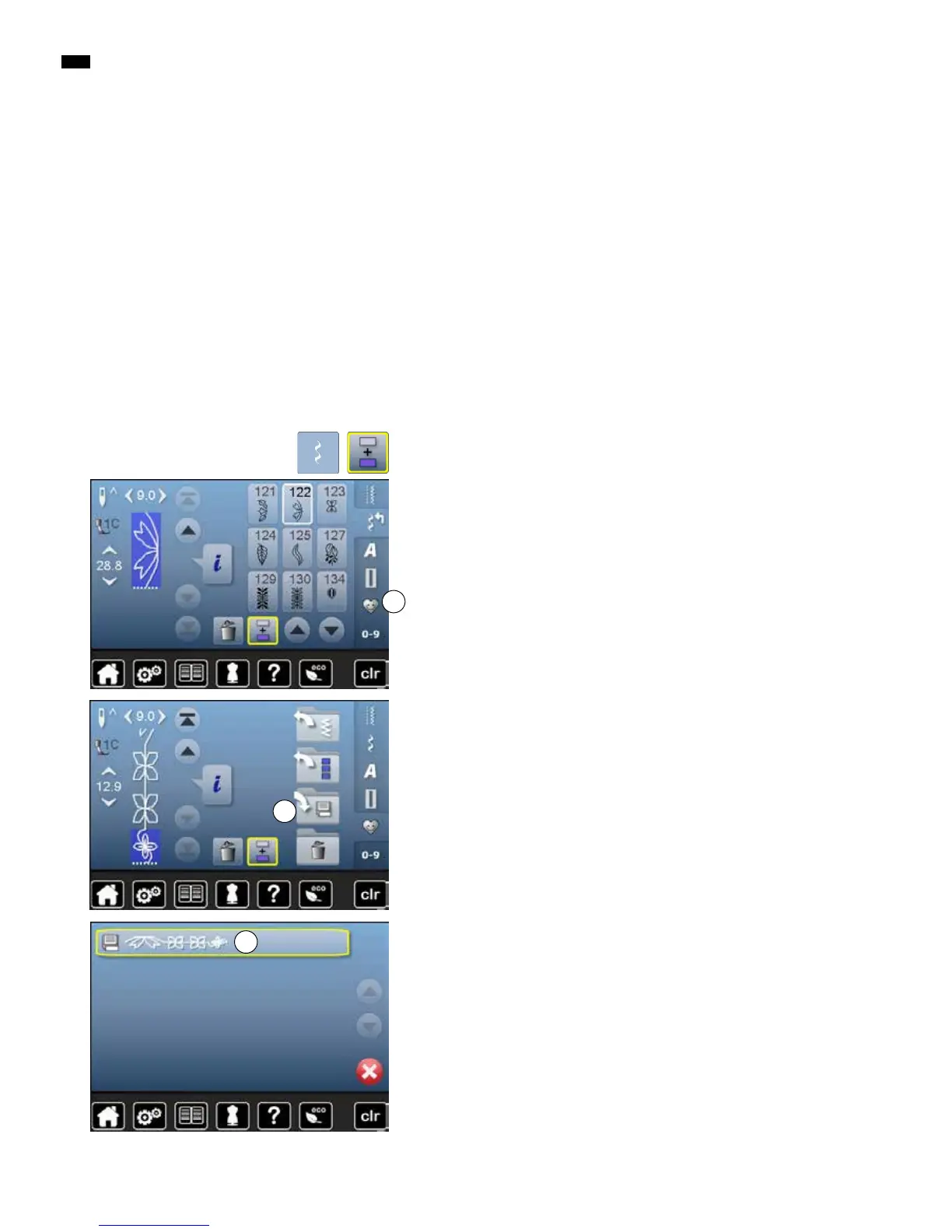
touch «Decorative stitch»-button
█
select category
█
touch «Combi mode»-icon
█
select the desired stitch pattern directly or type in the number
█
make any alteration concerning stitch length, stitch width, needle position
etc.
█
select another stitch pattern
█
touch «Memory»-icon 1 1
█
touch «Save»-icon 2
2
█
touch «Save»-icon 3
►
the combination is saved
►
the Display closes
3


 To Next Page