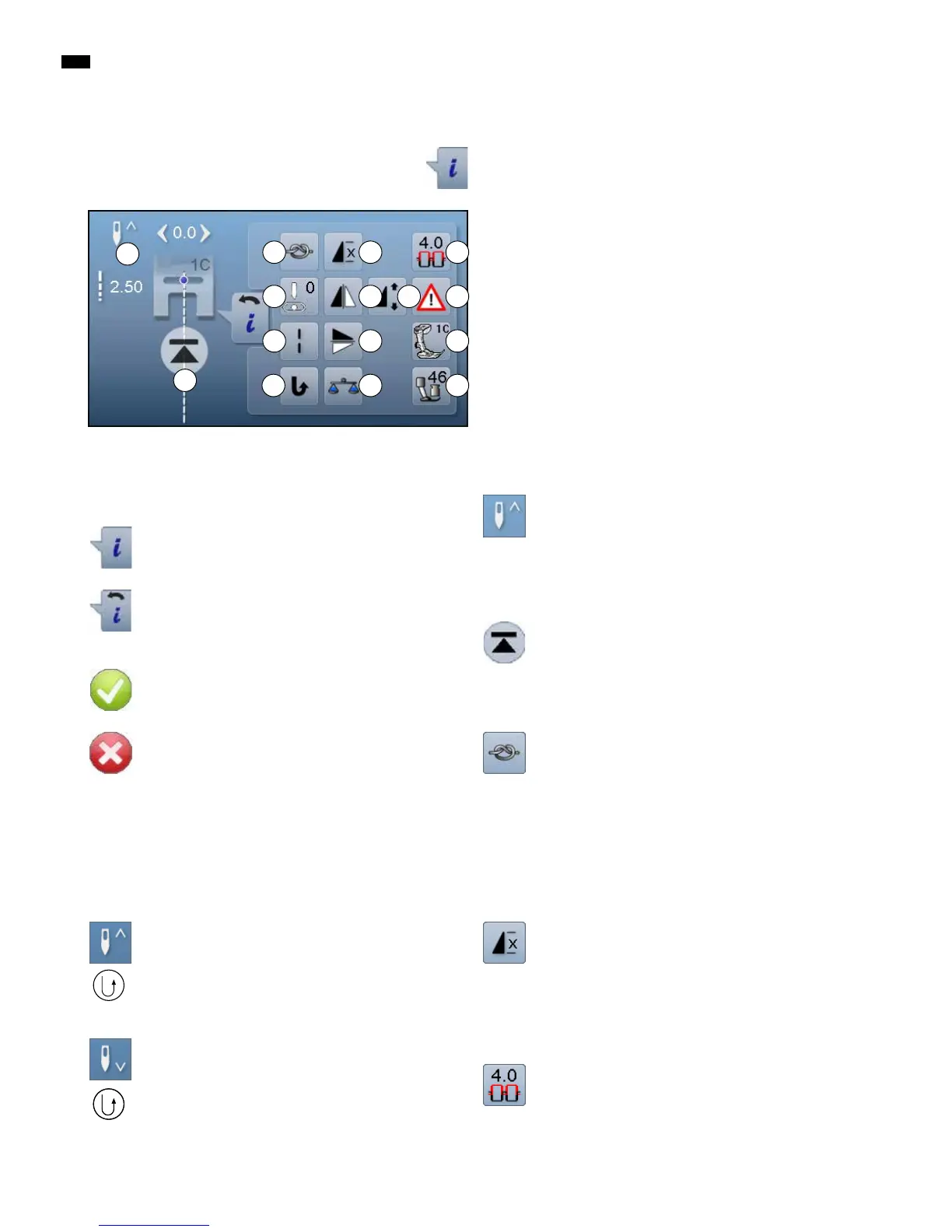
30
C
F
J
D E
G H
I
K L
N O
M
Functions
A Needle stop up/down
B Pattern begin
C Securing
D Pattern repeat
E Upper thread tension
F Needle position
G Mirror Image (Left/Right)
H To alter pattern length/stitch density
I Security program
J Long stitch
K Mirror image (Up/Down)
L Presser foot indicator
M Permanent reverse sewing
N Balance
O Presser foot pressure
Overview Sewing functions
█
touch «i»-icon
█
function Display appears
Needle stop up/down
█
touch icon
►
the arrow on the Display points down
►
the sewing computer stops with needle down
█
touch the icon again
►
the arrow on the Display points up
►
the sewing computer stops with needle up
Pattern begin
the function appears when the sewing computer is
stopped while sewing a single stitch or a stitch
combination
►
the needle moves to the beginning of a stitch
pattern or program
Securing
█
touch icon before sewing
►
the single stitch is secured with four securing
stitches at the beginning
█
touch icon while sewing a single pattern
►
the single stitch is secured at the end
►
the sewing computer stops
█
to program the securing function within a stitch
combination
█
any single stitch of the combination can be secured
at the begin or at the end
Pattern repeat
█
touch icon 1x
►
number 1 appears: the sewing computer stops at
the end of a single stitch or a stitch combination
█
touch icon 2-9x
►
numbers 2-9 appear: the sewing computer stops
after the selected repeats of single stitches or a
stitch combination
Upper thread tension
█
change upper thread tension
►
the respective value is visible in the icon
Overview Display
Information
█
touch icon
►
another Display is opened
Back
█
touch icon
►
goes back to the previous Display
►
all changes are saved
Confirm selection
█
touch icon
►
activates or confirms alteration/selection
Leaving the active Display
█
touch icon
►
the Display is closed
►
goes back to the previous Display
General functions
B
A
Needle stop position up and «Quick Reverse»-
button
If the «Quick Reverse»-button is pressed while sewing
or after stopping (e.g. zig-zag) with programmed needle
stop up, the sewing computer sews one stitch forward
before it switches to sewing in reverse.
Needle stop position down and «Quick Reverse»-
button
If the «Quick Reverse»-button is pressed after stopping
(e.g. zig-zag) with programmed needle stop down, the
sewing computer switches to sewing in reverse immedi-
ately.



 To Next Page