142
Motifs
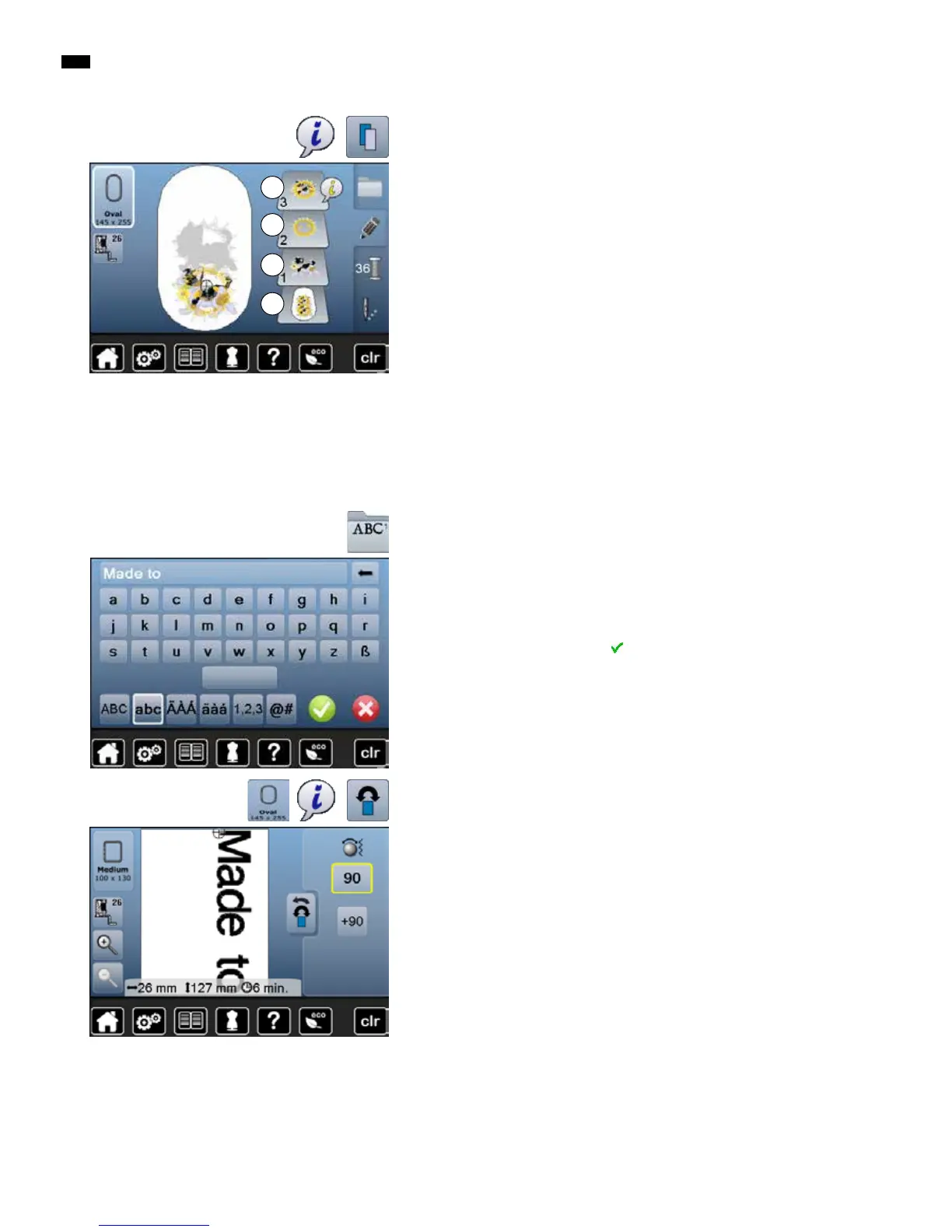
Duplicating a combination
█
activate a combination 1
█
touch «i»-icon
█
touch «Duplicate motif»-icon
►
the active combination 2+3 is duplicated 4
Within in a duplicated combination the single motifs cannot be selected
individually, contrary to the initial combination.
1
2
3
4
Combining
█
touch «Alphabet»-icon
►
the various alphabets appear in the Display
█
select desired «Alphabet»-icon
►
the Display with the keyboard is opened
█
e.g. enter Made to
Select characters using the Lower/Upper Case icon.
█
place the space with the bar under the keyboard
█
confirm combined lettering with
►
lettering appears in the «Edit»-display
Lettering (e.g. words) can be combined with other alphabet characters or
motifs. The individual words (e.g. Made to create) are individually combined by
the line and positioned individually.
Lettering
Positioning
█
touch «Select hoop»-icon
█
select medium hoop
█
touch «Back»-icon
█
touch «i»-icon
█
touch «Rotate motif»-icon
█
touch «+90»-icon
►
the text is rotated by 90°
►
touch «Back»-icon
█
touch «Move motif»-icon
█
position the text in the Display using the knobs, the touch pen or the finger
The outline of the hoop is highlighted in red if a stitch of the motif is positioned
outside the embroidery area.



 To Next Page