47
Setup Program
Reset/Delete user data
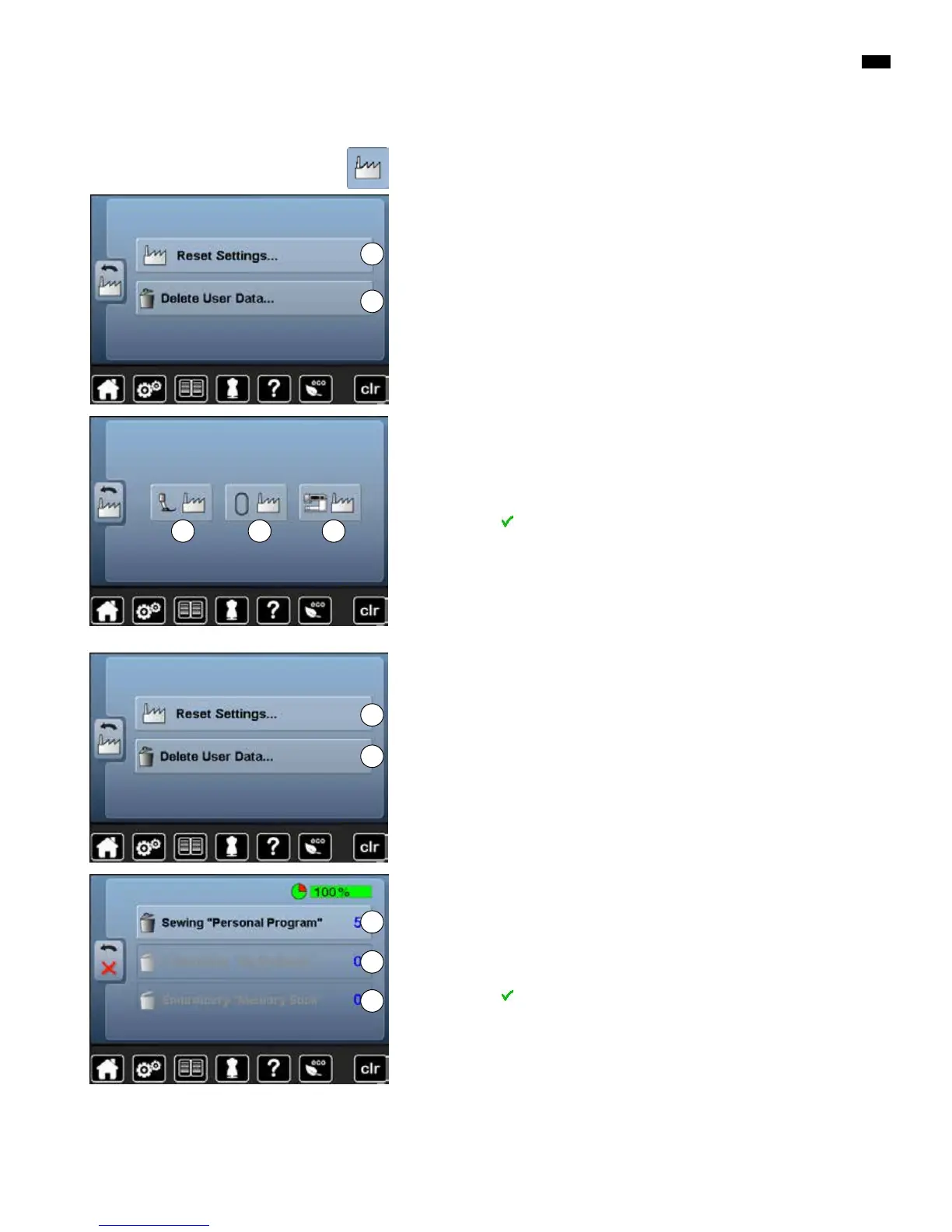
Choose from following options:
1 Reset Settings
2 Delete user data
Reset settings
█
touch icon 1
█
touch «Basic settings»-icon
Choose from following options:
A Reset Sewing
B Reset Embroidery
C Reset All
█
touch the icon, whose settings should be reset to basic setting
█
confirm with
►
the previous Display appears
█
touch «Back»-icon
►
selection menu appears
Exceptions:
Thread tension, brilliance, brightness, display color and speed need to be reset
to basic state knowingly according to the corresponding function.
Delete user data
█
touch icon 2
Choose from following options:
D Sewing «Personal program»
E Embroidery «My Designs»
F Embroidery «Memory stick» (the Memory stick must be inserted in the
sewing computer)
█
touch the icon, whose data should be deleted
█
confirm with
►
the data is deleted and the previous Display appears
█
touch «Back»-icon
►
selection menu appears
1
2
A B C
1
2
D
F
E



 To Next Page