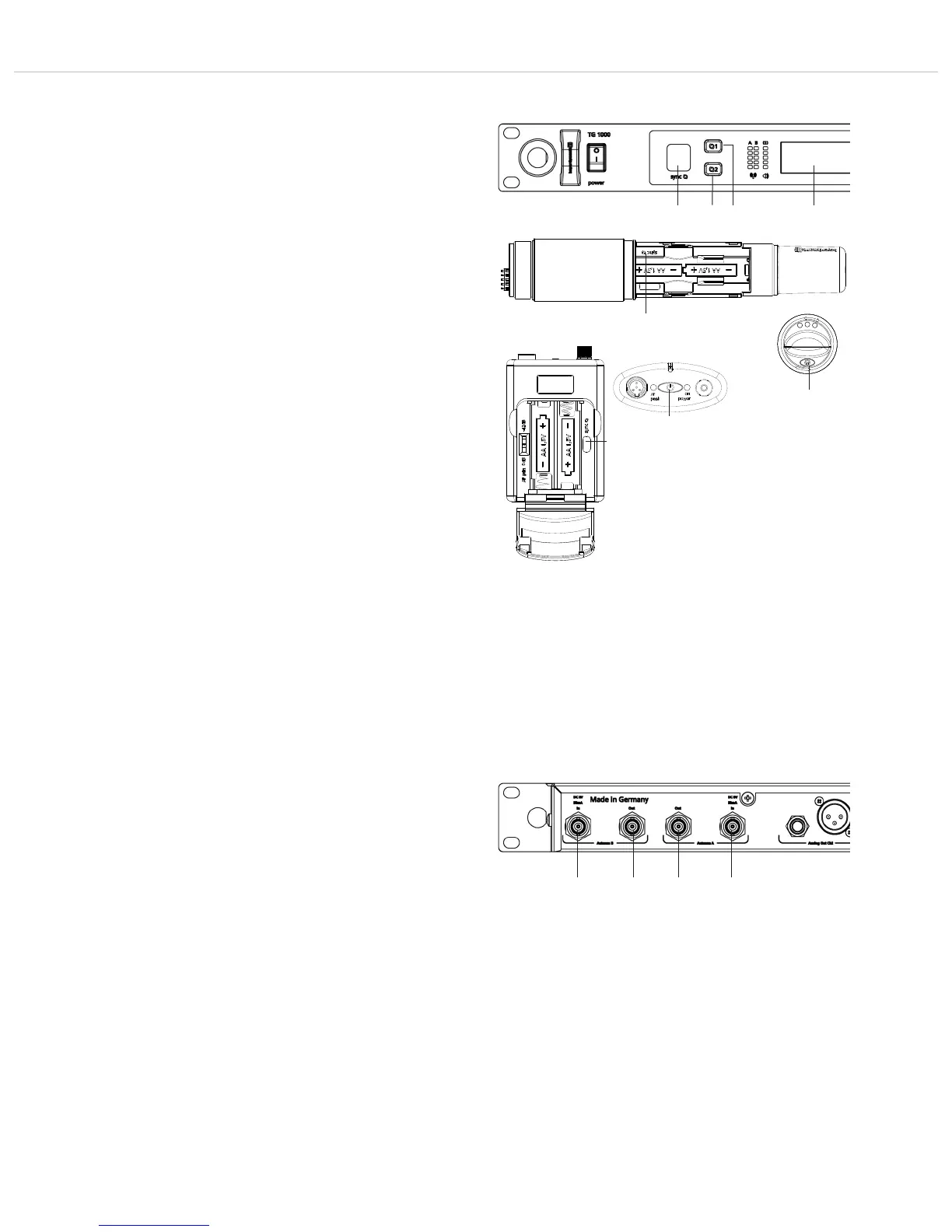
TG 1000 – Digital Diversity Receiver
25
2.10 Synchronisation
• Via an infrared interface the receiver can transmit frequency and
other settings such as encryption and “Power Lock” of the
appropriate channel to a transmitter.
• In order to transmit the settings to a transmitter, press the button
for synchronisation for channel 1 or 2 on the receiver.
• Inside the battery compartment of the transmitter there is an
infrared interface.
• When the pressed button for synchronisation is highlighted
red, hold the infrared interface of the handheld transmitter or
the beltpack transmitter in the open battery compartment
of the switched on transmitter directly in front of the infrared
interface of the receiver.
Important: Should the battery symbol in the display of the
transmitter flash, the batteries are almost empty and the
synchronisation should not be performed, because it will be
incomplete or stop.
• When the message “SYNC successful” is displayed, the process
is completed. Frequency and other settings have been success-
fully transmitted to the transmitter.
How to Synchronise Two Transmitters on the Same Channel
• Press the on-off button of the handheld or beltpack transmitter
for approx. 8 seconds to enter the “RF off” mode. Now you can
synchronise a spare transmitter on the same channel, although
the main transmitter is still activated (audio will still work when
synchronising).
• Synchronise the spare transmitter as described above.
• In order to leave the “RF off” mode switch the transmitter off
and on again.
Important: Before you switch the spare transmitter off and on
again, you must turn off the main transmitter, because otherwise
the channel can be interfered when two transmitters are
simultaneously active on the same frequency.
2.11 Multi-Channel Operation
(Cascading Several TG 1000 Receivers)
• The receiver is provided with an integrated active antenna splitter.
• For a multi-channel operation with two antennae you can
connect 6 receivers (12 channels) at maximum.
• Connect the antennae to the antenna inputs of the first receiver.
• Connect the antenna inputs of the second receiver to the
antenna outputs of the first receiver and the antenna inputs
of the third receiver to the antenna outputs of the second
receiver etc.
• Use the WA-CKL connecting cables (optionally available).
• Please turn on all receivers, so that they can be supplied with the
antenna signal.
• For large multi-channel systems we recommend using one or
more WA-AS 6 antenna splitters.
Beltpack transmitter
Handheld transmitter



 To Next Page