TG 1000 – Digital Diversity Receiver
9
2.7 Menu Settings
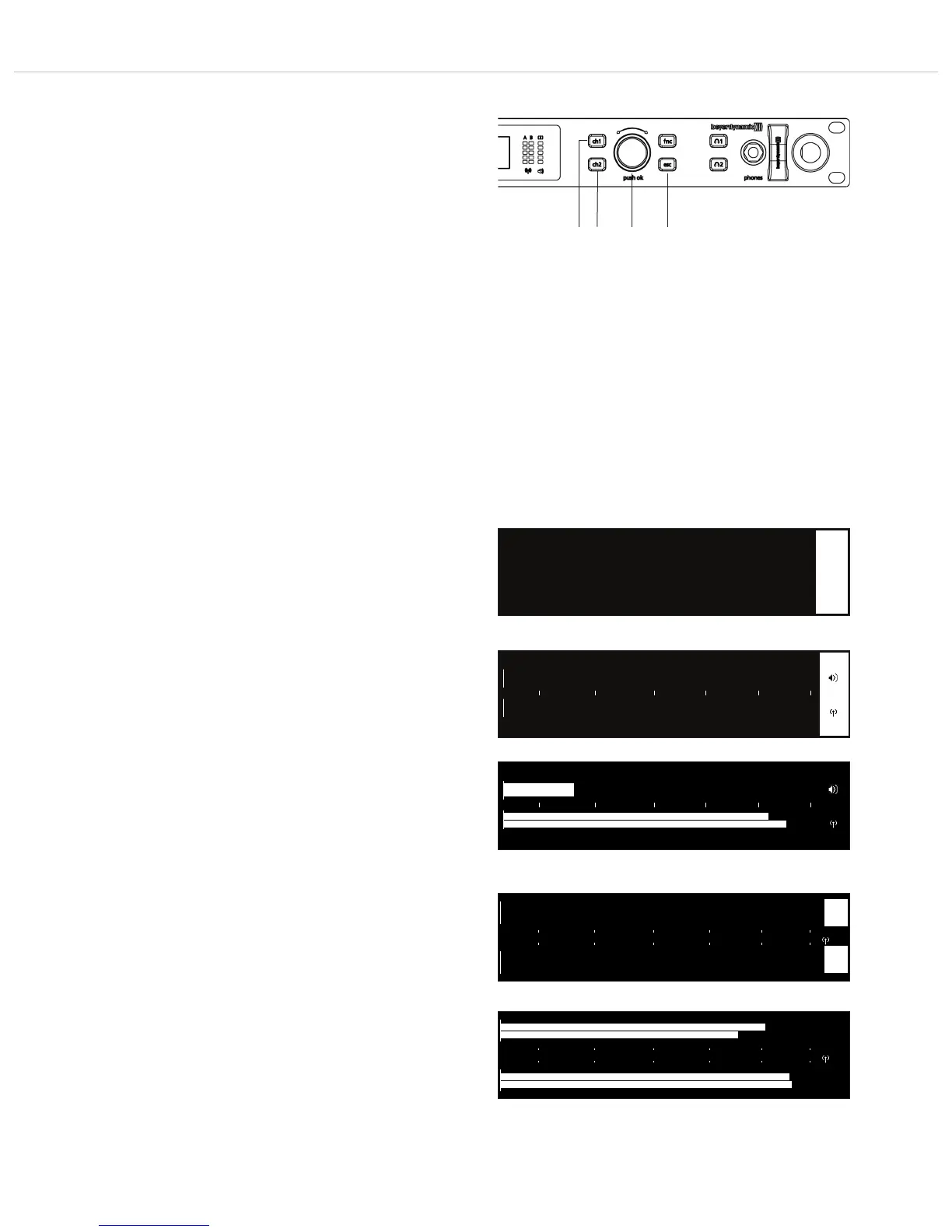
• At the receiver you can adjust settings for name, frequency group,
frequency, digital gain etc. in different menus for channel 1 or 2.
• Select channel 1 or 2 by pressing the appropriate channel selector
button .
• When the channel selector button is highlighted in red and
the display is changing, you can scroll through the menu by
turning the rotary switch and enter the sub-menu by pressing
the rotary switch to make some settings and confirm them
afterwards. When a setting is confirmed by pressing the rotary
switch the “OK” message will be displayed.
• With the ESC button you can cancel the entry within the menu
or sub-menu. The the entries are not accepted and the original
entries will be displayed.
• Caution: If you do not operate the rotary switch for a few
seconds, the appropriate sub-menu will automatically be left and
the default screen will be displayed . Settings, which are not
confirmed by pressing the rotary switch will not be stored.
• On the right hand side of the individual sub-menus the channel
is displayed for which the settings can be done, i.e. “1” or “2”.
• Note: If a setting (except “Digital Gain” and “Analog Out”) is
changed, the appropriate button of synchronisation will
illuminate red.
• The following settings are possible:
• Meter
Here you can display the audio and RF level in a combination for
channel 1 and channel 2. You can also display the RF level and
audio level for both channels separately when the transmitters
are turned on.
Press the rotary switch to access the submenu.
At first the combined audio and RF level will be displayed. When
channel 1 is selected, it will be displayed.
When you turn the rotary switch further to the right, the
combined audio and RF level for channel 2 will be displayed.
If channel 2 has been selected, the combined level for channel 2
will directly be displayed.
RF level display
When you turn the rotary switch further to the right, the RF level
is displayed for channel 1 and 2. The RF level is displayed by bars.
• Meter
▼ Name: Ch1
dBm -90 -80 -70 -60 -50 -40
dBu -42 -30 -18 -6 +6 +18
dBm -90 -80 -70 -60 -50 -40
1
A
B
dBu -42 -30 -18 -6 +6 +18
dBm -90 -80 -70 -60 -50 -40
1
A
B
Combined audio and RF level display – transmitter turned off
Combined audio and RF level display – transmitter turned on
RF level display – transmitter turned off
RF level display – transmitter turned on
A
B
1
A
B
2
dBm -90 -80 -70 -60 -50 -40
A
B
1
A
B
2
1
Select the “Meter” submenu



 To Next Page