BD/ED/FD (E2) Service Manual
State: 01/2002 Created: 06/2002 / Jochen Tussinger
18
5 BD, ED and FD connected to APT-COM
5.1 Communication Software APT-COM
The units of size 400 and 720 are equipped as standard with an RS422 serial interface (option with size
53, 115 and 240), to which Binder’s
5.2 Settings at the controller R3
The factory setting of the controller is 1. You need this address, that the PC knows with which controller
he has to exchange the data. The function is like a e-Mail System, every one needs a own address to get
the correct data. If you connect more then one chamber, every one needs a own address (1.......30 max).
Following described settings have to be done.
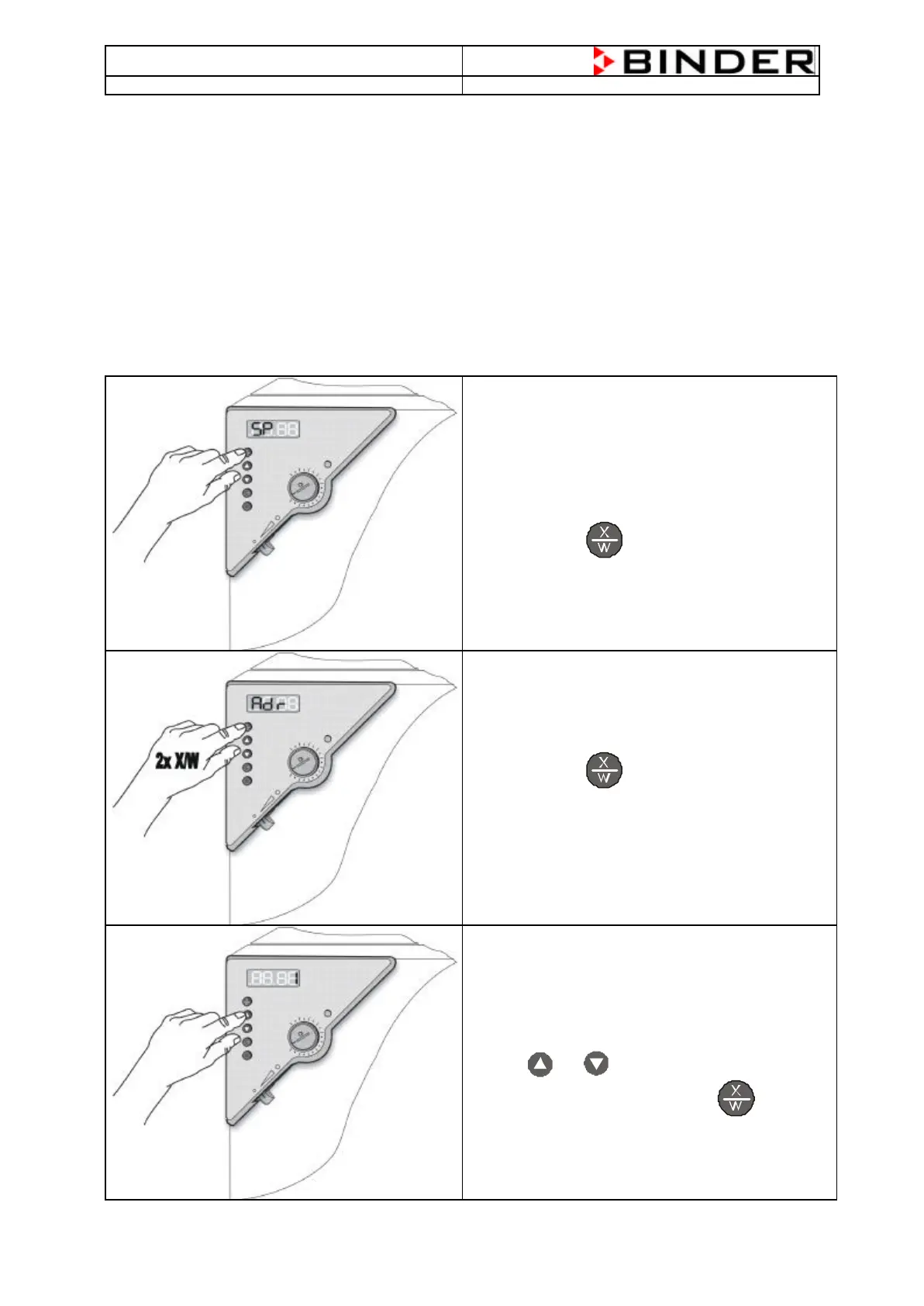
The chamber is switched on and shows the actual
Temperature
Press the Button for 5 seconds at least
Till the display shows “unit”
Press the Button 2 times till the display
shows “Adr” for 1 second
The Display changes now automatically between
„Adr“ and the entered Address.
Now choose the Address with the
Buttons and .
Confirm your setting with the Button till you’re
Back at the Temperature-Display







 To Next Page