III. SPECIFICATIONS, CONNECTIONS & USER INTERFACE cont’d.
19
1919
19
4
44
4-
--
- ALARM MENUS
ALARM MENUS ALARM MENUS
ALARM MENUS
ALARM MENU KEY
ALARM MENU KEYALARM MENU KEY
ALARM MENU KEY
Although there are three Alarm screens, only Alarm 1 and Alarm 2 are accessible by pressing a
corresponding key. The Alarm 3 screen only appears when a specific condition, as explained later in this
section, occurs. The Alarm 1 and Alarm 2 menus are available through a shared key. To access these alarm
menus, press the ALARM 1/ALARM 2 key once for ALARM 1 and press it again for ALARM 2. Whichever
alarm menu is currently displayed is indicated by the corresponding half of the ALARM1/ALARM2 being
highlighted. When an alarm menu is displayed, pressing the ALARM1/ALARM2 key will display the other
alarm menu.
When an alarm condition occurs, the appropriate alarm menu will automatically be displayed, unless it
occurs while a parameter is being scrolled or if ALARM QUIET was activated with no alarm condition
occurring. To change menus during an alarm condition, Alarm Quiet must be activated (see ALARM
QUIET).
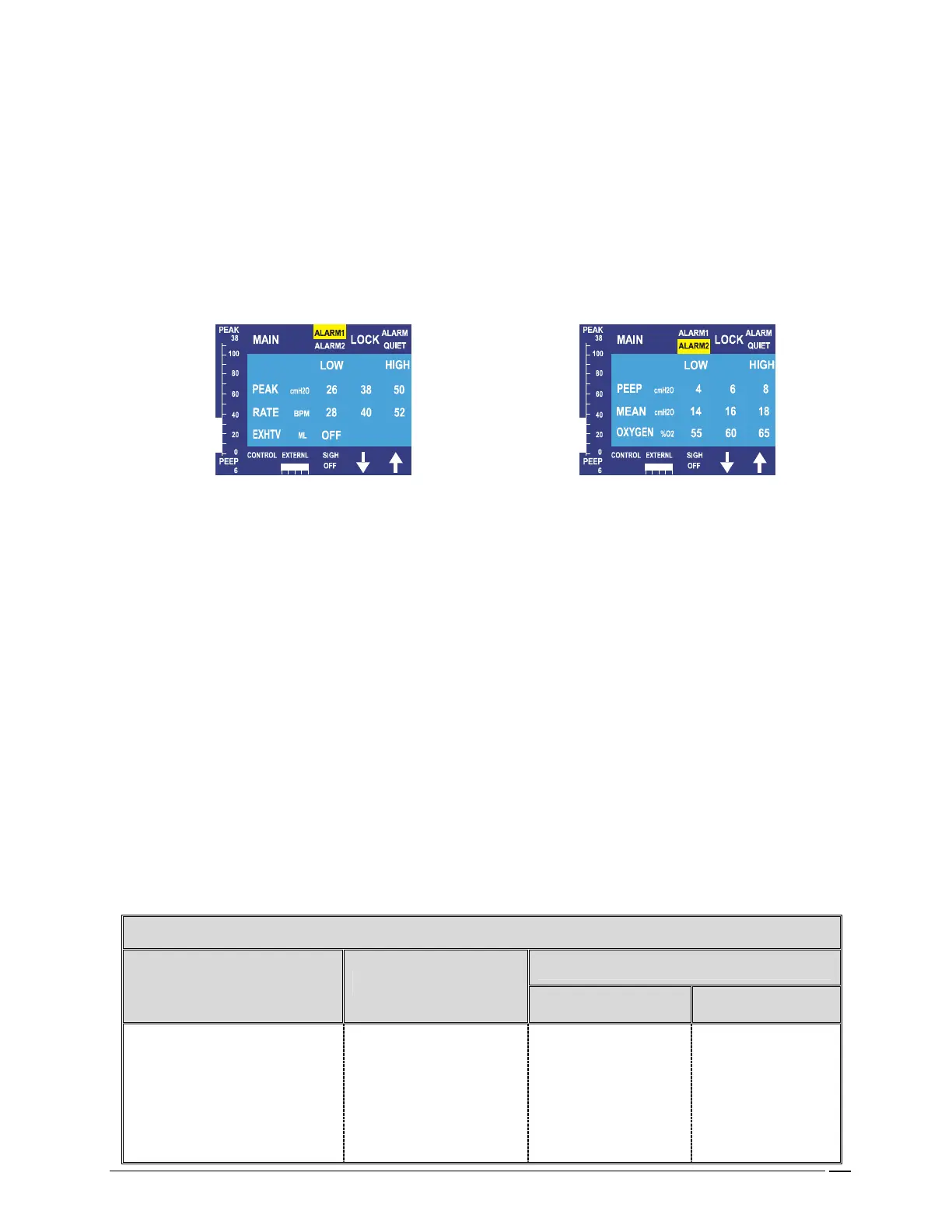
FIG. 7- ALARM MENUS
HIGH and LOW Alarm Limits- The high or low limits of an alarm parameter may be selected by pressing
the corresponding key for that value. The value is changed using the UP and DOWN Arrows. The low limit
may not be equal to nor above the high limit and vice versa. When an alarm sounds, the alarm parameter
that is in violation will flash red. If more than one alarm sounds simultaneously, they each flash. Whenever
an alarm is active in another menu while the Alarm Quiet is active, the corresponding menu key(s) flashes.
If more than one alarm sounds simultaneously, they each flash. If alarms occur in more than one menu, the
menus are prioritized. The CROSSVENT shifts first to the Alarm 1 menu and when these alarms are
rectified, it shifts to the Alarm 2 menu.
NOTE
:
Pressing Alarm Quiet allows control of the keyboard while alarms are active.
MONITORED ALARM VALUE- the actual monitored value for an alarm is displayed in the center
column between the high and low limits for that alarm.
PRIMARY ALARM MENU (ALARM1)- monitored parameters and alarms- Standard Alarms are Peak
Pressure and Rate. Alarms that can be turned off are Exhaled Tidal Volume and Exhaled Minute Volume.
SECONDARY ALARM MENU (ALARM2)- monitored parameters and alarms- PEEP and CPAP, Mean
Pressure, O
2
. The last two may be turned off.
TERTIARY ALARMS (ALARM3)- these alarms are not displayed in a menu, but rather only as they occur.
Therefore, there is no menu key. The monitored parameters and alarms are- Low Battery, Low Gas
Supply Pressure, and Ventilator Failure. These messages can be displayed singularly or in any combination.
ALARM PARAMETER RANG
ALARM PARAMETER RANGALARM PARAMETER RANG
ALARM PARAMETER RANGES AND ALARM LIMITS
ES AND ALARM LIMITSES AND ALARM LIMITS
ES AND ALARM LIMITS
SET LIMITS
PARAMETER DISPLAY RANGE
LOW HIGH
Peak Pressure cmH
2
O 0-125 3-124 4-125
Rate bpm 0-199 4-159 5-160
Exh. Tidal Volume ml
50-4000
50-3199
51-3200
Exh. Min. Volume L
0-200
0.0-99
0.1-100


 To Next Page