User’s Guide
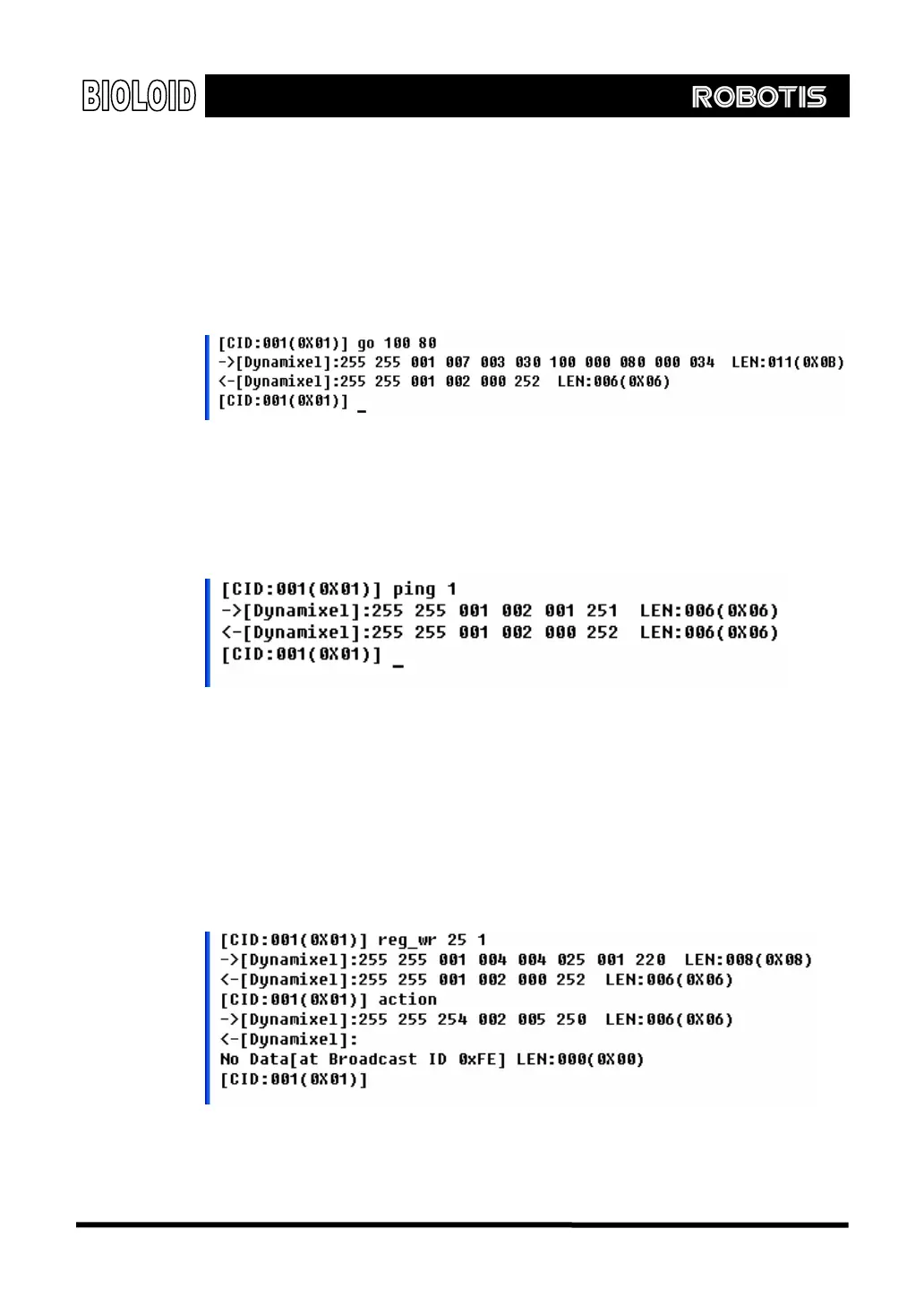
GO This command moves the Dynamixel to the specified position. The GO command is
used like the following.
Usage: GO [Position Value] [Speed Value]
Here, the range of parameter values is from 0 to 1023. If you take a look at the
packet, you can see that the WRITE command has been executed starting from
Address 30 which corresponds to goal position and goal speed.
PING This command does not execute any special tasks, but is used to check to see if
a Dynamixel is connected. The Dynamixel will return a packet even when it
receives a Broadcasting ID with this command.
Usage: PING [ID]
REG_WR This command registers the command WRITE. The command is only registered; not
executed. The format is the same as the WRITE command. But it will only execute
when the ACTION command is given.
ACTION This command executes the WRITE command that is registered by REG_WR.
The example below shows the process of turning on a LED using the REG_WR
command. The LED will actually be turned on with the Action command.
The Action command is executed with the Broadcasting ID. The REG_WR and Action
commands are useful when you want to actuate several Dynamixels starting at
the same time.
113



 To Next Page