User’s Guide
AX-12 Continuous Turn Mode
To use the wheel motor of AX-12, it is required to set the “continuous turn
mode” rather than the “joint mode.” For more details on the “continuous turn
mode,” refer to the AX-12 manual.
Among the items of AX-12, if you set the “CCW angle limit” 0, it will be set as
“continuous turn mode,” and it will be set to “joint mode” if you input values
other than the 0. If you look closely however, you will notice that there is no
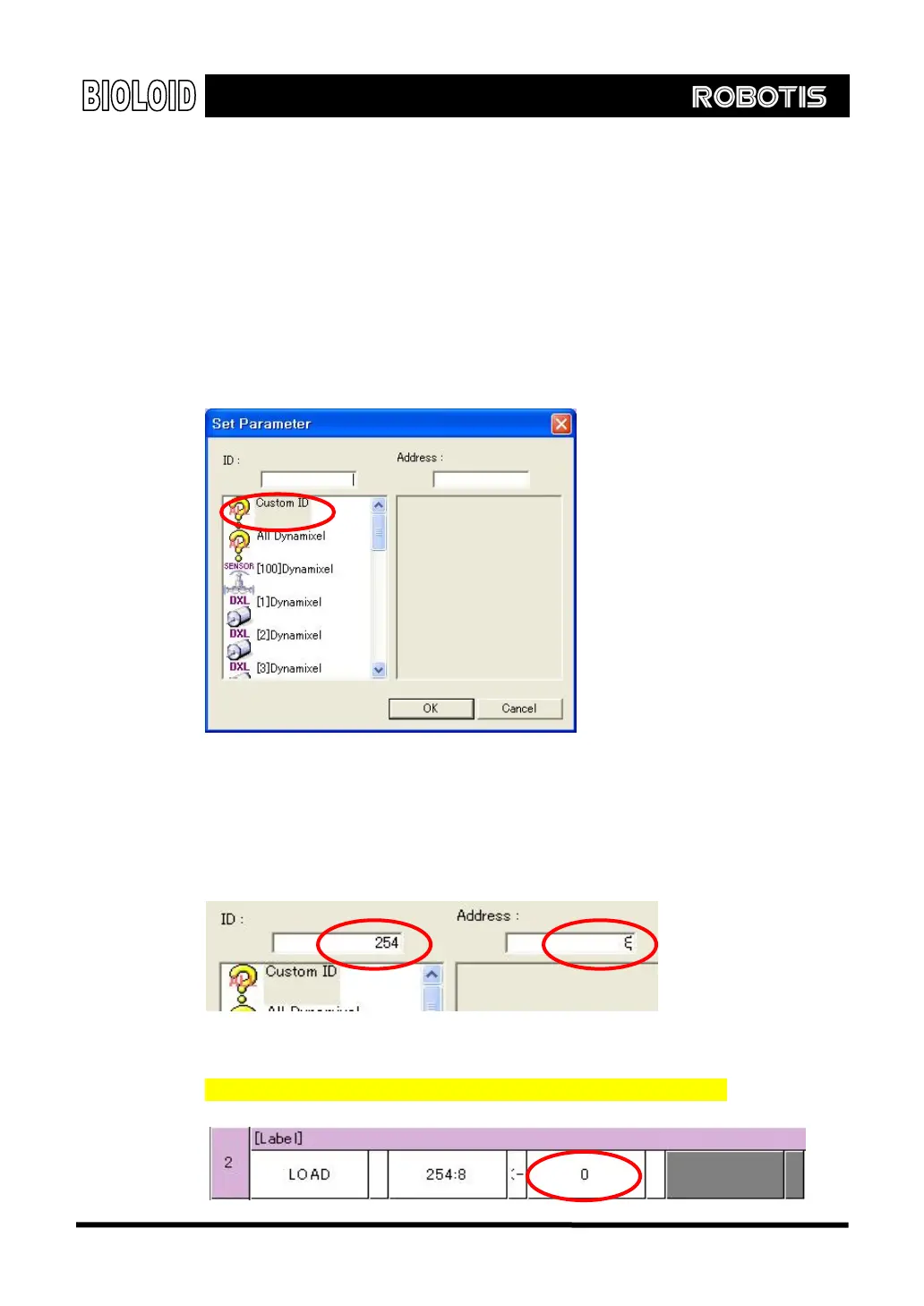
“CCW angle limit” item. For items not available, use “Custom ID” item to
directly control the behavior. In this case, to use “continuous turn mode,” you
have to select “Custom ID.”
Here, you input the value 254, the value representing all Dynamixel in “ID” and
for “address,” input the value of 8, the designated value for“CCW Angle
Limit.”If you want to select specified ID of Dynamixel, input the applicable value in
“ID.”
Input the value of 0 for wheel mode for the AX-12 parameter. Refer to
“Examples\Example(Change endless turn mode).bpg”inside the CD.
70



 To Next Page