27
3-10 Entering Setup Mode
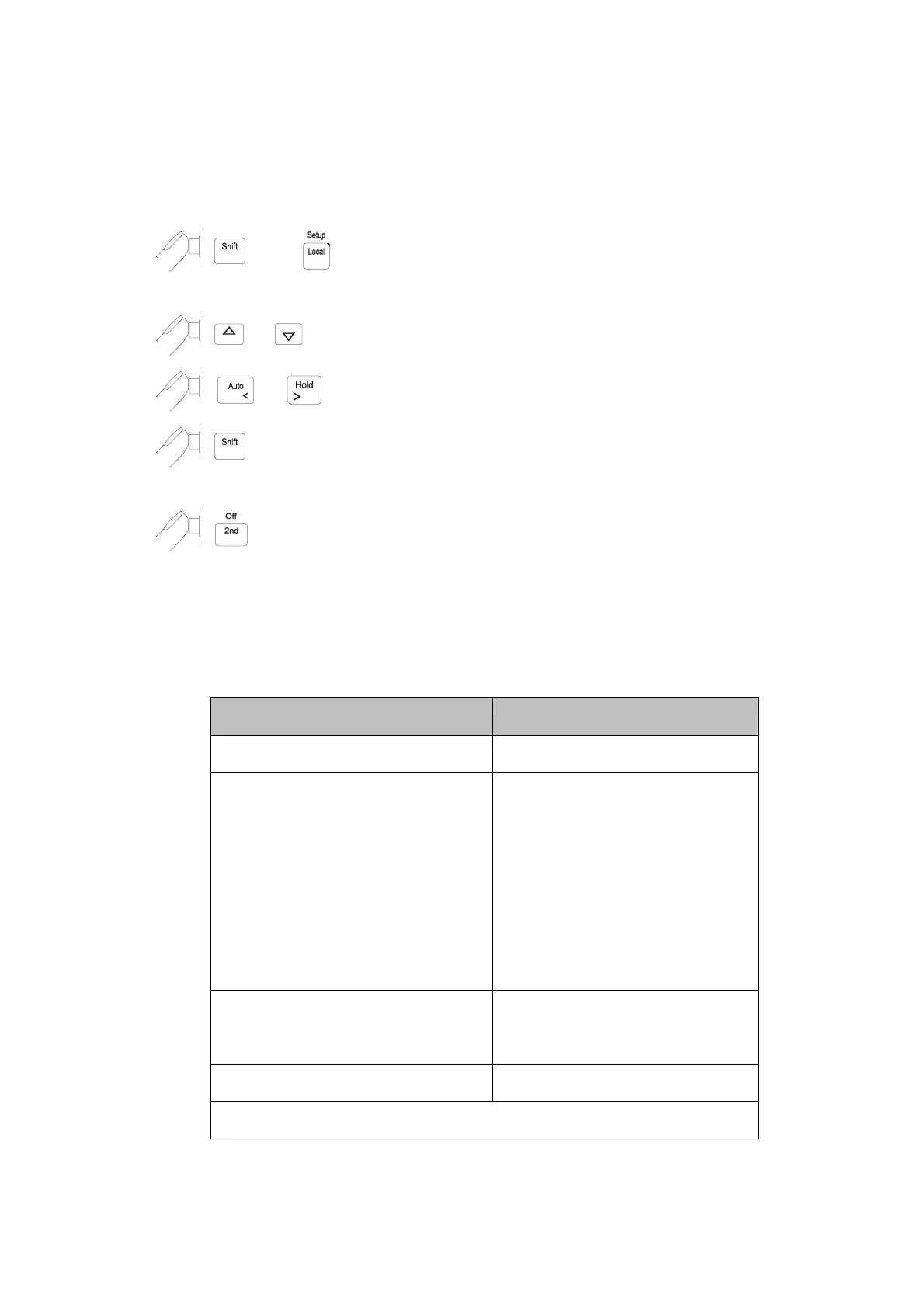
User may select computer interface, set RS-232 interface (standard) or GPIB
interface (option), and beeper mode on Setup Mode. To ensure the remote
interface will operate appropriately, user may need to configure the remote
interface parameters by following the procedures as shown below:
then to enter the
setup mode
to configure the remote interface
parameters.
or to select the each tier menu items.
or to select the parameters of the menu item.
to enter second tier menu or to store the selected parameter. The
selected parameter is flashed in primary display.
to quit the tier menu. To quit from the setup mode and this will save
all parameter settings.
Table 3-7 describes the outline of the setup menu item. Some menu
items will be not displayed without GPIB interface meter (option).
Table 3-7. Descriptions for Outline of Setup Menu Item
First Tier Menu Second Tier Menu
1. Remote Mode Selection
(1)
2. RS-232 Interface Parameters
1. Baud Rate
2. Parity
3. Data Bit
4. Stop Bit
5. ECHO
6. Printer-Only
3. GPIB Interface Parameters
(1)
1. Address
(1)
2. Talk
(1)
4. Beeper Mode Selection
(1)
The items will be displayed when GPIB option is installed.



 To Next Page