Enigma™ M4 Manual - Rev A Page 13 (c) 2020 Blizzard Lighting, LLC
3.3 Check & Setup the Patch
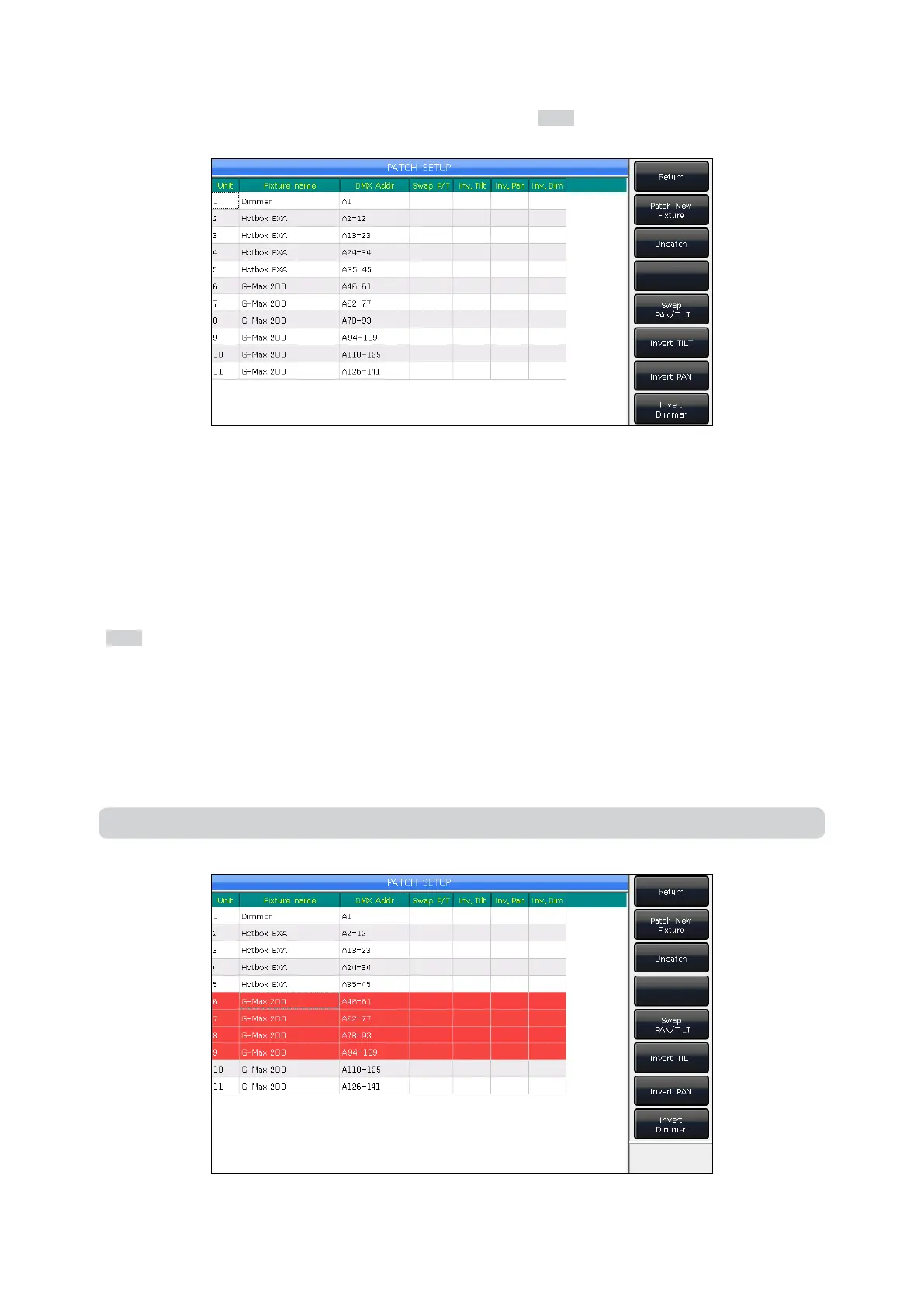
To check the DMX address or other information of patched xtures press Patch to enter PATCH SETUP.
3.3.1 Delete Patched Fixtures
On the PATCH SETUP menu, select any xtures you do not need and press [Unpatch] to delete.
3.3.2 Setting Up Moving Lights
You can swap or invert the Pan and Tilt of any moving lights installed on stage to control them with mirrored movements.
Dimmer channels can also be inverted.
Press Patch to enter PATCH SETUP. This is where you can setup moving light channels.
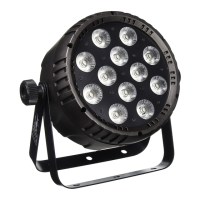
You can select multiple xtures simultaneously to setup the pan, tilt, or dimmer channels, or delete them.
[Swap PAN/TILT] — Swaps the Pan and Tilt
[Invert TILT] — Inverts control of a Tilt channel
[Invert PAN] — Inverts the control of a Pan channel
[Invert Dimmer] — Inverts the control of a Dimmer channel
Note: All moving lights of the same model will be aected if inverting a dimmer channel.


 To Next Page