Enigma™ M4 Manual - Rev A Page 43 (c) 2020 Blizzard Lighting, LLC
9. Setup the Controller
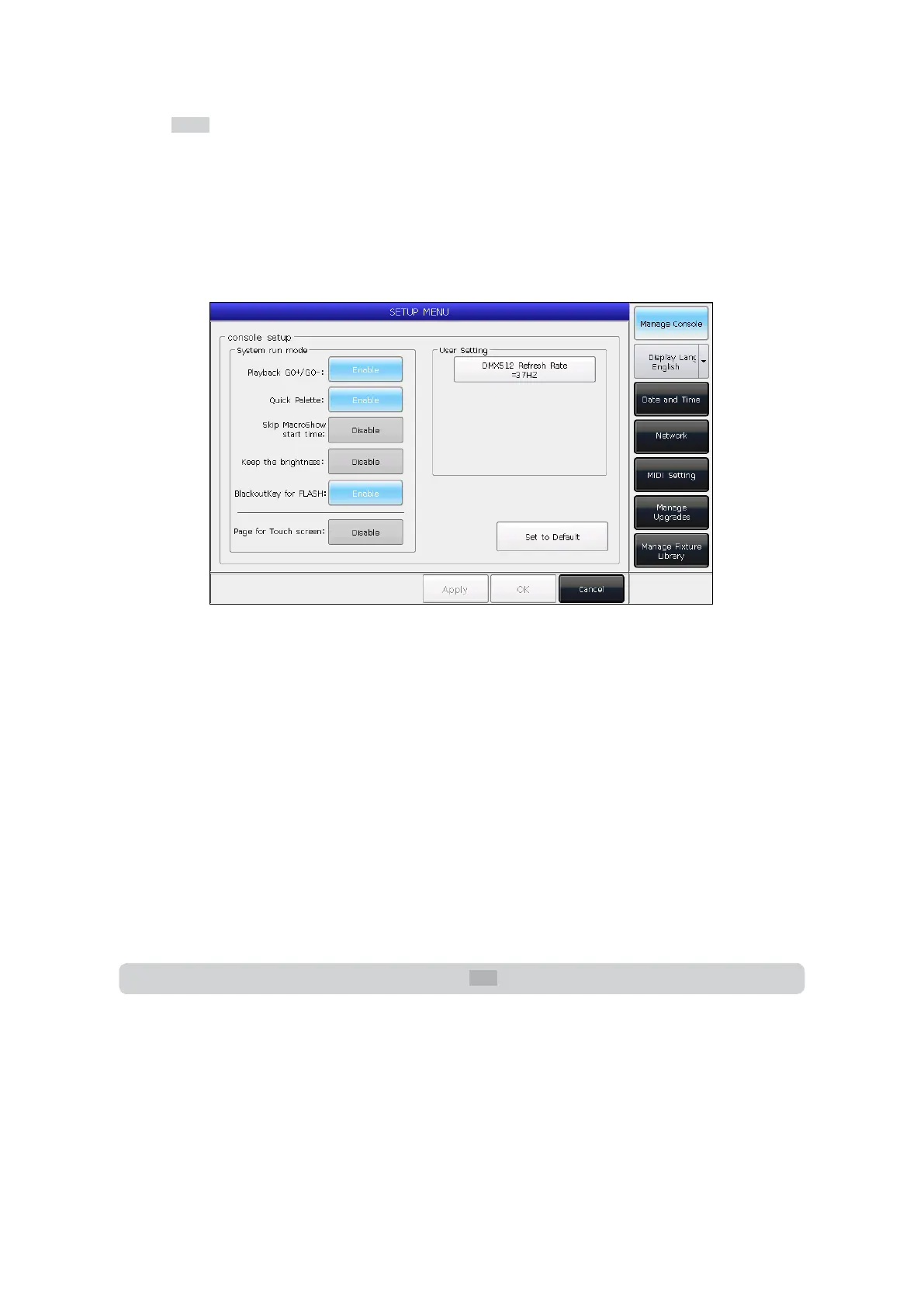
By pressing the Setup key, you will enter the SETUP MENU.
9.1 User Options
9.1.1 Console Management
You can setup the run mode by pressing [Manage Console]:
Playback GO+/GO- — The default option is [Enable]. When the Cue-list link mode is set as manual or Link=O, the key
under playback fader can be used as a GOTO function (Go+ or Go- depends on the direction setting of Cue-lists).
If the option is set to [Disable] and the playback fader is not fully output, the keys under the faders can be used as
intensity ash outputs.
Quick Palette — The default option is [Enable]. You can recall presets without selecting xtures.
If the option is set to [Disable], you need to select the xtures before recalling presets. If none are selected, the presets
can not be recalled.
Skip Macro Show start time — The default option is [Disable]. It is used for macro shows recorded using the internal
clock. When this option is set to [Enable], the beginning time slot will be canceled.
Keep the brightness — The default option is [Disable]. If set to [Enable], grouped xtures will be switched to light up
one at a time. Once lit they will stay on.
Note: Once nished, you can use the Find key to select all xtures again.
Blackout Key for FLASH — The default option is [Enable]. This key is used as a ash output when the master fader is not
faded in. If the option is set to [Disable], the key is used as a blackout function for all outputs.
Page for Touch Screen — The default option is [Disable]. You can turn pages on the selection area, while the options
on the touch screen will stay on the page. You can also select options on dierent pages at the same time. If the option is
set to [Enable], the options on the touch screen will turn pages together on the selection area.
In the User Setting section, you can change the refresh rate output ranging from 26~37Hz to match the rate of any
special xtures being used. You can also reset all options here by pressing [Set to Default].


 To Next Page