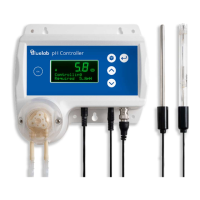
1. Rinse and place both clean pH
and conductivity probes in fresh
water and place both probes in a
small amount of fresh pH 7.0
calibration solution.
2. Wait a few minutes for the probes
to come to the same temperature
as the solution.
3. Press and hold the pH
measurement button and wait for
PH CAL to be displayed. Release
button.
4. PH 7 and the first ‘[]’ will flash on
screen.
5. When all 4 ‘[][][][]’ have appeared,
PASS or FAIL will be displayed.
PASS indicates a successful
calibration at pH 7.0, and the pH 7
LED will be displayed. If FAIL is
displayed, see section 7.1.
6. Now you can calibrate to pH 4.0
and/or pH 10.
pH 4.0 and/or pH 10.0 calibration
1. Rinse pH and conductivity probes
in fresh water, place both probes
in a small amount of fresh pH 4.0
or pH 10.0 calibration solution.
2. Wait a few minutes for the probes
to come to the temperature of the
solution.
3. Repeat the calibration steps
above using pH 4 or pH 10
solution.
4. If a 3-point calibration is required,
(you are expecting to measure
both above and below pH 7)
repeat the calibration procedure
with the remaining solution value.
5. The Pro Controller is now
calibrated, and ready for use.
pH 7.0 calibration
solution
Ec Probe
ph Probe
cal
p
Ph7
0
pH 7.0 calibration progress
Ec Probe
ph Probe
pH 4.0 calibration
solution
cal
ph
Ph4
0000


 To Next Page