The Bjong is a data logger developed and manufactured by B.M. Tecnologie Industriali, drawing on extensive experience in thousands of field applications. It is primarily designed for water cycle management, including flow rate and pressure measurement in full pipes or open channels, parameter analysis for drinking and waste water, spillway and overflow activations, submerged and non-contact level measurement, and event acquisition (on/off).
Function Description:
The Bjong is suitable for medium and long-term monitoring campaigns. It features a built-in modem for transmitting saved data and diagnostics to a remote server, enabling real-time monitoring of the device's status and data readings. It can be equipped with a high-efficiency internal antenna for data transmission even in low signal conditions, or with an external antenna. The device supports alert management for every variable, recording events, transmitting to a remote server, and sending SMS to a list of users. Activation and deactivation delays can be set for each alarm. The datalogger unit and its modules boast an IP68 protection rating.
Configuration is managed via a free Android™ app called EasySetup, which connects to the device via Wi-Fi. This app provides a simple and intuitive interface for setting up the device, downloading data and events, monitoring read values, and diagnosing the device. Downloaded files are in CSV format, easily processed in Excel. Remote system configuration is also under development.
Important Technical Specifications:
I/O:
- Analog Inputs (2): 4 wires - 4-20mA and 0-10V, active 42mA@24V, 16-bit resolution.
- Digital Inputs (active) (4): Clean contact, max frequency 60 Hz.
- RS485 (supplied): RS485 interface powered.
- Digital Inputs (events) (4): ON/OFF event (clean contact).
- Relays (2): Configuration SPST-NO, contact nominal current 500mA, contact nominal tension 200 Vac/Vdc. Relay 1 for cleaning function, Relay 2 for alarm function.
- Built-in pressure sensor: Range to be selected, connection ¼" GAS M.
Diagnostics:
- Logic inputs (4): Check case closure.
- Internal case relative humidity and temperature: Accuracy +/-2%, 14-bit resolution.
- Battery tension reading: 10-bit resolution.
Power Supply:
- Low voltage: 3.6VDC.
- Standard voltage: 8-24VDC.
- Power consumption: Max 200mA @ 12V, Min 0.08mA @ 12V.
Data Acquisition Memory:
- Internal Flash: 800,000 records, cyclic buffer.
Real Time Clock:
- Internal with back-up battery.
Connectivity:
- Modem: 2G and NBIoT (SIM holder included for standard SIM card).
- Wi-Fi: Suitable for Android™ systems for setup and data display.
- Antenna: Built-in (standard or high efficiency for low signal) or external (Linear Up Polarization with 1.5m cable).
Interface:
- 4 LEDs: Green (App connection), Red (active alarm), Yellow (diagnostics), Blue (data transmission modem status).
- Activation: By magnet.
Environmental:
- Temperature: -10°C to +50°C (14°F to 104°F).
- IP68 Protection degree: Immersion up to 1 year @ 1 meter.
Mechanical:
- Weights and Dimensions: H242 mm x D166 mm – 1.1 Kg (mounting system NOT included).
- Connectors: Waterproof, military type.
Compliance:
- Directive 2014/53/EU RED – Art. 3.1a- Art. 3.1b- Art. 3.2.
- Electromagnetic Compatibility (EMC) e Safety (LVD): EN 61326-1:2013, EN 62311:2008, EN 62368-1: 2014 + A11:2017 + AC:2017.
Functional Features:
Configuration:
The EasySetup Android™ app allows users to set up the device with an intuitive interface. It enables data and event downloads, real-time value monitoring, and device diagnostics. The Bjong connects to a user's device (tablet, smartphone) via a secure Wi-Fi connection, and downloaded files are in CSV format for easy processing in Excel. Remote system configuration is under development.
Diagnostics:
Signal LEDs provide diagnostic information, indicating the case's mechanical and environmental conditions.
Data Acquisition:
Data acquisition time can be set from 1 minute to 60 minutes using a cyclic buffer. It supports 255 alarm events using a cyclic buffer and includes a warm-up time for each I/O.
I/O Configuration:
- Analog inputs: Users can set measuring range, enter a 16-point linearization curve, and set an offset. Calibration can be done on low and full range, with current or voltage input selection.
- Digital counter inputs: Pulse weight, totalization, and average value in the unit of time can be configured.
Check on/off status (activation), log status, and sampling rate change on event.
RS485 Port (FLOW version):
Complete configuration of connected sensors, reading of variables, and flow calculation.
RS485 Port (STD version):
Reading up to 20 variables using Modbus RTU protocol.
Relay:
Configuration for alarm signaling and cleaning function (cleaning system not included).
Alarm Event Management:
Alarm events are triggered on each variable read by the device. Each event is associated with an alarm message, recorded in memory and sent via SMS or GPRS. Users can set activation and deactivation delays for each alarm and send historical data with every alarm.
Advanced Function:
- Sensor cleaning function: Configurable cleaning time and waiting time after cleaning.
- Mathematic function: Easy operation of I/O.
Connectivity to a Remote Server:
Data can be sent to a remote server using HTTP and MQTT protocols (data in JSON format) or FTP (CSV file). It supports 2G or NBIoT networks (NBIoT connection available in future firmware versions) and automatically searches for the best operator with multi-operator SIMs. The IMEI of the modem and SIM can be identified.
Data and Configuration Sending:
Saved data is sent from the oldest to the last. Data transmission frequency can be set from 1 to 24 hours. Configuration parameters are sent to allow remote configuration/setup checks.
SMS:
Alarm events can be sent via SMS to a maximum of 3 users. If transmission fails, the device can be set to retry sending SMS at selected intervals.
Date/Time Synchronization:
If enabled, the time can be synchronized to a remote NTP server.
Working Modes:
The Bjong offers two operating modes: continuous and discontinuous, both supporting data transmission. These modes ensure either long battery life or continuous and frequent data acquisition for short periods, with remote monitoring capabilities. A "freezing" mode is also available to conserve battery during transport or storage when measurements and data transmission are not needed.
- Continuous Mode: The Bjong remains constantly on, with all management peripherals and external sensors continuously powered. No consumption reduction operations are performed. Connection via the App is possible at any time for configuration or data visualization. This mode is recommended only with an external power source due to high battery consumption.
- Discontinuous/Low Power Mode: The Bjong enters an energy-saving mode, disconnecting unnecessary internal and external peripherals to minimize power absorption and maximize battery autonomy. The instrument reactivates only for sensor readings and potential data transmission. Manual activation (wake-up mode) can be performed by briefly (1-5 seconds) approaching a magnet to the reed contact (highlighted by a blue sticker), temporarily activating Wi-Fi for App connection.
Status LED:
The Bjong has four LEDs (Green, Red, Blue, Yellow) indicating device status and working mode:
- Green (Wi-Fi Connection): Fixed when Wi-Fi module is ON and connected to the device; blinking when connecting to the App; blinking (in sleep mode) when reading and logging.
- Red (Alarms): Fixed when an alarm is active; blinking (in sleep mode) when an alarm is active.
- Blue (Modem Connection): Fixed when modem is on; blinking when modem is sending data; single blinking (every 5 seconds) in sleep mode when modem is ON; double blinking (every 5 seconds) in sleep mode when modem is sending data.
- Yellow (Diagnostics): ON when case is open; blinking (in sleep mode) when case is open.
If all 4 LEDs blink simultaneously every 2 seconds, it indicates the magnet is near the reed contact. The yellow LED's operation is linked to the diagnostic function's activation.
App EasySetup:
The EasySetup app is designed for Android™ devices and connects to the Bjong via Wi-Fi. Each device has a unique 12-character alphanumeric ID (0-9, A-F) on an external label, which forms the SSID of the generated Wi-Fi network (BJONG_xxxxxxxxxxxx). If multiple devices are in range, users must identify the correct network. In low power mode, the Wi-Fi network is not available and requires magnet activation.
Device Features for App EasySetup Installation:
The Android™ device (smartphone or tablet) used for the app should have:
- Android™ 6.0 or higher.
- 1GB RAM.
- Minimum 7" display.
- 15MB free space for installation.
Installation and Update:
The installation file (APK) is provided by the sales network or assistance service. EasySetup may be pre-installed if a tablet is purchased with the Bjong. To install or update, copy the APK file to the device's internal memory or SD card and tap on it. EasySetup is not available on the Play Store, so installation from unknown sources must be enabled in device settings (Settings → Advanced settings → Security → Unknown sources). For safety, it is recommended to disable unknown sources after installation.
Authorizations:
The app requires Wi-Fi and GPS access to manage networks, and read/write access to tablet memory for data export. These authorizations are requested as needed and are essential for correct operation.
How EasySetup Works:
The app features intuitive screens with navigation buttons for various device functions and parameter settings. A status bar at the top indicates connection status, warnings, and errors. Not all buttons or options may be enabled depending on the device's features (e.g., if an integrated pressure sensor is not available, its configuration button will be unusable).
App Working Mode (Live and Off-line):
The app can work in "live" mode (directly connected via Wi-Fi) or "off-line" mode (when disconnected). In off-line mode, users can check and modify configurations, which will be implemented when Wi-Fi is available. Features like historical data download and real-time data visualization are only available in live mode. All device configurations are stored as "profiles" within the app, which can be viewed and edited even without a device connection.
Status Bar:
The status bar provides connection status (Disconnected/Connected), working mode (Discontinuous/Continuous), and device information (profile name, ID, date/time). Colors and icons indicate status: Green for normal, Orange for warnings (e.g., profile not loaded, modem profile not set), Red for serious errors (e.g., open case, device not recognized). Tapping the icon displays details and guides to solutions.
App Settings:
This section provides information about the application and its settings.
- General Information: Displays application and database versions, and allows checking for updates.
- General Settings:
- App Update: Manual update mode via "Check for updates" button.
- Keep display on: Prevents the tablet screen from turning off during device connection, ensuring continuous dialogue with the Bjong. This setting is effective only when the app is in use and does not interfere with the tablet's automatic shutdown settings for other applications. Leaving EasySetup active unnecessarily can quickly discharge the tablet battery.
- Profiles Management:
- Save Local Profile: When connecting to a Bjong, EasySetup reads and stores the device's configuration (profile). Users can choose to always save, never save, or be prompted to save the profile read.
Codes and Passwords:
- Wi-Fi Connection to the device: SSID (network name) is on the external label, default password is "users password".
- Delete device memory: Password "1234".
- Reset to factory settings: Password "1234".
Wi-Fi Connection to the Device:
Connection is established via a Wi-Fi network named BJONG_XXXXXXxxxxxx (where X's are the device ID). EasySetup lists only BJONG and Kaptormini networks. If the device is not listed, check its status LEDs. If the list is empty, ensure the tablet's localization is active. Connection can also be made via Android™ Wi-Fi manager with default password "users password". For optimal connection, keep the tablet at least 50 cm from the Bjong. Disabling mobile data may improve connection as Android often prioritizes internet-enabled connections.
Profiles Management:
When connecting to an instrument, the app saves the profile locally. Saved profiles can be displayed and edited offline. Each profile is associated with a unique MAC address and firmware version. The list includes profile name, instrument name and firmware version, MAC address, and last saved date.
Duplication and Association of Profiles:
Profiles can be duplicated and associated with different devices. This is useful for managing multiple instruments or configurations.
- Save: Saves changes locally on the tablet only, not sent to the Bjong. Useful for making multiple changes before loading the entire profile. Always enabled, even offline.
- Save and upload: Saves changes and sends them to the instrument immediately. Not available offline.
Local saves turn the status bar orange to indicate changes are not yet effective on the device.
Sensors Connected to RS485 Port:
The Bjong firmware has two versions: "Standard" (reading variables using Modbus RTU protocol) and "Flow" (managing sensors for flow measurement). A factory reset is mandatory when switching between versions, which will result in data loss.
RS485 Standard:
The firmware version "Standard" reads variables from sensors using the Modbus RTU protocol. The Bjong can power these sensors directly. It can read up to 20 variables (or 32 discrete inputs) of various data types (integers, floats, etc.). For each variable, the label, unit of measurement, and number of decimal places can be defined. A multi-slave connection is possible on the RS485 port.
RS485 Flow:
The "Flow" firmware version communicates with specific sensors supplied by B.M. Tecnologie Industriali. Users can select the sensor type (Doppler or TTFM) and customize settings.
- Sensor type: Choose the connected sensor type.
- Warm up time: The time (in seconds) needed for sensors to provide a valid reading after receiving power. Important in discontinuous mode.
- Time out: The waiting time (in milliseconds) before a sensor is considered non-responsive.
- Delay: The pause time (in milliseconds) after reading a variable before reading the next.
- Variables: A list of defined variables is available.
Built-in Pressure Sensor:
The Bjong can be equipped with a built-in pressure sensor. It has a hole for barometric compensation (VENT) with a hydrophobic membrane. To avoid unnecessary power consumption, disable the pressure sensor if not needed. After configuration, ensure variables are logged correctly.
The Bjong has 2 active analog inputs (4-20mA and 0-10V). Inputs can be configured independently. Users can define a correlation curve with up to 20 points for engineering value conversion.
- Input type: Choose between tension (0-10V) or current (4-20mA).
- Warm Up Time: Waiting time (in seconds) before the value is read, especially in discontinuous mode.
- Begin-scale/Full-scale: Values saved to zero value (0V or 4mA) and maximum value (10V or 20mA).
- Offset: Compensation value.
- Curve type: Select a customized curve or linear.
- Calibration: Allows fine-tuning of the input, defining cut-off for noise, and generating a reference current/voltage.
The Bjong has 4 digital inputs, configurable as status input or counter.
- State: Check on/off status, log status, change sampling rate on event.
- Counter: Increments with each pulse, saves totalized value.
- Counter with average: Similar to counter, but saves the difference in value averaged over time.
- Operating mode: Digital operating mode. Can disable input by selecting "none".
- Pulse value: Value to be totalized for each received pulse.
- Average: Time unit for calculating average values.
- Reset totalizers: Resets totalizers and starts new counting.
Digital Events:
This section configures Bjong's behavior when external digital events occur.
- Enabling: Events 1-3 can enable storage of external digital events and change the sampling period during an active alarm.
- Swap from discontinuous to continuous: Changes the instrument's working mode from discontinuous to continuous when a specific external event occurs (e.g., activated overflow sensor), reverting when the event ends.
- Interrupt not triggered: Displays the normal sampling period.
- Interrupt triggered: Sets a different sampling period when at least one digital event occurs.
Mathematical Functions:
This section allows configuring mathematical calculations, such as using two separate digital meters for a balance (e.g., bidirectional flow meters).
Auto Cleaning:
The auto cleaning system automatically closes relay contacts to control a compressor for sensor cleaning. Activation times and frequency are configurable.
- Cleaning time: Time (in seconds) relay contacts are closed.
- Waiting period after cleaning: Waiting time (in seconds) between relay contacts opening and next sampling.
- Samples after cleaning: Period (in number of samples) between two cleanings.
- Clean now: Button to start a cleaning cycle.
Cleaning relay is No. 1.
Warm Up Time:
The warm-up time is the waiting period between sensor activation and reading execution. It is crucial for accurate readings, especially with TTFM modules. In discontinuous mode, the sensor power supplies are turned off and on to conserve energy, so warm-up time ensures stable readings.
Variables Log:
Users can change the sampling time and properties of saved variables.
- Sampling period: Time interval between two readings.
- Saved variables: A list of available variables, measuring units, and decimals for reading. Long-tap (long pressure) to access the customization window.
Data:
Real-time data from Bjong and historical data can be viewed.
- Real time data: Displays current values for board temperature, board humidity, analog inputs, battery voltage, and digital events.
- Historical Data: Over 800,000 records can be stored. Data is managed in a circular buffer, with older data overwritten when capacity is exceeded. The app allows synchronization and export as CSV.
- Memory status: Information on percentage of memory used and indexes of records.
- Synchronization status: Percentage of data transmitted.
- Start/end date: Interval of logs copied and available on the tablet.
- Memory functions: Delete data on tablet or instrument.
Communication:
This section covers settings for Bjong's connection to the internet and data transmission.
- Integrated modem: Sends stored historical data, alarm events (to server and via SMS), synchronizes time with NTP server, and sends configuration to the server.
- Data sending methods: HTTP protocol, CSV file transfer via FTP, MQTT messages to a broker.
- Connection parameters:
- Identification: Identifier for data transmission when multiple instruments are installed.
- Connection mode: Select HTTP or FTP.
- Host name/IP: Server address for sending data in HTTP.
- Host port: Port for connection.
- Data page: Page to which stored data is sent.
- Settings page: Page to which configuration data is sent.
- Date synch. page: Page for date synchronization.
- Messages page: Page to which alarm messages are sent.
- FTP mode: Choose between standard (PORT/active) and passive (PASV).
- FTP name/IP, FTP port: Data to reach the server.
- FTP User, FTP Password: Credentials for server authentication.
- FTP dir: Folder on server for CSV files.
- FTP time out: Inactivity time before considering connection closed.
- MQTT name/IP: Server address for sending MQTT messages.
- MQTT port: Port for connection.
- User, password: Credentials for MQTT broker.
- QoS, retain, time out, keep alive, clean session: Configuration parameters for MQTT communication.
- Enable last will: If enabled, sends a "last will" message as defined in MQTT protocol.
- Topic, message: Specifies the message and topic for "last will".
- QoS, retain: Specifies sending parameters for "last will".
- NTP IP: Name or address of the NTP server.
- NTP port: Server port for NTP service (usually 123).
- NTP time out: Inactivity time before considering connection closed.
- UTC: Used to set time based on time zones.
- Data Transmission:
- Transmission period: Frequency of sending data to the server.
- Data: Logs stored during sampling.
- Configuration: Instrument configuration information.
- Events: Events stored during normal operation.
- Fast sending on alarm: Immediate data sending if an alarm threshold is exceeded.
- Fast sending samples: Frequency of sending data (in number of samples) during an active alarm.
- SMS:
- Send SMS: Enable sending alarm SMS.
- Max daily SMS: Maximum number of SMS per day.
- SMS attempts: Maximum attempts to send an SMS on transmission error.
- Attempts delay: Delay (in number of samples) before retrying SMS.
- Daily SMS sent: Unmodifiable counter of messages sent today.
- Enable sync: Enables automatic date synchronization with the server.
- SIM:
- SIM CCID: Uneditable SIM identification code.
- SIM type: Choose single-operator or multi-operator.
- Operator: Operator used for internet connection.
- Network type: Currently only 2G.
- APN: Access Point Name, specific to the SIM.
- APN user, APN password: Credentials for access point connection.
- Read CCID SIM: Reads and updates SIM ID.
- Set up network type: Not currently used as only 2G is selectable.
- Search operators: (Multi-operator SIMs only) Searches for available operators.
- Search and test: Performs operator search and modem test.
Functional Test:
The Bjong can perform a modem test to check network connectivity. The test results include CSQ (signal quality), registration status, and operator/network type.
Alarms:
Set thresholds to trigger alarms, define users for SMS warnings, and manage alarm events. Each triggered alarm generates an "alarm event" stored on the instrument and potentially transmitted to the server or via SMS.
- Thresholds: Maximum 8 thresholds can be set on variables.
- Relay: Enable/disable alarm relay (Relay 2).
- Variable: Monitored variable.
- Condition: Select minor/major (numeric) or ON/OFF (coil/discrete input).
- Threshold/bit: Reference value for triggering the alarm.
- Activation/deactivation delay: Number of consecutive samplings the threshold must be met before alarm is triggered/reset.
- Users: Define up to 3 users to receive SMS warnings.
- Download events: Download saved events as a CSV file.
- Reset alarms: Resets all alarm events after confirmation.
Service Function:
Advanced "service" functions for instrument management.
- Reboot: Restarts the device if anomalies occur.
- Firmware Update: Updates Bjong firmware. Copy .mhx file to tablet, select in menu, wait for completion. A factory reset is mandatory when transitioning between Flow and 485 standard versions, resulting in data loss.
- Wi-Fi password: Changes the Wi-Fi password.
- Set modem profile: Reads modem serial code and firmware version.
- Battery calibration: Calibrates battery reading.
- Factory settings: Restores instrument to factory settings.
- Diagnostics: Detects open case.
Maintenance Features:
The Bjong requires no special maintenance. However, it is recommended to:
- Replace O-rings and drying bags every time the case is opened.
- Clean the instrument before opening to prevent dirt from contacting internal electronics.
- Clean the contacts with antioxidant lubricant sprays.
- A drying bag is necessary to remove residual moisture; a desiccant kit can be requested from assistance.
- B.M. Tecnologie Industriali is not liable for damage caused by non-compliance with these requirements.
Power Supply Options:
The Bjong can be powered by:
- Internal 3.6Vdc primary battery: For long-term monitoring (e.g., 4 years) with low-power analog/digital sensors. Cannot supply RS485 sensors.
- Internal or external 14.4V primary battery: For long-term monitoring (>12 months) with RS485 sensors, low sampling frequency, or on event. Guarantees low self-discharge.
- External 11.1V rechargeable battery: For medium-term monitoring (6-12 months) with RS485 sensors, elevated sampling frequency (<5 minutes), and data transmission frequency (<12 hours).
- External 8-24Vdc source: For fixed installations with all sensor types, elevated sampling frequency (<5 minutes), and high data transmission frequency (<6 hours).
Internal Battery Replacement:
The Bjong can have an internal primary battery (2 or 4 cells). To replace:
- Open the case using the external collar.
- Remove the top cover.
- Disconnect the battery connector from the board.
- Unscrew the three screws holding the battery holder.
- Remove and replace flat batteries, respecting polarity.
- Screw the battery holder into place and reconnect the connector.
- Close the case.
Disassembling the battery pack, replacing cells, or recharging non-rechargeable batteries can cause damage. B.M. Tecnologie Industriali is not liable for damage from incorrect installation/use.
External Source Power Supply:
The Bjong can be supplied by an external source via a dedicated cable connected to the POWER SUPPLY input. Using a power supply tension incompatible with the device's features will cause irreversible damage.
Wiring and Connections:
The Bjong is equipped with IP68 connectors. Connectors are sized and polarized to prevent incorrect wiring. Each connector's function is indicated by an inscription inside a blue label ring. Sensors purchased with the Bjong come with pre-wired IP68 connectors. For custom signals, pre-wired connectors with free cable lugs are needed. Incorrect connection or failure to close plugs will void IP68 protection.
Warranty:
12 months from the date of receiving the device.
Disposal:
Environmentally friendly recycling is encouraged. Do not dispose of in household waste. For EU countries, instruments and peripherals must be collected separately for ecological reuse, in accordance with Directive 2012/19/EU (WEEE). Lithium batteries must be disposed of separately.

 Need help?
 General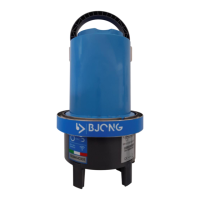

 To Next Page