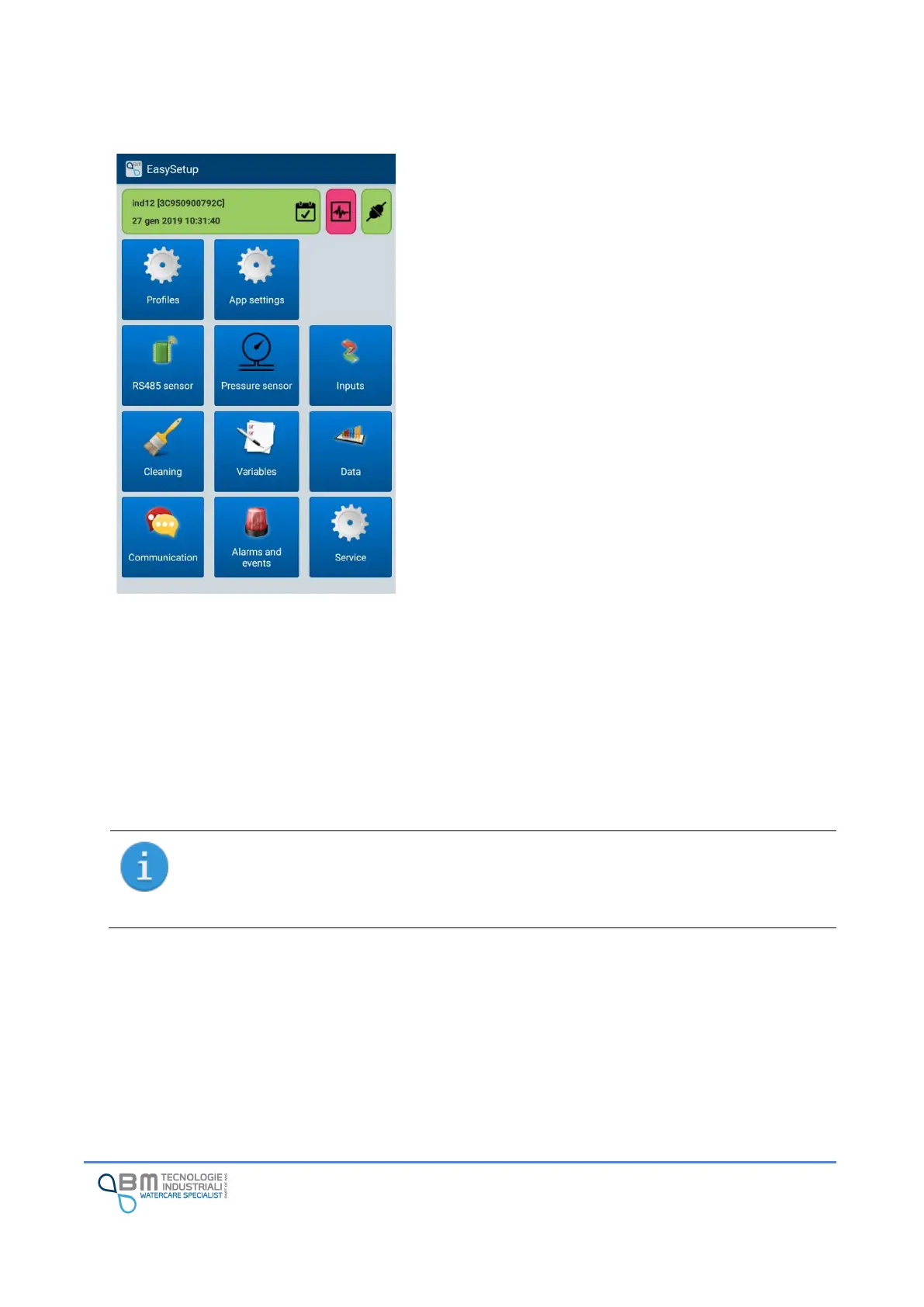
The App comes with different screens designed to be as
intuitive as possible.
Each of them has navigation buttons between the various
functions of the device and sections dedicated to setting the
related parameters.
In any case, at the top, there is a status bar that indicates,
through different icons and colors, the connection status,
any warnings and/or errors and other information that will
be detailed later.
It is possible that not all buttons or not all options are
enabled and selectable according to the device in use. For
example, if the Bjong does not have the integrated pressure
sensor available, the corresponding button to access the
configuration will not be usable.
An example of an interface (main menu) is shown in the
figure.
11.4.1 App working mode (live and off-line)
The App can work both if directly connected to the instrument (“live” mode) and in “off-line” mode once
you move away from or disconnect from the Wi-Fi network for other reasons. In this second mode it is
possible to check the configuration and possibly make changes that can be implemented when the Wi-Fi
network is available.
Certain features such as historical data download or real-time data visualization which imply
communication with the instrument are, of course, only available in live mode.
All the device configurations are called profiles. Different profiles can be stored within the
App for each device to which you connect.
The profile can be viewed and edited even without being connected to the device.
Please refer to the dedicated section for more information on the use of profiles.


 To Next Page