Bjong – User Manual – V1.0 - pg.60
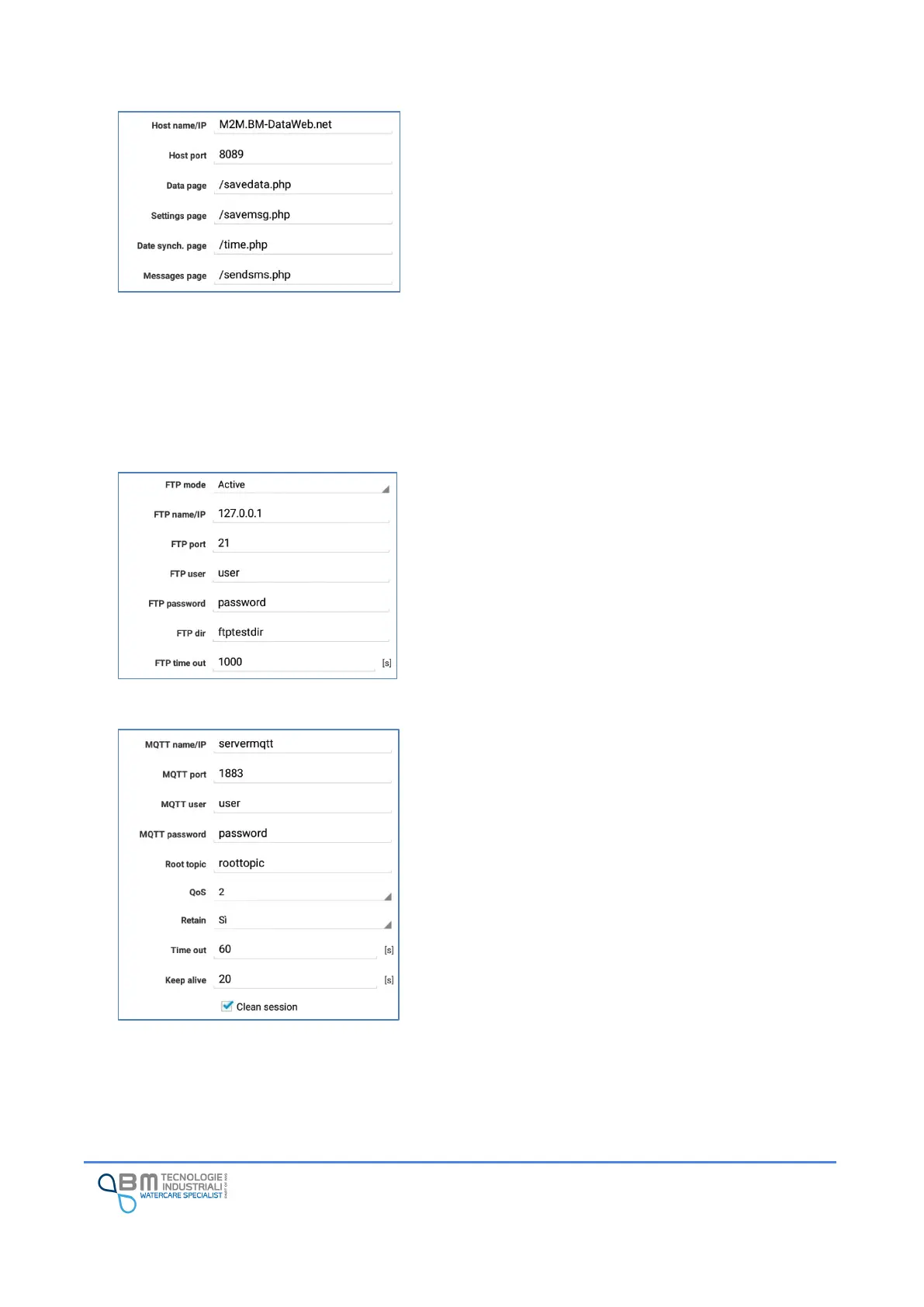
Host name/IP: server address for sending data in HTTP.
Host port: port for connection to the server.
Data page: this is the page to which the data stored on the
instrument are sent.
Settings page: this is the page to which the instrument
configuration data are sent.
Date synch. page: page used to perform a date
synchronization. In this way multiple tools can have a unique
date. This is essential in measurement campaigns where
multiple measurement points need to be compared.
Message page: this is the page to which alarm messages are
sent.
FTP mode: you can choose between the standard mode
(also called PORT or active) and passive (or PASV).
FTP name/IP, FTP port: data needed to reach the server.
FTP User, FTP Password: needed if the server request for
authentication.
FTP dir: folder on server in which CSV files are loaded.
FTP time out: time, in seconds, of inactivity necessary
before considering connection closed or lost.
MQTT name/IP: server address for sending MQTT
messages.
Port: port for connection.
User, password: credentials for connecting to the MQTT
broker.
QoS, retain, time out, keep alive, clean session: you can
choose the typical configuration parameters for
communication with the MQTT broker.


 To Next Page