tion 3 and REB: (Rebound) is
displayed at position 4.
Hold down button 2 until the
reading next to "REB:"/"COM:"
flashes.
Using buttons 1 and 2, adjust
damping as desired.
+1 … +7: Increase damping by
a maximum of seven levels.
-1 … -7: Reduce damping by
a maximum of seven levels.
0: Default settings.
Performing a zero position
alignment
Place the motorcycle on the
side stand or on a suitable aux-
iliary stand.
During the alignment, do not
sit on the motorcycle; remove
pieces of luggage.
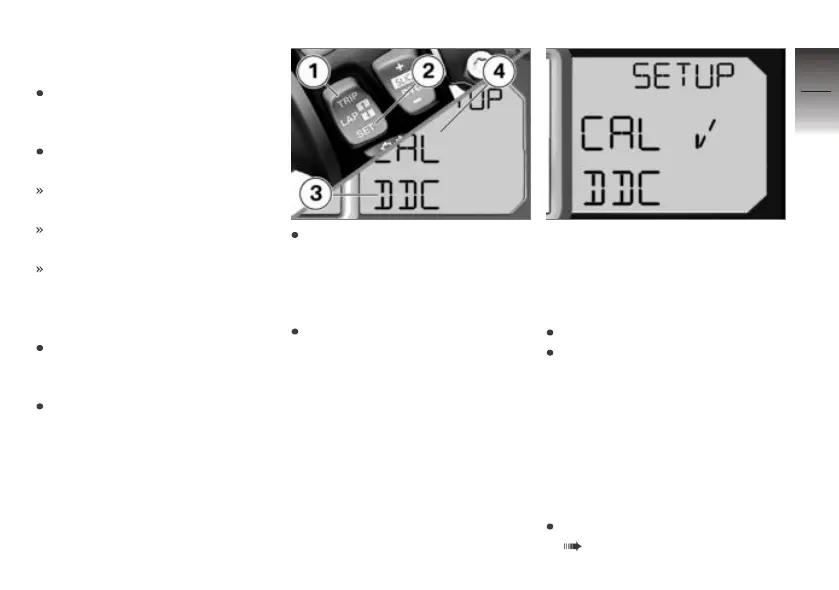
To calibrate, first press but-
tons 1 and 2 as applicable until
"DDC" is displayed at posi-
tion 3 and "CAL" (Calibration)
is displayed at position 4.
Then press and hold down
button 2 until the "CAL" starts
flashing.
If the zero position alignment was
successfully performed, a check
mark is displayed.
If the check mark is not dis-
played:
Repeat alignment.
If the check mark is still not
displayed after repeating the
alignment, seek the advice of a
specialist workshop, preferably
an authorised BMW Motorrad
dealer.
Installing height sensor
plugs
Remove the side panel
( 137).
6
101
z
On the race track


 To Next Page