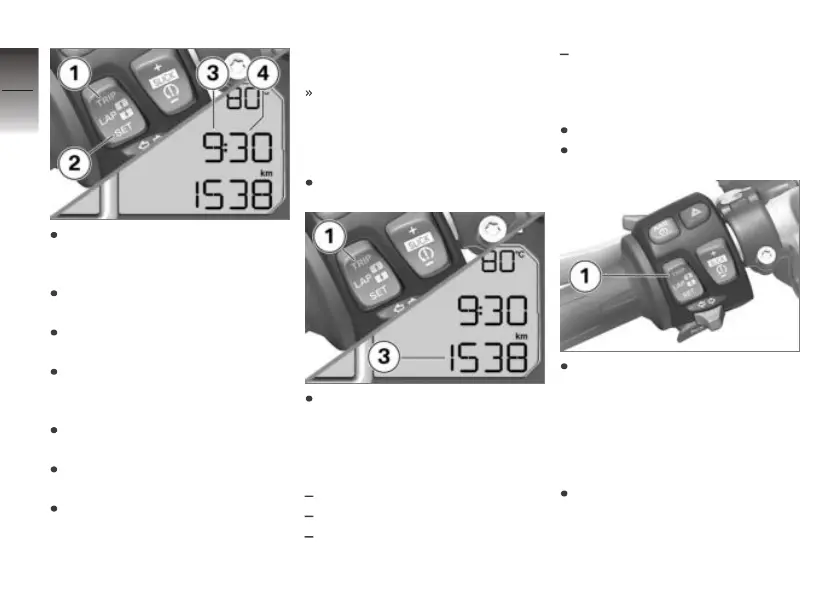
Press and hold down button 2
until the hours number 3
flashes.
Press button 1 to step the
hours reading up.
Press button 2 to step the
hours reading down.
When the hours reading is cor-
rect, hold down button 2 until
minutes reading 4 flashes.
Press button 1 to step the
minutes reading up.
Press button 2 to step the
minutes reading down.
When the minutes reading is
correct, press and hold down
button 2 until the number
stops flashing.
This completes the process.
Odometer
Selecting the display
Switch on the ignition.
Repeatedly press button 1 until
the value you want appears in
panel 3.
The following values can be dis-
played:
Total distance
Tripmeter reading 1 (Trip 1)
Tripmeter reading 2 (Trip 2)
Range (once fuel level is down
to reserve)
Resetting tripmeter
Switch on the ignition.
Select a tripmeter.
Press and hold down button 1
until the tripmeter reading is
reset.
Speed warning
Adjusting speed warning
If applicable, activate the speed
warning in the SETUP menu
(see "On the race track").
4
38
z
Operation


 To Next Page