40
English
3 - Use
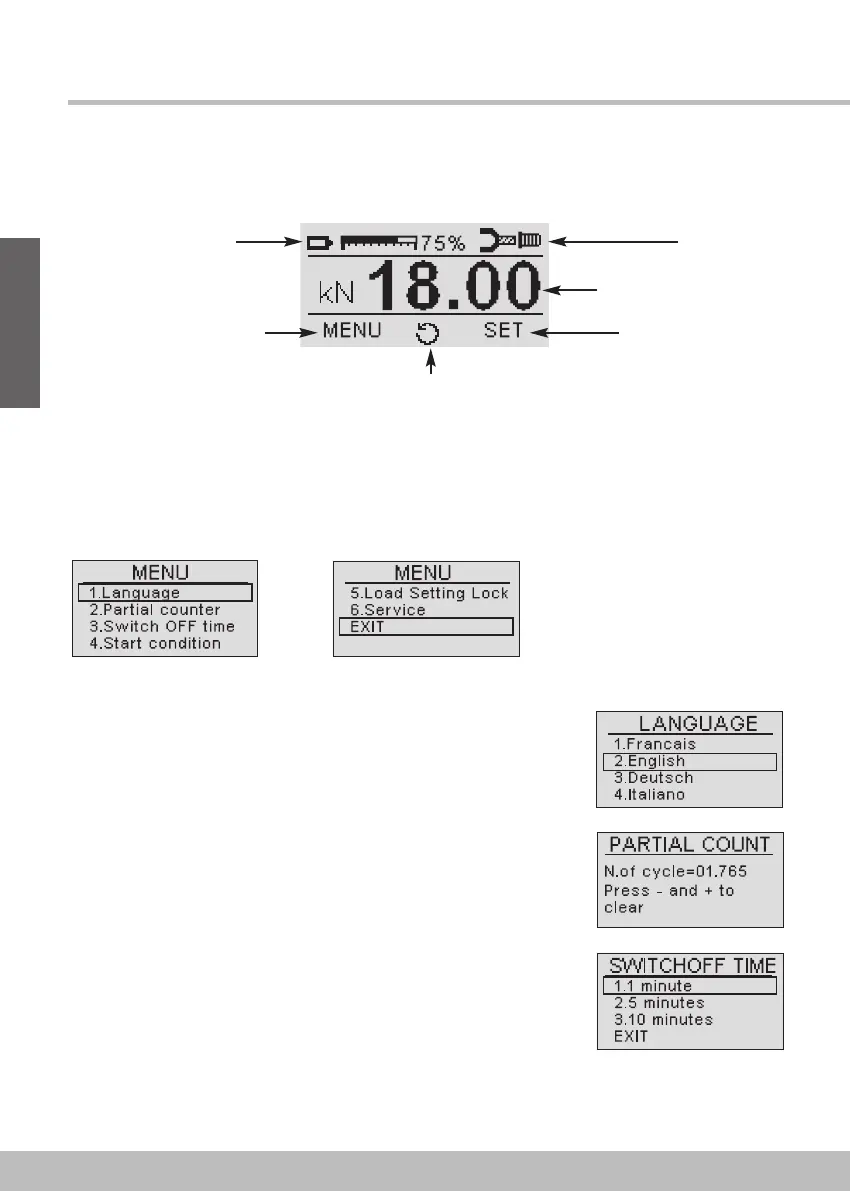
Press the LEFT (MENU) button for 2 seconds to enter the programming menu. The LEFT button
moves the selection UP, the RIGHT button moves it DOWN, the CENTER button CONFIRMS.
The screen shows the main menu. Selectable options are:
! 1. Language
Select the display language. Available options: French, English,
German, Italian, Spanish, Portuguese.
! 2. Part counter
Displays and allows the resetting the part cycle counter. Reset is
done by pushing LEFT and RIGHT buttons at the same time.
! 3. Switch OFF time
Select the time after which the tool switches off, if no operation is
performed or no button is pressed (available options: 1, 5 or 10
minutes). In order to switch it on again, press the trigger briefly.
This time affects battery life.
Programming menu
The display screen appears after start up with the definition below:
Battery load level (%)
Access to the menu pages
Information
of screwing state
Setting force level (in kN)
Access to the setting
force adjustment screen
Manual command for the
unscrewing / Acquitment button in case of fault


 To Next Page