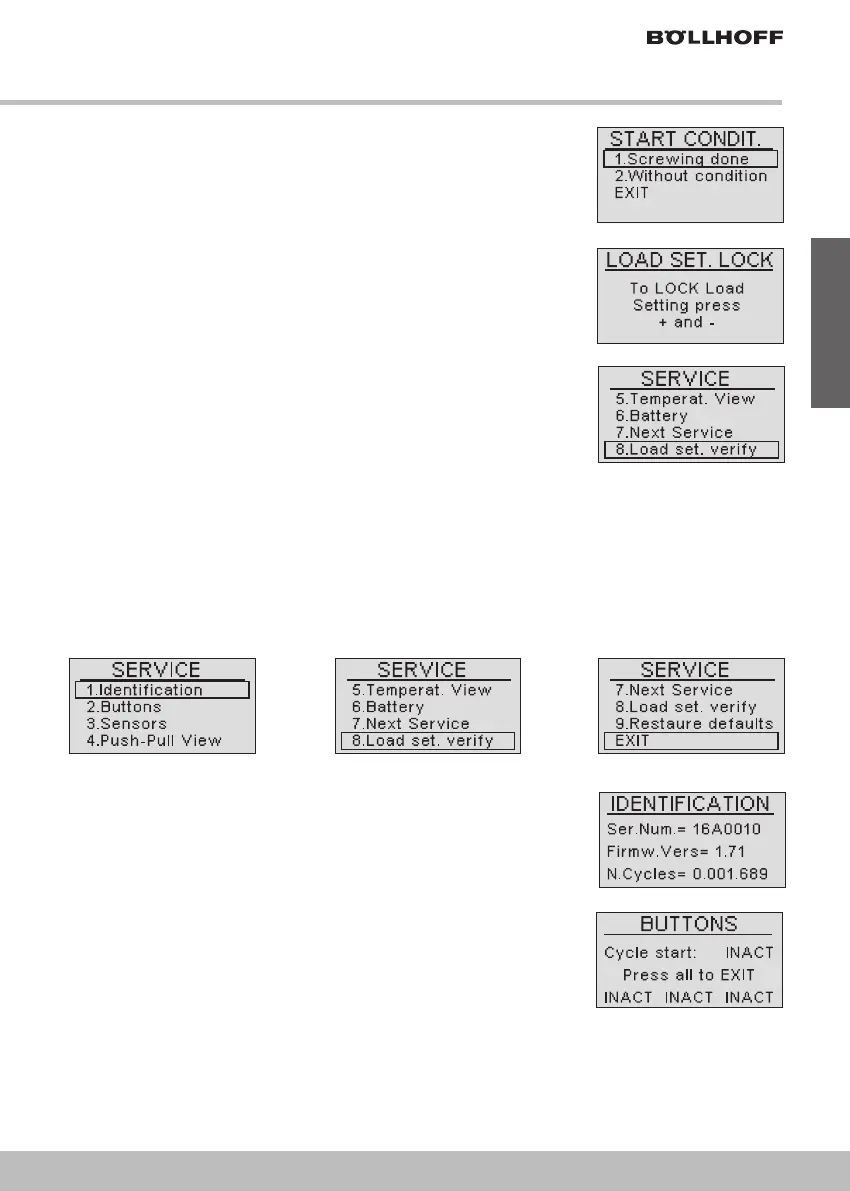
Service sub-menu
Access by selecting option 6 of the main menu. Selectable options are:
41
English
! 4. Start condition
Select the status of the tool at start.
Available options: Screwing done – Without condition.
! 5. Force setting lock
By pushing on both + and - buttons at the same time the setting is
locked, which means that it will not be possible to modify the setting
force using the "SET" assess button from the production page.
Operation is reversible by proceeding the same way
! 6. Service
Service sub-menu, see below.
! EXIT
To return to the production main page.
! Option 1: Identification
Displays Serial number, Firmware version, Total number of cycles.
This data is important in case you require assistance.
All our battery tool have been tested before delivery. Counter level
might be includes between 1500 cycles and 5000 cycles.
! Option 2: Buttons
Allows a funciton check of the three display buttons and the trigger.
Unlike the other sceens, to exit press all three buttons at the same
time.


 To Next Page