INGENIO COMPACT ИБП руководство пользователя
INGENIO COMPACT UPS user manual
42 OMS90051 РЕД. / REV. A
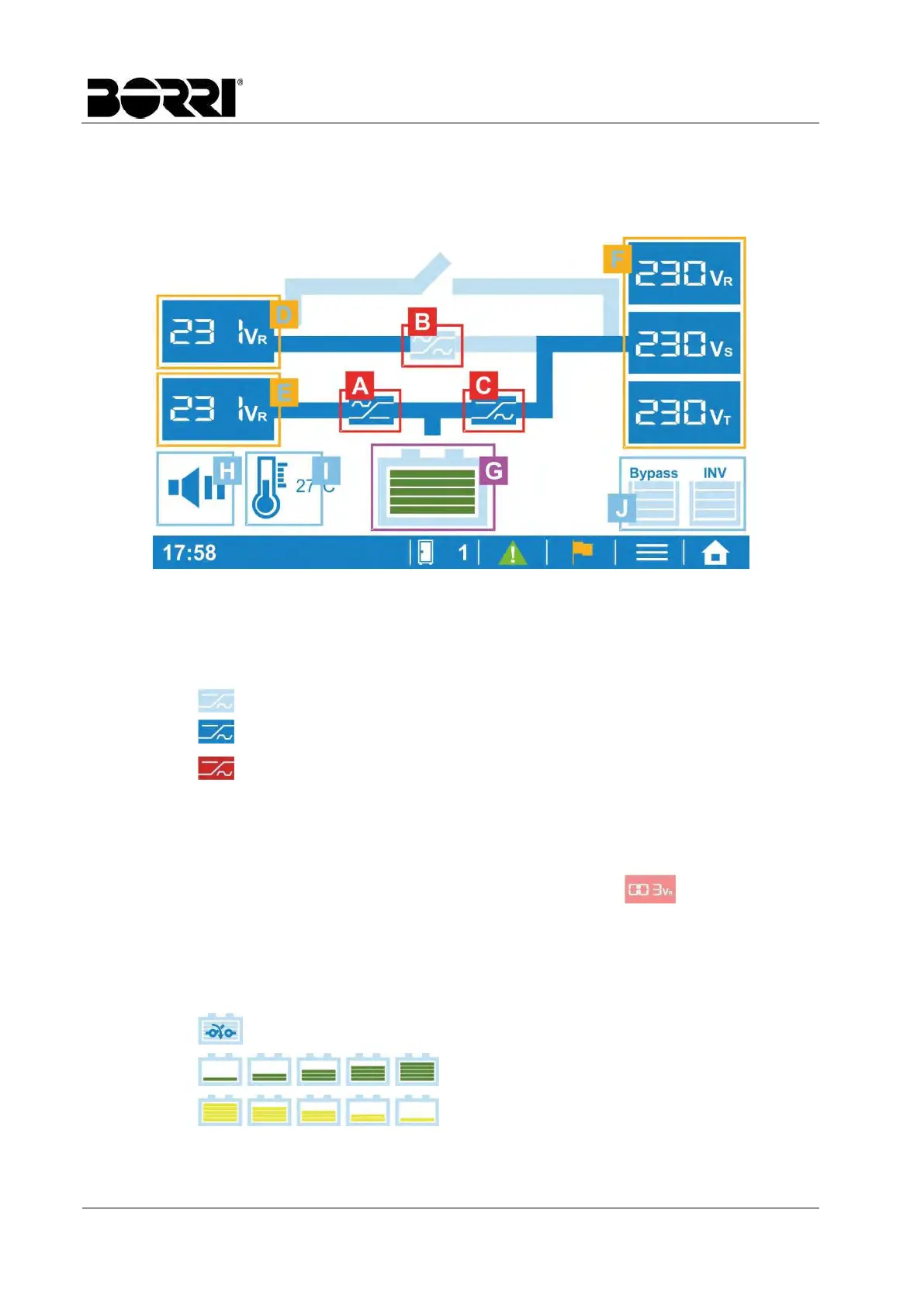
4.3 MIMIC DISPLAY
The mimic display shows the energy flow and gives immediate information about the UPS
status.
Picture 13 – Mimic display
[K] Rectifier
[L] Static switch
[M] Inverter
The part is not activated
The part is activated and corretly operating
Abnormal condition or failure
[N] Displays the bypass input measurements
[O] Displays the mains input measurements
[P] Displays the UPS output measurements
Any abnormal measurement will have a red background .
Tap on the desired section to change the measure parameters.
Press for 3 seconds to enter the Real Time Information.
[Q] Displays the battery status.
Press for 3 seconds to enter the Real Time Information.
The battery is not connected
The battery is charging
The battery is discharging








 To Next Page