INGENIO COMPACT ИБП руководство пользователя
INGENIO COMPACT UPS user manual
OMS90051 РЕД. / REV. A
43
[R] Silences the buzzer
Tap on it to silence the alarm.
Press for 3 seconds to enable/disable the buzzer.
Buzzer is enabled
Buzzer is disabled
[S] Displays the UPS internal temperature
Press for 3 seconds to enter the Real Time Information.
[T] Overload counter
4.4 TROUBLESHOOTING
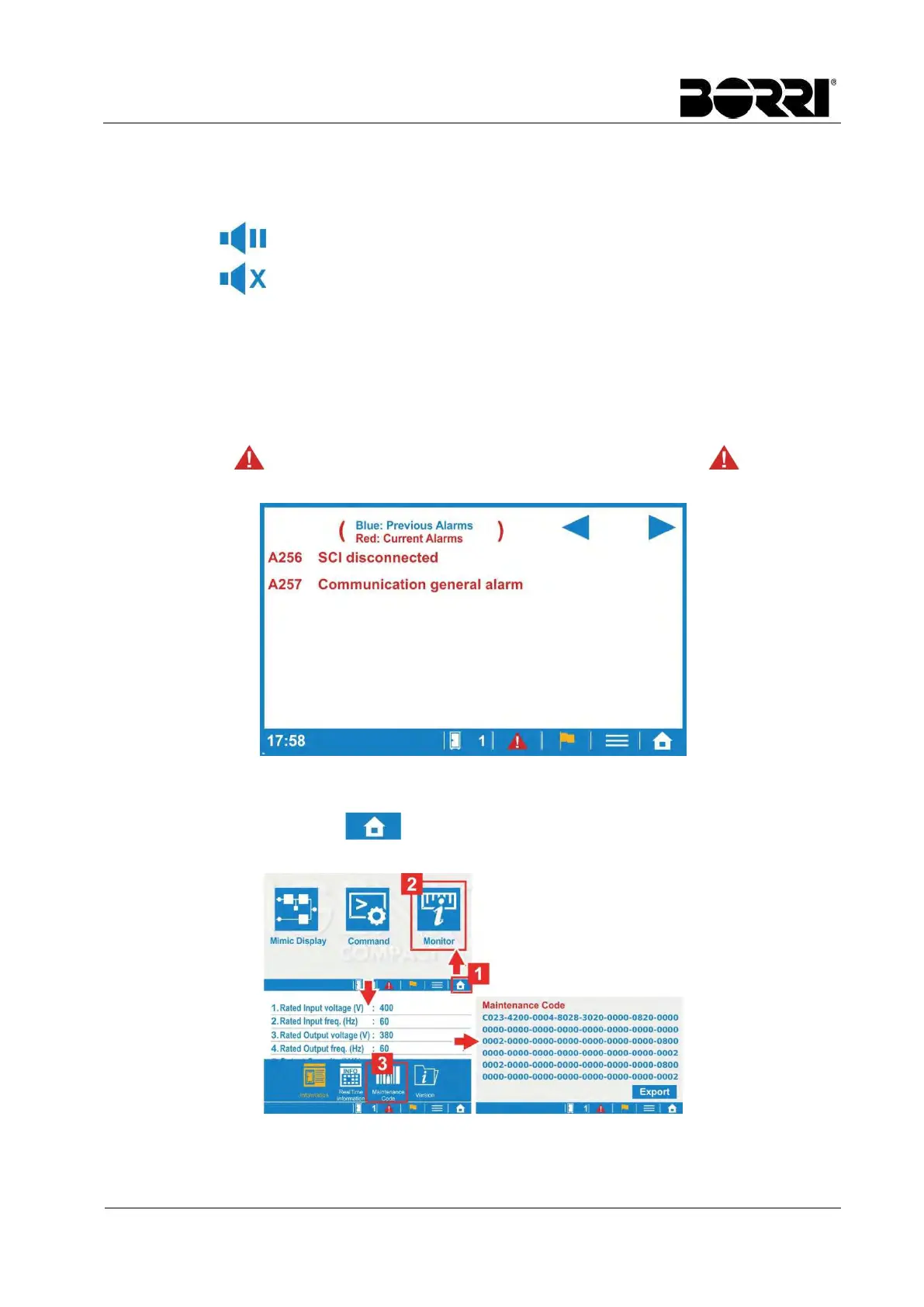
In the event of a failure, the mimic display will highlight the area where the problem is located.
The alarm icon will also blink as an additional indication. Tap the icon to open the
active alarms list, as shown in the picture below.
Picture 14 – Alarms list
If troubleshooting from the service center is required, we recommend to take note of the
maintenance code, by tapping Monitor Maintenance Code. The code can also be
saved in a SD memory card by tapping Export.
Picture 15 – Maintenance code








 To Previous Page