Implanting the DBS System
Surgical Implant Manual
92495783-02 Page 43 of 1157
Implanting the IPG
1. Ensure that the IPG is charged before implantation (rechargeable Stimulators only). See the
“Pre‑Conditions” section of this manual.
2. Insert and then remove the Port Plug from the IPG Ports to verify that no Setscrews are
obstructing the socket.
3. Wipe the Lead Extension Contacts.
4. Insert the Lead Extensions into the IPG Port. See the “Connecting to the IPG” section of this
manual for model specic details. Do not tighten the Setscrews at this time.
When fully inserted, the tip of the Lead Extension will slide to the back of the IPG Port and the
Retention Sleeve on the Lead Extension will be located under the Setscrew.
Caution: Verify that the Lead Extension was properly inserted into the IPG Port by checking
impedances before tightening the Setscrew. Tightening the Setscrew on a Contact
can damage the Lead Extension.
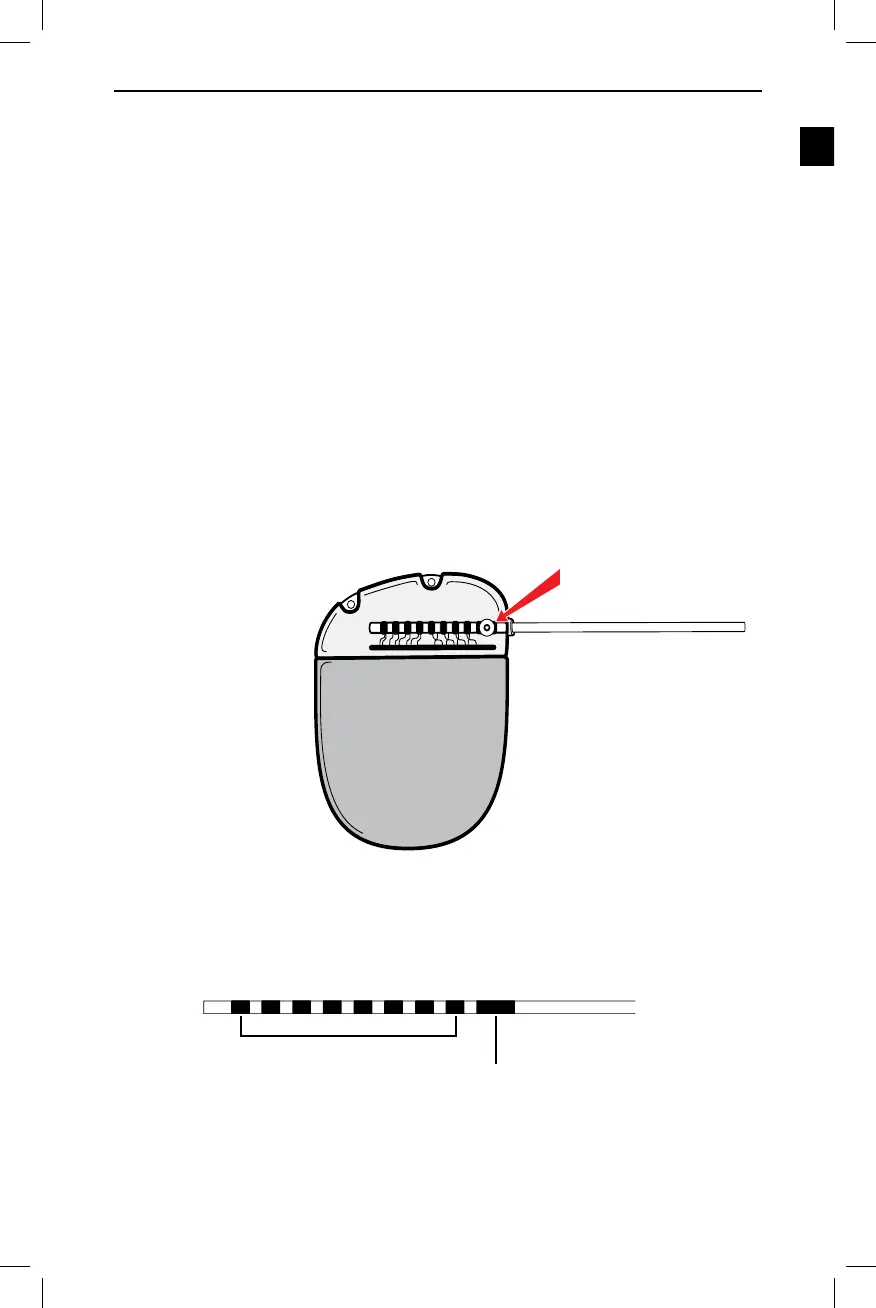
5. Visually conrm that the Contacts on the Lead Extension are aligned with the Contacts within
the IPG Header. Verify that the Retention Sleeve on the Lead Extension is located directly
under the Setscrew in the IPG Port (Figure 32).
Retention Sleeve
Directly Under Setscrew
Figure 32. Alignment of Lead Extension Contacts in the DBS IPG Port
Note: The Retention Sleeve is easily distinguished from the Contacts by its longer length
(Figure 33).
Contacts
Retention Sleeve
Proximal End of the Lead Extension
Figure 33. Retention Sleeve on the Lead Extension


 To Next Page
 Loading...