M211 User Manual 26
Troubleshooting
Troubleshooting Scenarios
Printer turns off by itself
Problem:
The printer frequently turns itself off.
Solutions:
• The battery may be low.
Plug the printer into a USB port or wall outlet. For more information, see
“Power and Battery” on page 5.
• The printer may be set to shut off automatically after too short a time.
Print quality is poor
Problem:
Print is too light, fuzzy, grainy, compressed, offset, or has blank spots or lines.
Solutions:
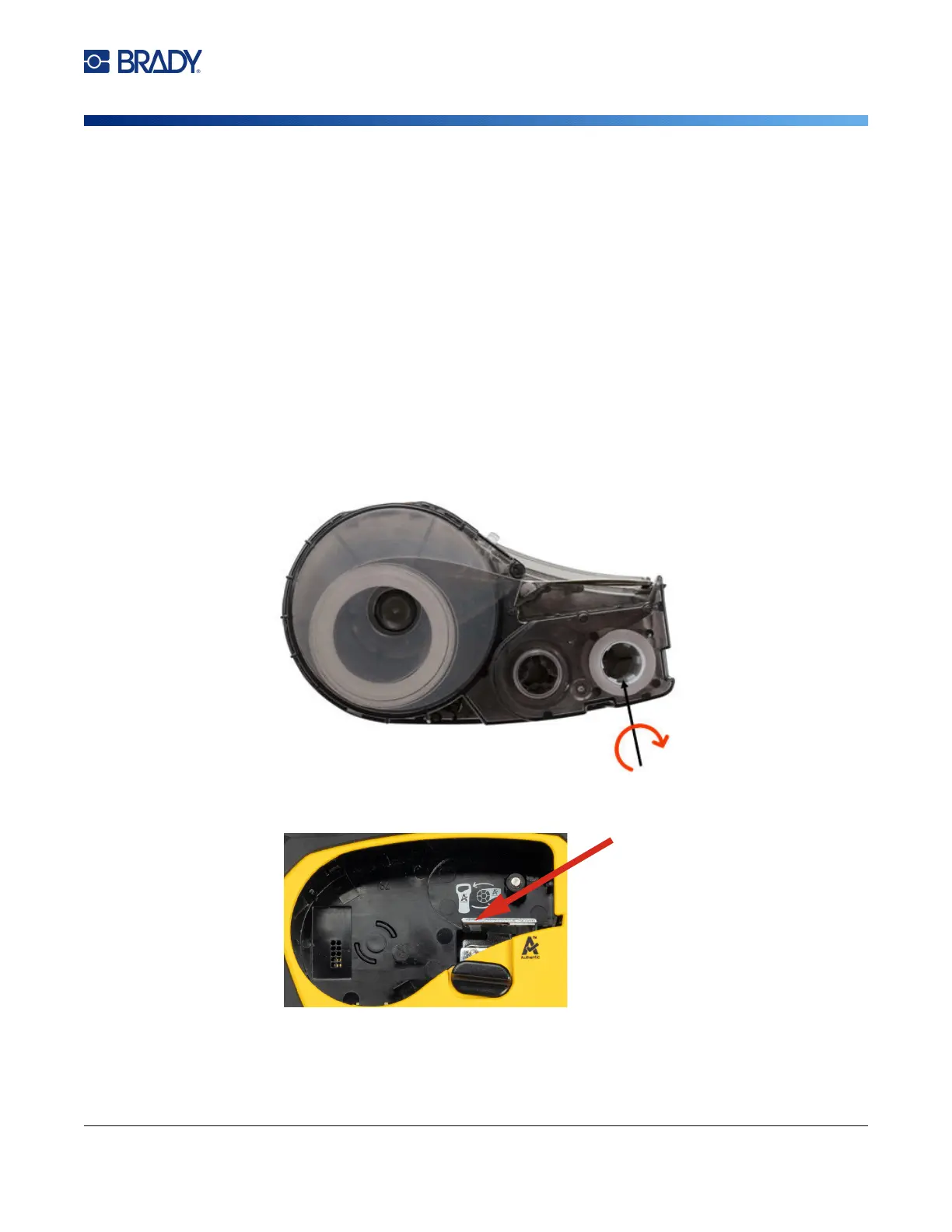
• The ribbon may be wrinkled. Remove the cartridge from the printer and advance the ribbon by
rotating the take-up spool clockwise until the wrinkled ribbon is no longer visible. Reinstall the
cartridge and reprint the label.
When reinserting the cartridge, be careful that the ribbon does not get caught on the metal at
the bottom of the cartridge bay.
• Dust or adhesives may have accumulated on the printhead. Clean the printhead. See
“Cleaning the
Printhead and Platen Roller” on page 22
.
• The media may not be usable. Install a different cartridge.



 To Next Page