No. Component Article No.
②
Pointer Tip Structure Acquisition (Straight) 55791-07
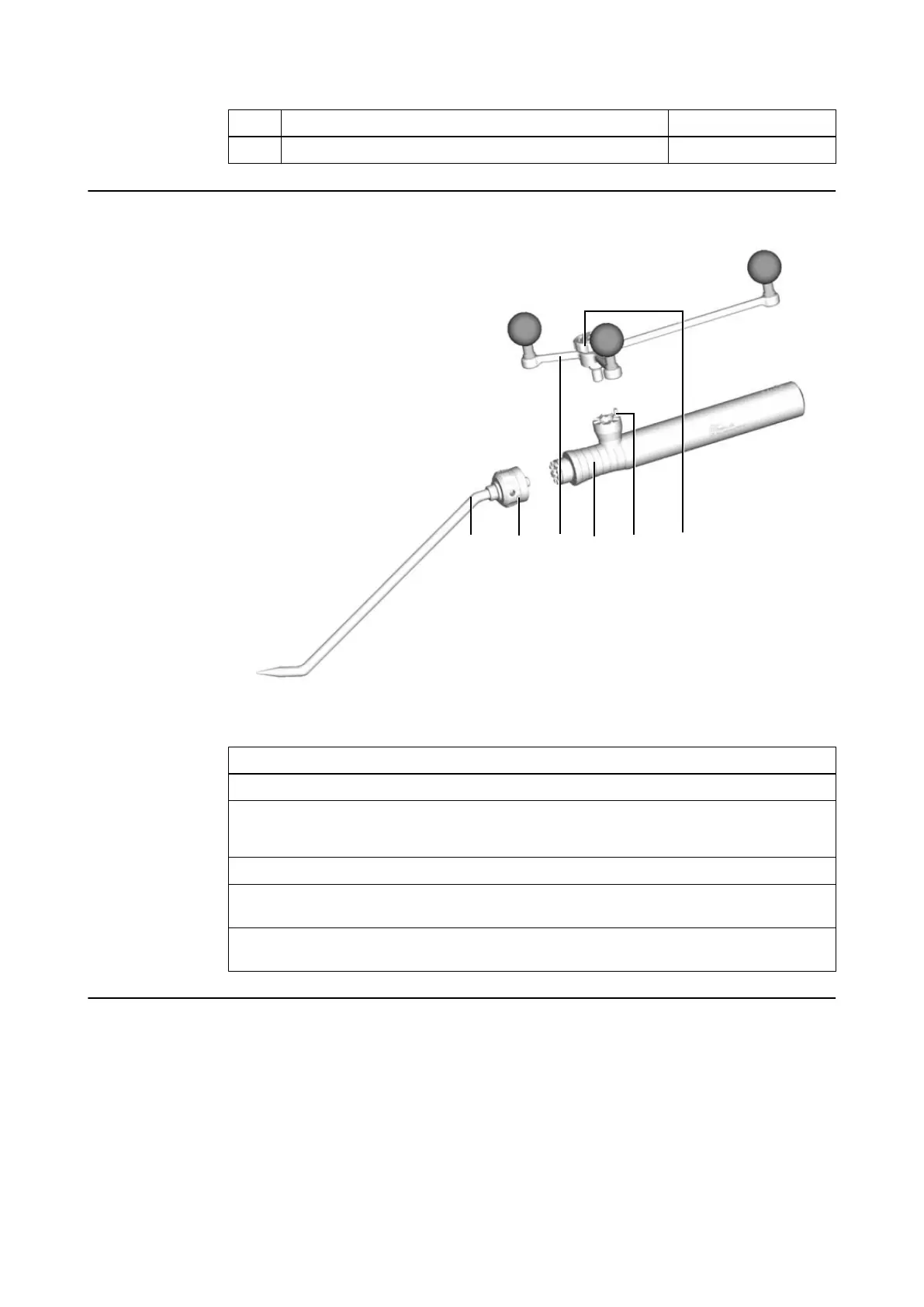
How to Assemble the Pointer
Figure 10
Step
1. Select a pointer tip ①.
2. Place the tip securely onto the handle ④, matching the teeth on both components.
NOTE: The pointer tips can be attached in eight possible orientations (45° steps).
3. Tighten the cap nut ⑥.
4. Hold the Instrument Adapter Array ③ to the handle, so that the pin ⑤ on the interface
matches the hole at the bottom of the tracking array.
5. Securely tighten the fixation screw ⑥ using the Allen key provided (or by hand). Be aware
that excessive force may damage the instrument or screw.
Calibrating Multiple Tip Pointers
Calibrate the pointer prior to use (see Software User Guide).
NOTE: Exchanging the pointer tip or the instrument tracking array requires a new calibration.
NOTE: The tip, and not the shaft of the Multiple Tip Pointer is used for calibration of the
instrument’s trajectory.
Multiple Tip Pointer Package
32 Instrument User Guide Rev. 2.6 Cranial/ENT Optical Tracking



 To Next Page