Warning
Do not drill directly through the Guide Disc.
To avoid damage to the Guide Disc, leading to inaccurate alignment of the inserted
instrument and exposure of the brain to abrasive particles, always protect the Guide Disc
when drilling (e.g., by using an appropriate drill guide tube which is robust enough to
withstand such abrasions).
Warning
When inserting an instrument through the Guide Disc, ensure that the Guide Disc encloses
the instrument tightly but does not damage or bend the instrument.
Warning
Each modification of the Guide Disc or change in instrument diameter requires the
VarioGuide to be re-aligned to the trajectory.
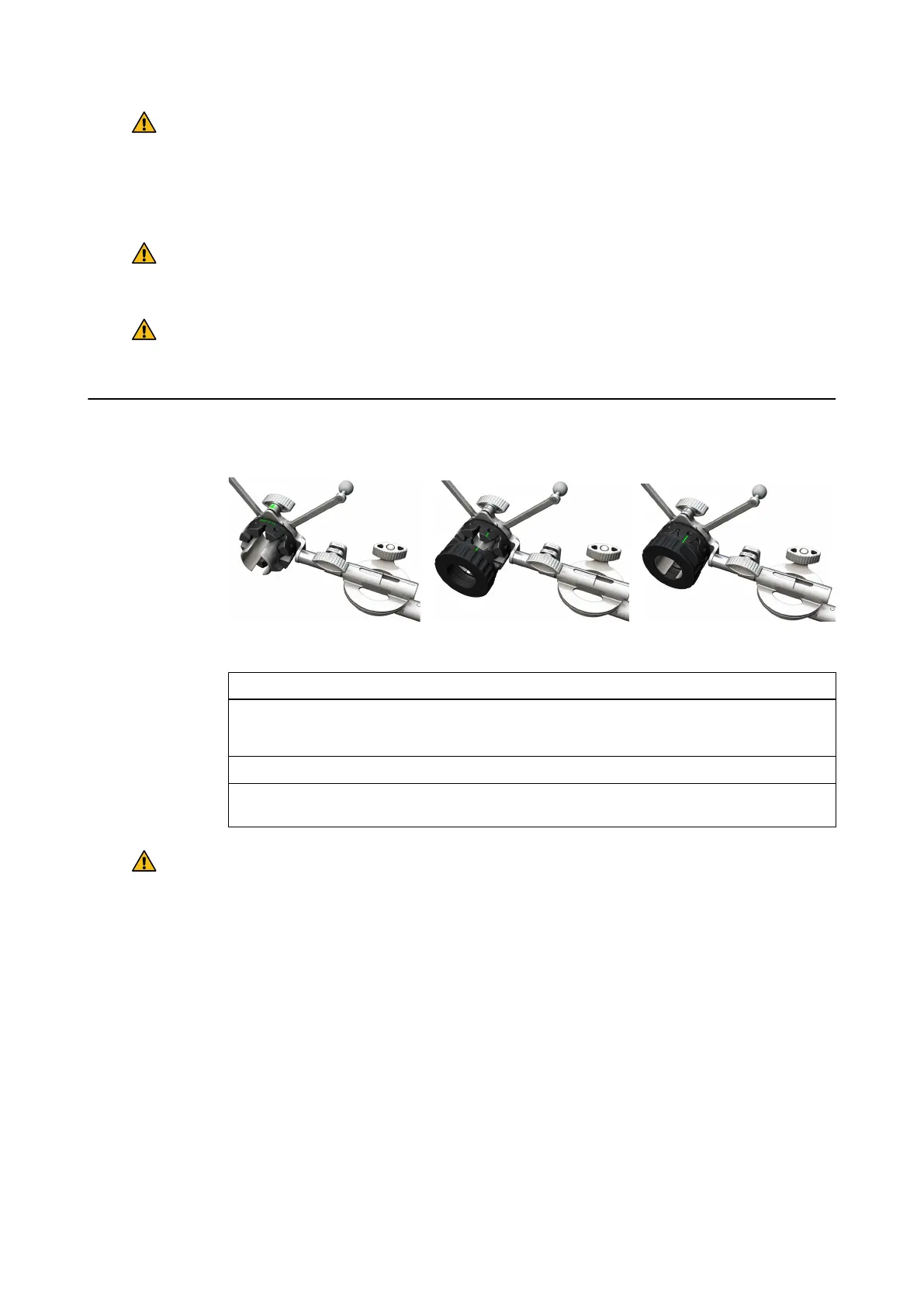
How to Attach the Disc Set
Figure 55
Step
1. Place the inner disc onto the array holder until it clicks into position ①.
NOTE: Align the required diameter on the inner disc to the arrow on the array.
2. Screw the two outer discs together ②.
3. Align the line on the assembled outer discs with the line on the inner disk and screw the
rings together on the array holder ③.
Warning
Always hold the guide disc while taking it out of the VarioGuide.
TRAJECTORY ALIGNMENT TOOLS
Instrument User Guide Rev. 2.6 Cranial/ENT Optical Tracking 99



 To Next Page