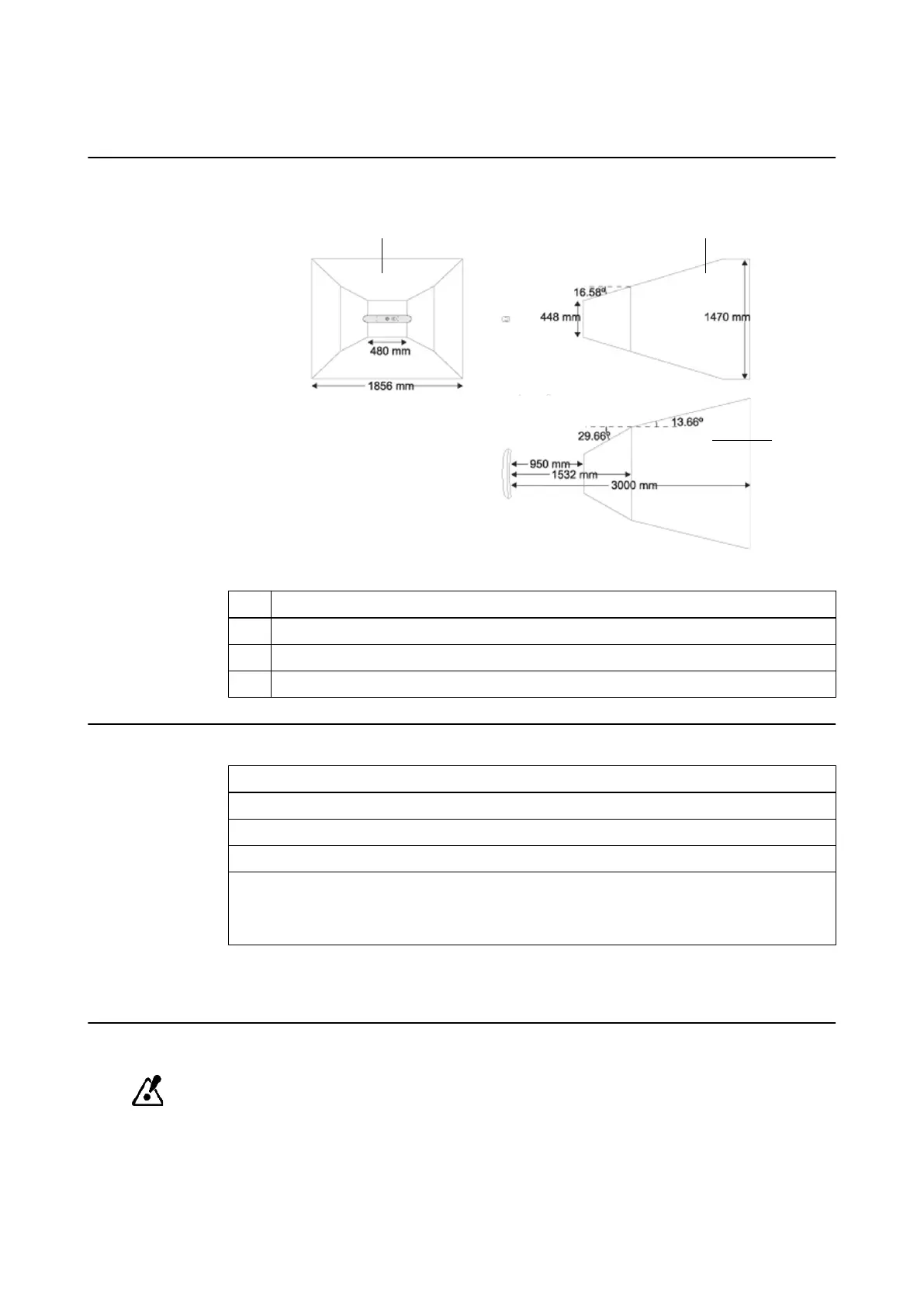
2.3.1 Camera Volume
Illustration
The camera field of view is a pyramid-shaped volume with the following dimensions:
Figure 8
No. View
①
Front
②
Side
③
Top
How to Test the Camera Volume
Steps
1. Place an instrument with attached reflective marker spheres in the camera field of view.
2. Adjust the camera horizontally.
3. Measure the working distance.
4.
Measure the volume diameter at several distances.
NOTE: If the camera field of view is significantly decreased, the camera may need to be
repaired or exchanged.
NOTE: You can also check the camera field of view in the software as described in the Software
User Guides.
Camera Accuracy
To ensure the specified accuracy of the camera, adhere to the storage and operating
conditions (see page 64).
SYSTEM OVERVIEW
Technical User Guide Rev. 1.1 Curve Dual Navigation Station Ver. 1.2 27



 To Next Page