Software User Guide Rev. 1.0 Kolibri cranial/ENT Ver. 2.7 83
Surface Matching Registration
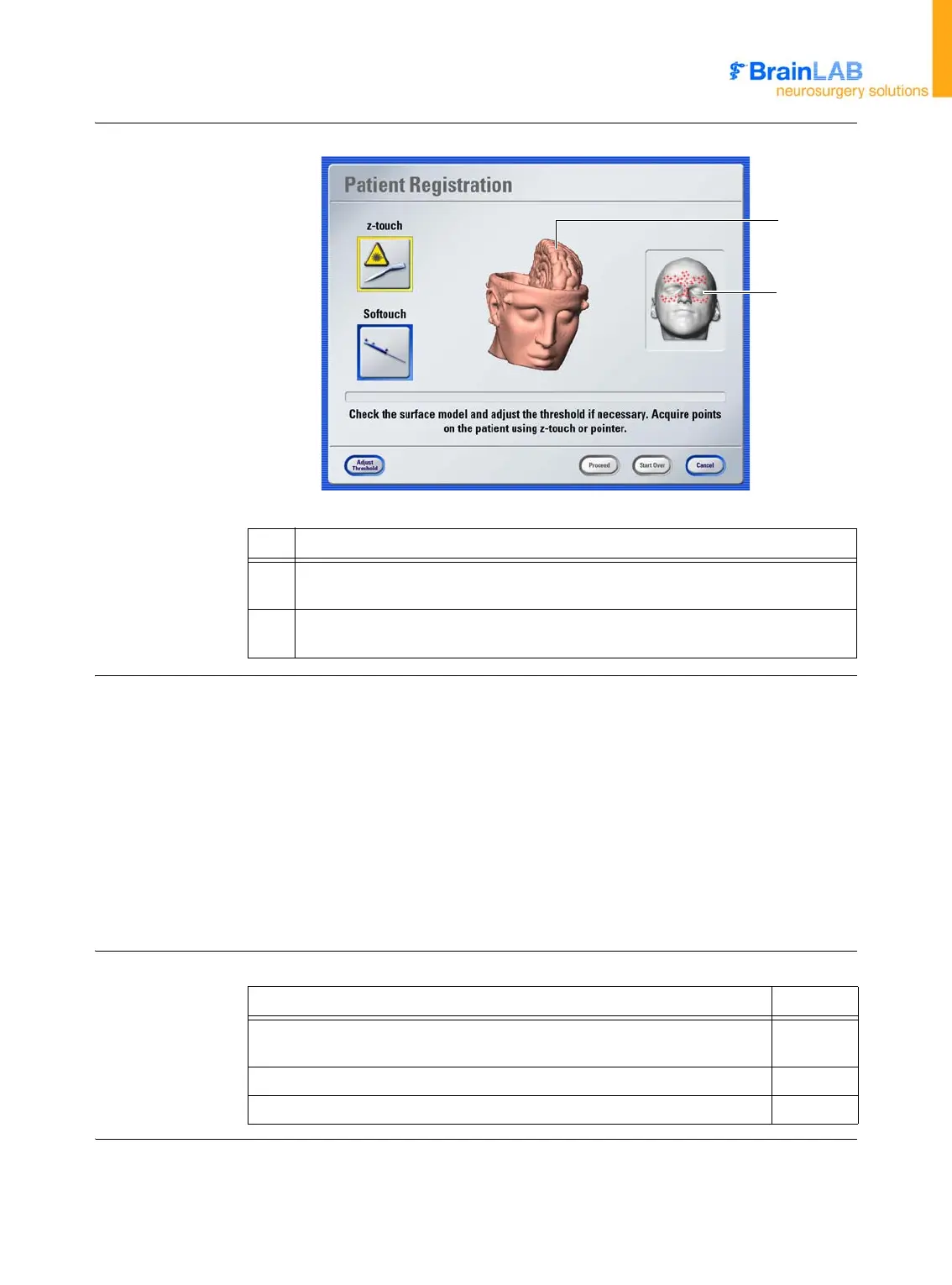
Patient Registration
Dialog
Figure 23
Verifying the
Scannable Surface
To verify the scannable surface, you can press directly in the image view to rotate the 3D
construction. Check the following:
• The surface of the face should be clearly visible
• The skin surface should be smooth without breaks or major artifacts
• The surface model should look like your patient
• Look for tubes, tape and other devices that may change the appearance of the face since
the patient was scanned
The quality of the surface reconstruction may be improved by adjusting the threshold.
NOTE: Be aware that skin shift may have occurred during scanning due to the patient fix-
ation device.
Next Steps
No. Description
a
Three dimensional reconstruction based on the image set. You can use this to
verify the scannable surface.
s
Crosses indicate areas which are generally useful for successful surface match-
ing.
a
s
Option See
To optimize surface matching results by adjusting threshold values, press
Adjust Threshold
.
page 84
To activate registration using
z-touch
, press
z-touch
. page 86
To activate registration using
Softouch
, press
Softouch
. page 91



 To Next Page