12
1. Electromagnetic interference (EMI) – these may be generated by machinery, appliances,
lighting, dimmers and computers, etc. So please keep your display console 1 or 2 meters
away from these items.
2. Radio-frequency interference (RFI) – if you have other devices operating on 868 / 915 / 917
MHz, you might experience communication intermittent. Please re-located your transmitter or
display console to avoid signal intermittent problem.
3. Distance. Path loss occurs naturally with distance. This device is rated to 150m (450 feet) by
line of sight (in interference free environment and without barriers). However, typically you will
get 30m (100 feet) maximum in real life installation, which includes passing through barriers.
4. Barriers. Radio signal are blocked by metal barriers such as aluminum cladding. Please align
the sensor array and display console to get them in clear line of sight through window if you
have metal cladding.
The table below show a typical level of reduction in signal strength each time the signal passed
through these building materials
Materials Signal strength reduction
Glass (untreated) 10 ~ 20%
Wood 10 ~ 30%
Plasterboard / drywall 20 ~ 40%
Brick 30 ~ 50%
Foil insulation 60 ~ 70%
Concrete wall 80 ~ 90%
Aluminum siding 100%
Metal wall 100%
Remarks: RF signal reduction for reference
3.3 SETUP THE CONSOLE
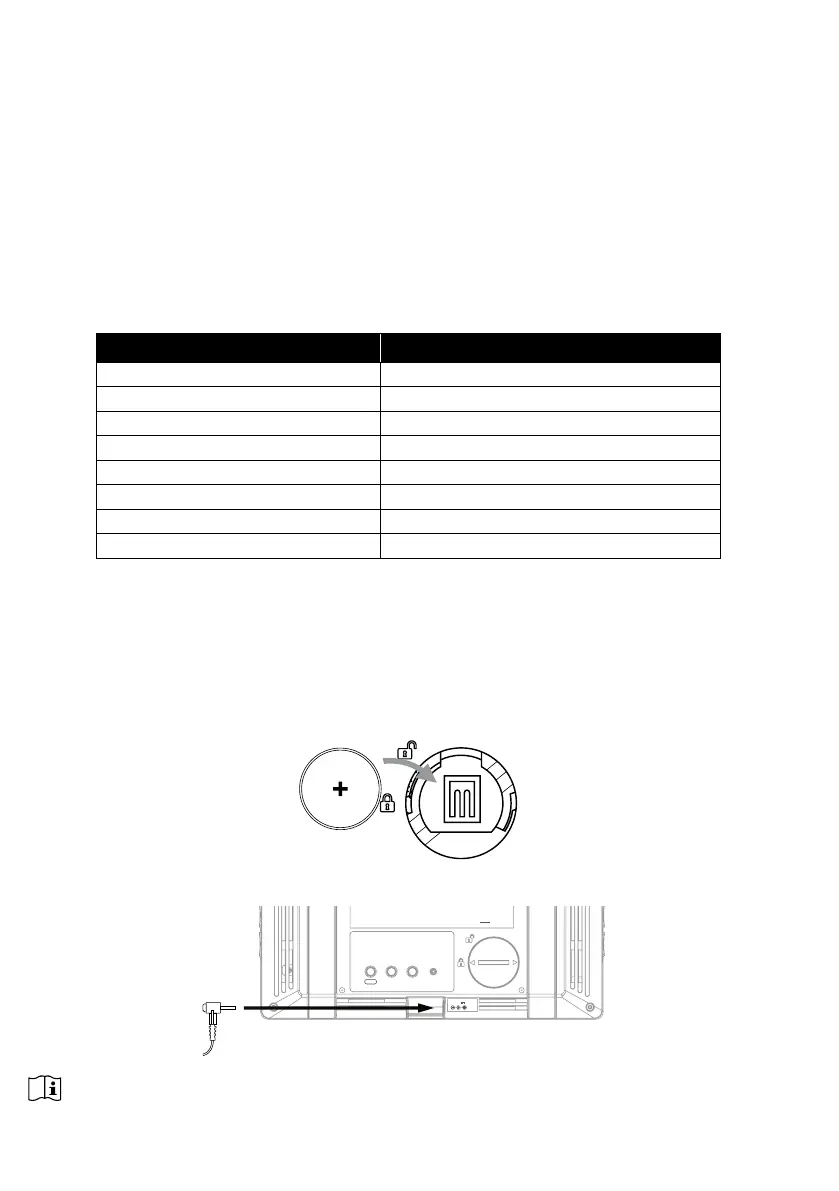
Follow the procedure to setup the console connection with wireless sensor array and WI-FI.
3.3.1 POWER UP THE DISPLAY CONSOLE
1. Install the back-up CR2032 battery
2. Connect the display console power jack to AC power with the adaptor included.
SENSOR
REFRESH
CONTRAST
RESET
WI-FI
DC5V 1A
NOTE:
- The backup battery can backup: Time & Date & Max/Min weather records, rainfall records and Alert
setting values / status.
- The built-in memory can backup: WI-FI setting, Hemisphere setting, Calibration values, and Sensor ID.



 To Next Page