29
6. CREATE WUNDERGROUND & WEATHERCLOUD ACCOUNT
The console can upload weather data to Weather Underground, weathercloud or 3nd party
cloud server through WI-FI router, you can follow the step below to setup your device.
NOTE:
Add the cloud server website and app are subjected to change without notice.
6.1 FOR WEATHER UNDERGROUND (WU)
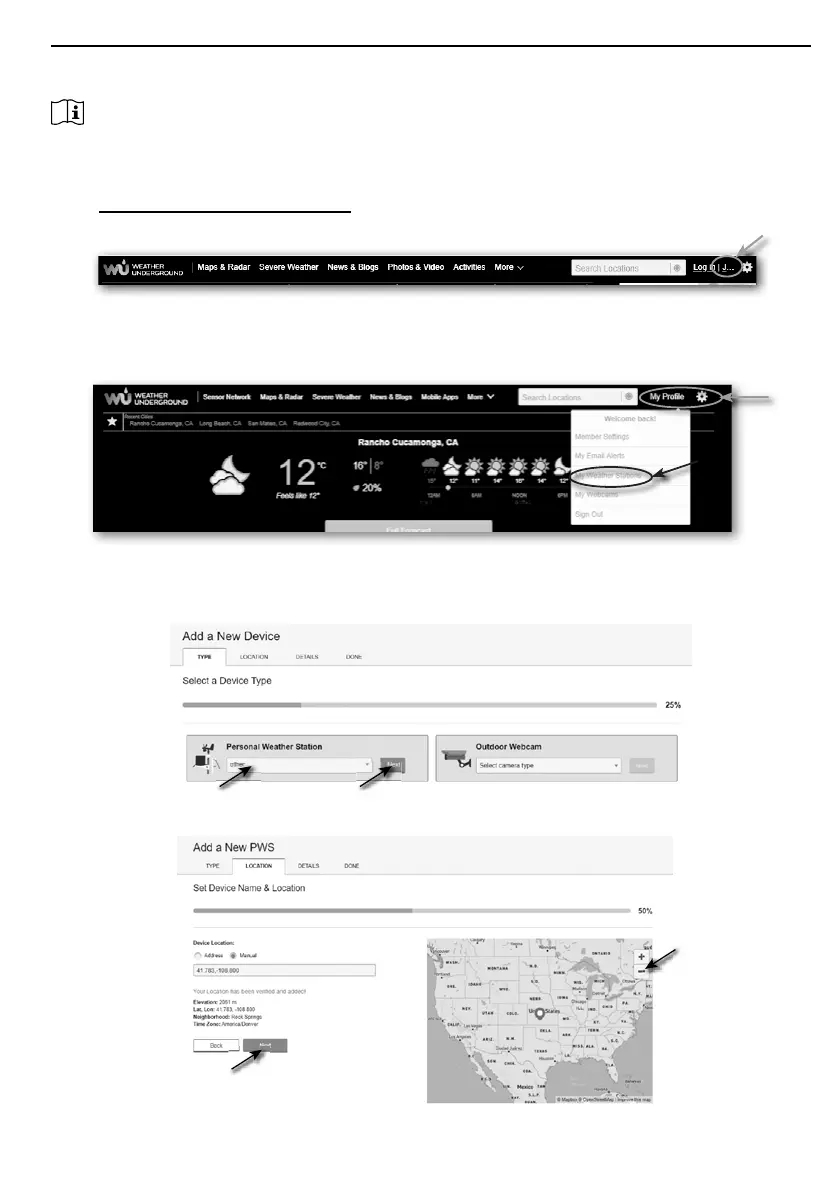
1. In https://www.wunderground.com click the "Join" on the top right corner to open the
registration page. Follow the instructions to create your account.
2. Once you have created your account and completed the Email validation, please go back to
the WUndergound web page to login. Then, click “My Prole” on the top to open the drop-
down menu and click "My Weather Station".
3. In "My Weather Station" page bottom, click the "Add New Device" to add your device.
4. In step “Select a Device Type”, choose “Other” in the list, then press “Next”.
5. In step “Set Device Name & Location”, select your location on the map, then press "Next".



 To Next Page