14
4. DISPLAY CONSOLE FUNCTIONS AND OPERATION
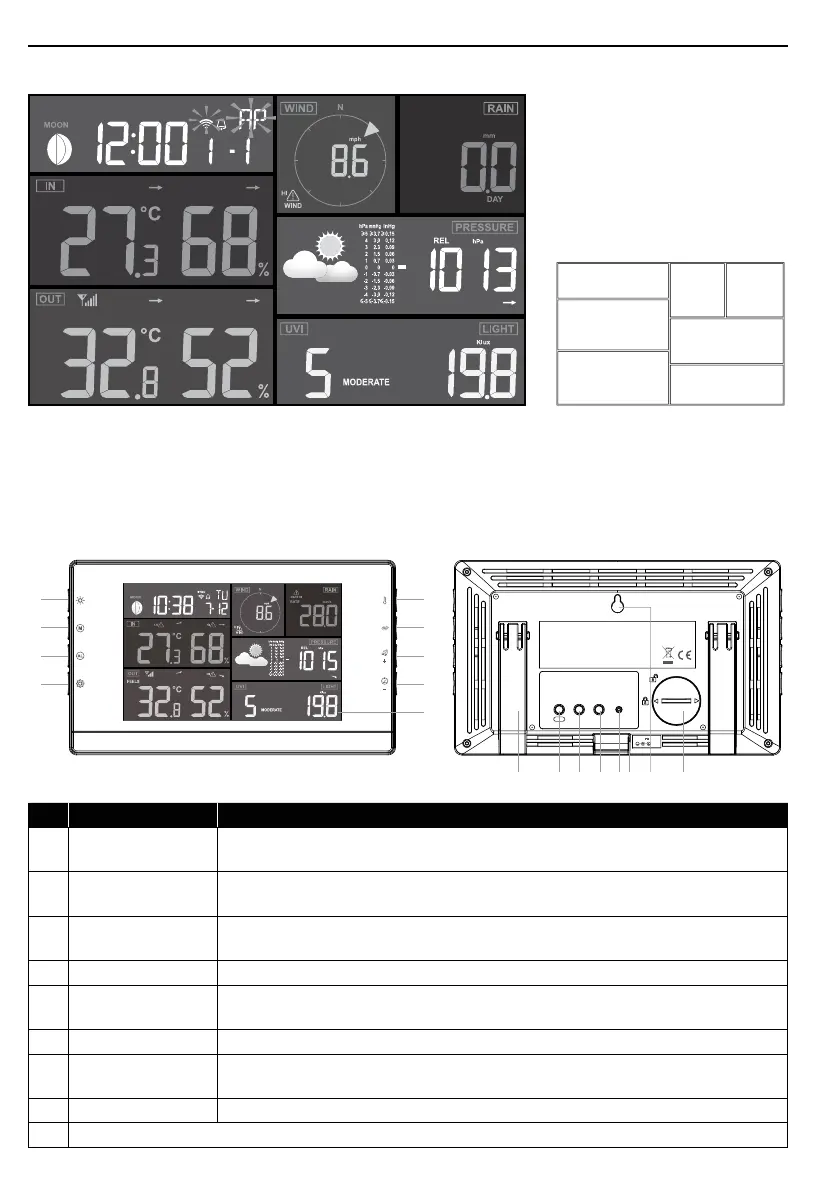
4.1 SCREEN DISPLAY
1
2
4
5
6
7
3
1. Moon phase, time & date
2. Wind speed & direction
3. Rain rate & rainfall
4. In temperature & humidity
5. Weather forecast & pressure
6. Outdoor temperature & humidity
7. UV and Light intensity
4.2 DISPLAY CONSOLE KEYS
SENSOR
REFRESH
CONTRAST
RESET
WI-FI
DC5V 1A
5
6
7
8
9
10 11 12 13 14 15 16 17
1
2
3
4
No. Key / Part Name Description
1
BACK LIGHT /
SNOOZE
Press to change the back light level or stop alarm sound
2 MEMORY
Press to switch between maximum and minimum values of Daily and
Since last reset
3 ALARM
During alarm, press to stop the alarm, press and hold for 2 seconds to
stop current snooze
4 SET Hold to enter time and date setting
5 INDEX
To switch between outdoor temperature, feels like, heat index, wind
chill and dew point reading
6 RAIN Press to switch between rain rate and rainfall
7 + / WIND
Press to switch between average wind speed, gust and Beaufort
scale
8 - / BARO Switch between relative and absolute air pressure reading
9 Display screen



 To Next Page