33
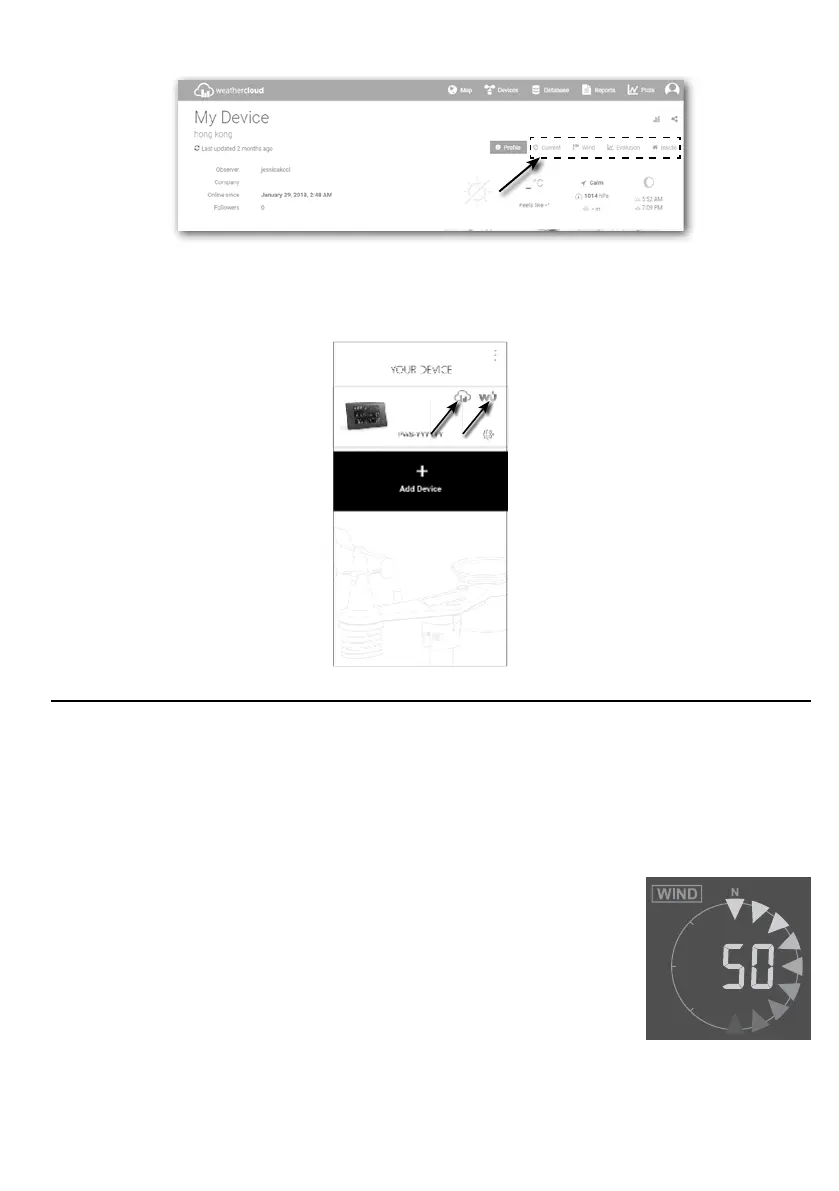
3. Click "Current", "Wind", "Evolution" or "Inside" icon to view the live data of your weather
station.
7.3 VIEWING WEATHER DATA VIA WSLINK APP
With WSLink app, user may tap the Wunderground and/or Weathercloud icon in "Your Device"
to directly access live weather data on their dashboard respectively.
8. MAINTENANCE
8.1 FIRMWARE UPDATE
The console supports OTA rmware update capability. Its rmware may be updated over the air
anytime (whenever necessary) through WSLink app.
8.1.1 FIRMWARE UPDATE STEP
1. The latest rmware will download to you smart phone automatically, just connect you
console to check the rmware version (refer to section 5 and 5.5.6).
2. Follow the app step to transfer the OTA le from smart phone to console
3. Once le transferred, the console will start to update, the update
time is around 5 ~ 10 minutes. While updating, the progress will
be displayed (i.e. 100 is completion).
4. The console will restart once the update is completed.
5. The console will stay in AP mode for you to check the rmware version and all the current
setting. Simply press and hold [ SENSOR / WI-FI ] key for 6 seconds to exit AP mode.







 To Next Page