16
4.3.2.1 VIEWING PRESSURE HISTORY
In normal mode, press [ BARO ] key to view the average hourly pressure of 3, 6, 12 and 24
hours ago.
4.3.2.2 ABSOLUTE OR RELATIVE BAROMETRIC PRESSURE MODE
In normal mode, press and hold [ BARO ] key with 2 second to switch between ABSOLUTE
and RELATIVE barometric pressure.
4.3.3 OUTDOOR TEMPERATURE, HUMIDITY
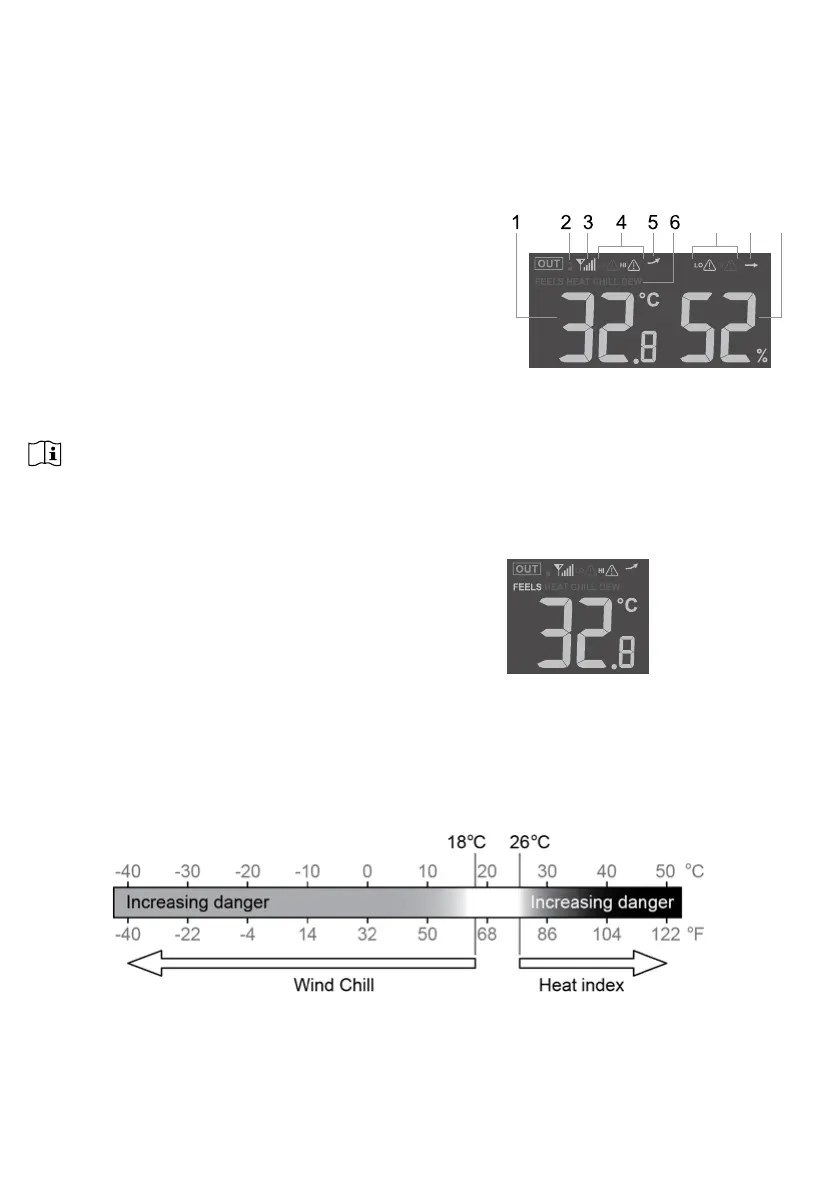
1. Outdoor temperature reading
2. Outdoor sensor low battery indicator
3. Outdoor sensor signal indicator to show the signal
receiving strength
4. Outdoor temperature high / low alert indicator
5. Outdoor temperature trend
6. Temperature index indicator
7. Outdoor humidity high / low alert indicator
8. Outdoor humidity trend
9. Outdoor humidity reading
7 98
NOTE:
If temperature / humidity is below the measurement range, the reading will show “Lo”. If
temperature / humidity is above the measurement range, the reading will show “HI”.
4.3.4 OUTDOOR TEMPERATURE INDEX
Press [ INDEX ] key to switch between Feels Like, Heat
Index, Wind Chill, and Dew Point of outdoor.
4.3.4.1 FEELS LIKE
Feels Like Temperature shows what the outdoor temperature will feel like. It’s a collective
mixture of Wind Chill factor (18°C or below) and the Heat Index (26°C or above). For
temperatures in the region between 18.1°C to 25.9°C where both wind and humidity are less
signicant in aecting the temperature, the device will show the actual outdoor measured
temperature as Feels Like Temperature.


 To Next Page