15
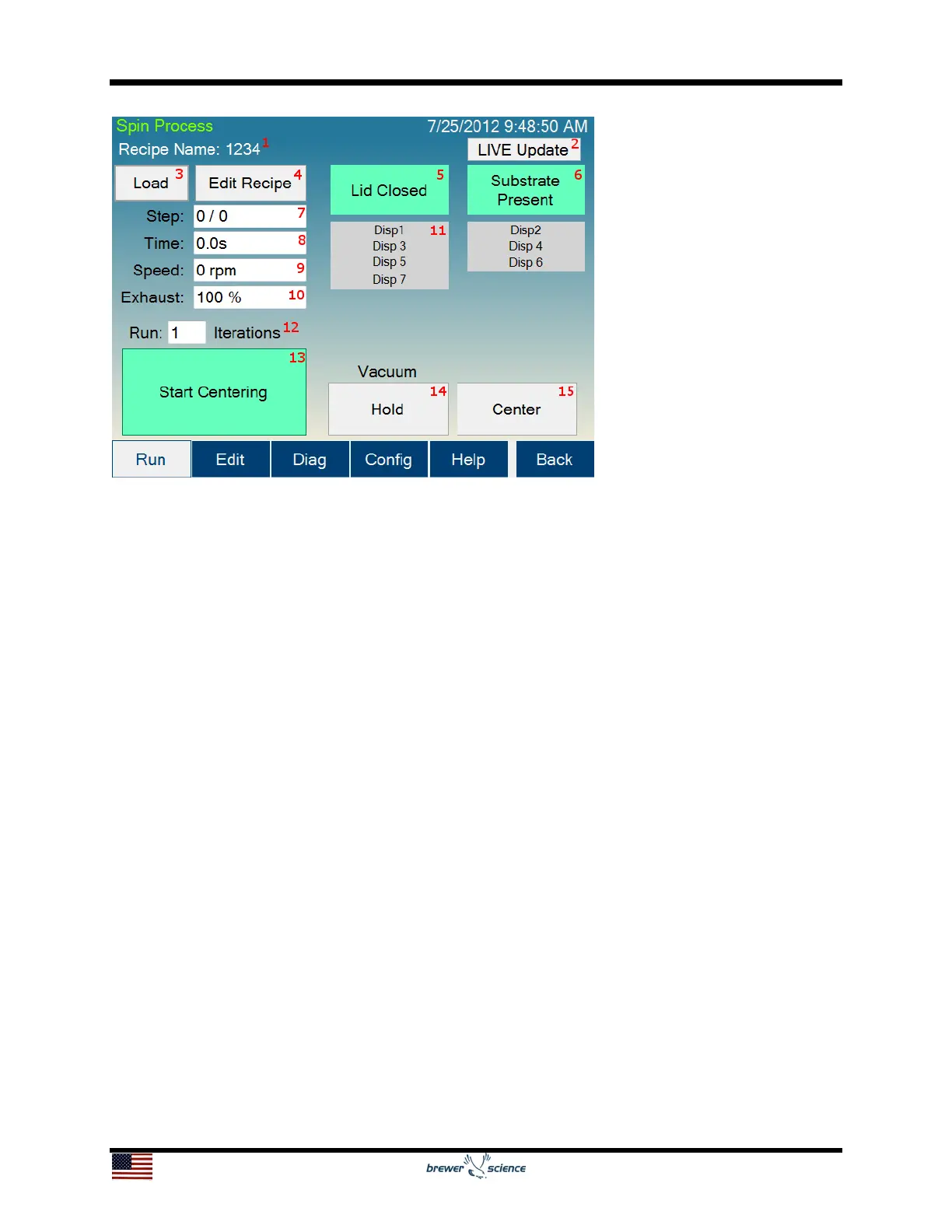
10. Exhaust indicator: Shows the current setting of the programmable exhaust.
(Programmable exhaust is not available on all models.)
11. Dispense indicators: Show which dispenses are currently activated.
12. Iteration setting: Allows the currently selected process to run consecutively for the
entered number of times without stopping. (Iterative processing is not available on all
models.)
13. Process button: The process button has four modes:
a. Start Centering: Starts the wafer spinning very slowly to check for centering
on the spin chuck.
b. Start Process: Starts the selected process.
c. Abort: Aborts a currently running process.
d. OK: Turns off the Process Complete alarm.
14. Vacuum Hold/Release button: Allows the user to actuate the vacuum of the spin
chuck as he/she centers the substrate.
15. Center button: This button will only appear if a non-zero time is set for the centering
time on the Spin Configuration page. This button will re-run the centering process.
This process can be run as many times as necessary until the Start Process (13)
button (13) is pressed.


 To Next Page